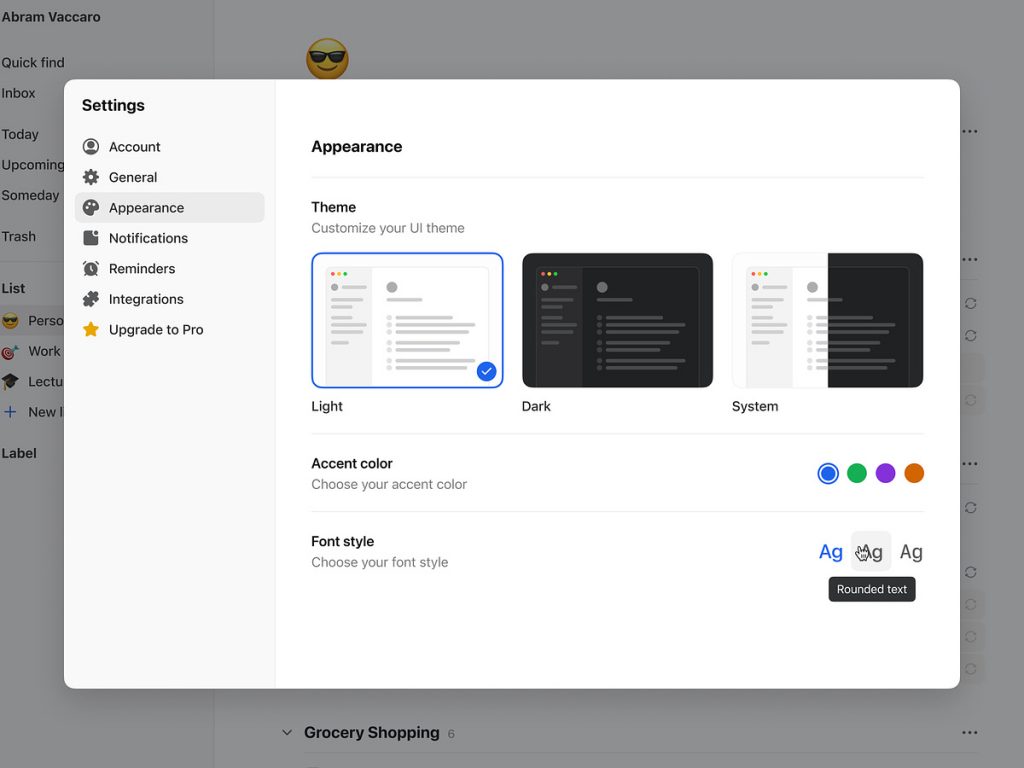
Do It – Appearance Settings
🌈 Do It – Appearance Settings 🎨✨
Welcome to Do It, where functionality meets customization. The Appearance Settings feature in Do It empowers users to tailor their experience and create a workspace that reflects their unique style. Let’s explore the key elements and design features that make Appearance Settings in Do It a delightful and personalized journey.
🖌️ Theme Selection – Express Yourself
Do It understands that personalization begins with choosing the right theme. The Appearance Settings offer a variety of themes, each designed to evoke a different mood. From vibrant colors to subtle tones, users can express their personality and create a workspace that resonates with their visual preferences.
🌟 Font Customization – Readability and Style
Enhance readability and add a touch of personal style with font customization options. Do It provides a selection of fonts to choose from, allowing users to find the perfect balance between aesthetics and functionality. Whether it’s a classic serif or a modern sans-serif, the choice is yours.
🎨 Color Palette – Your Palette, Your Rules
Tailor the color palette to match your taste and create a visually pleasing environment. Do It’s Appearance Settings include a customizable color palette, enabling users to personalize the background, text, and accent colors. This feature goes beyond aesthetics, providing a workspace that feels uniquely yours.
🌓 Dark Mode – Work Anytime, Anywhere
For those who prefer a different ambiance, Do It offers a sleek Dark Mode. With just a click, users can switch to a darker interface, reducing eye strain during late-night tasks and adding a touch of sophistication to the overall appearance. Dark Mode in Do It is not just a feature; it’s a lifestyle choice.
🖼️ Background Images – Make It Yours
Inject personality into your workspace with customizable background images. Do It allows users to upload their images, turning their task management environment into a canvas of memories, inspiration, or art. The background images feature transforms Do It into a personalized and visually engaging space.
🔗 Seamless Integration – Consistency Across Devices
Do It ensures a consistent and seamless experience across devices. The Appearance Settings configurations sync effortlessly, allowing users to enjoy their personalized workspace whether they’re using Do It on a desktop, tablet, or mobile device. Your customized environment is always within reach.
⚙️ Easy-to-Use Interface – Effortless Customization
Do It’s user-friendly interface makes customization a breeze. The Appearance Settings are designed with simplicity in mind, ensuring that users can effortlessly navigate through options and make adjustments with just a few clicks. Tailoring your workspace has never been this easy.
📱 Responsive Design – Adapted to Your Device
Do It’s Appearance Settings are responsive, adapting to the screen size and resolution of your device. Whether you’re working on a large desktop monitor or a compact smartphone screen, the appearance configurations seamlessly adjust, maintaining the aesthetic appeal you’ve chosen.
✨ Conclusion – Your Workspace, Your Style
In conclusion, Do It’s Appearance Settings feature is a celebration of individuality and personal style. Whether you prefer a bright and vibrant workspace or a sleek and minimalistic one, Do It empowers you to shape your environment. Your tasks, your goals, and now, your workspace – all in perfect harmony. Customize, personalize, and make Do It uniquely yours. 🌈✨
— — — — — — — — — —
Want to collaborate? Email Us: hello@keitoto.com


