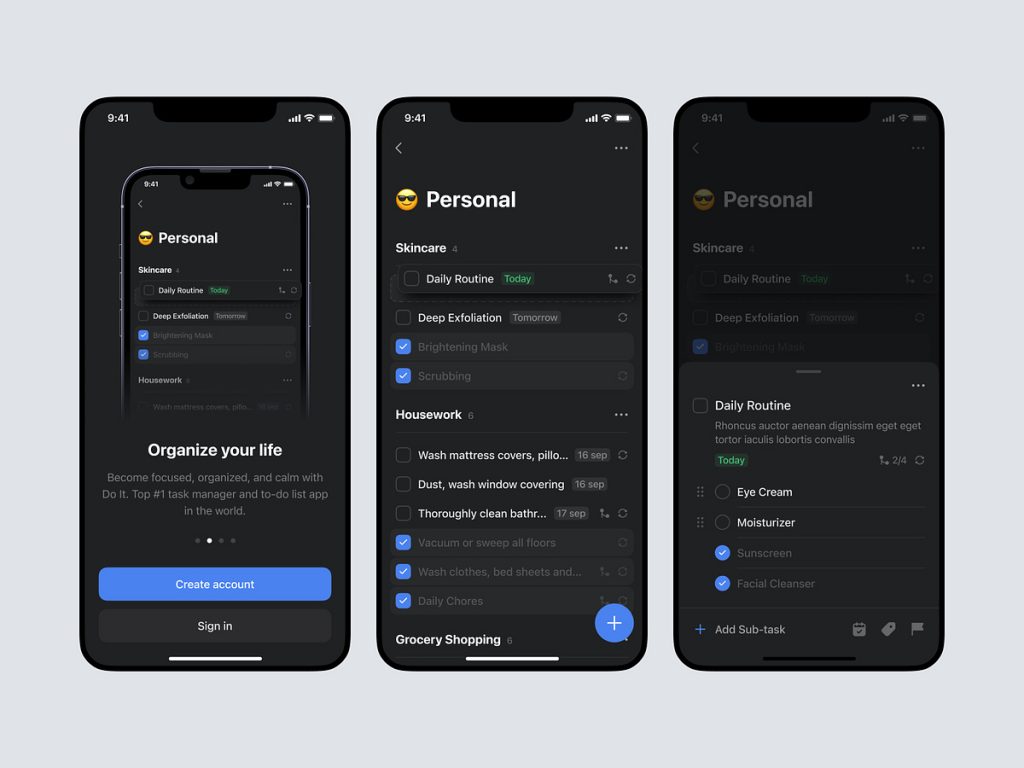
Do it – To Do List Mobile App Dark
🌑 Do It – Dark Mode To-Do List App 🌌
Embark on a journey of productivity in a sleek and sophisticated atmosphere with the Do It To-Do List Mobile App in Dark Mode. This version of the app not only enhances visual appeal but also reduces eye strain in low-light environments. Let’s explore the key features that make the Do It Dark Mode the ideal companion for those who value both style and efficiency.
🌌 Stylish Dark Interface – Visual Comfort
Immerse yourself in a stylish and visually comfortable dark interface. The deep, dark hues create a sophisticated ambiance that not only looks great but also minimizes glare, ensuring a pleasant experience for users who prefer a subdued backdrop.
📝 Task Management Excellence – Organize with Ease
Continue enjoying the exceptional task management features of Do It in Dark Mode. Organize your to-do list effortlessly, set priorities, and schedule tasks with the same intuitive interface that users love. The dark background adds a touch of elegance to your productivity routine.
🔵 Accent Colors – Subtle Highlights
Accent colors in the Do It Dark Mode are carefully chosen to provide subtle highlights against the dark backdrop. These accents guide your attention to important elements without being intrusive, maintaining a balanced and refined visual hierarchy.
📅 Calendar Integration – Time Management Made Easy
Efficiently manage your schedule with integrated calendars. The Dark Mode seamlessly incorporates calendar features, allowing you to sync tasks with your schedule and stay on top of your commitments. The dark theme complements the calendar interface, creating a unified and polished look.
🌙 Night Mode – Eyes at Ease
Switch to Night Mode for an even softer experience during nighttime or low-light usage. The Night Mode further reduces screen brightness and minimizes blue light emission, promoting eye comfort and contributing to a better overall user experience.
🔄 Synchronization Across Devices – Seamless Connectivity
Experience seamless synchronization across all your devices. Whether you’re managing tasks on your smartphone, tablet, or desktop, the Do It Dark Mode ensures that your to-do list stays consistent and up-to-date, enhancing connectivity in your busy lifestyle.
🎨 Customizable Themes – Personalized Aesthetics
Tailor the app to your personal preferences with customizable themes. The Do It Dark Mode not only offers a sleek default appearance but also allows users to choose from various themes to match their individual aesthetics and moods.
🔒 Secure and Private – Data Protection
Rest easy knowing that your task lists are secure and private. Do It Dark Mode, like its counterpart, prioritizes data protection and confidentiality. Your sensitive information remains guarded, allowing you to focus on your tasks with peace of mind.
🚀 Speed and Performance – Efficient Functionality
The Dark Mode not only elevates the visual aesthetics but also contributes to efficient functionality. Enjoy a smooth and fast user experience, whether you’re adding new tasks, checking off completed items, or navigating through the app.
🔚 Conclusion – Productivity in Elegance
In conclusion, the Do It To-Do List Mobile App in Dark Mode is the epitome of productivity in elegance. With its stylish dark interface, task management excellence, accent colors, calendar integration, Night Mode, synchronization across devices, customizable themes, secure data protection, and efficient performance, this version of the app is designed for users who appreciate a refined and visually pleasing task management experience. Elevate your productivity with the sophisticated charm of the Do It Dark Mode. 🌑📱
— — — — — — — — — —
Want to collaborate? Email Us: hello@keitoto.com


