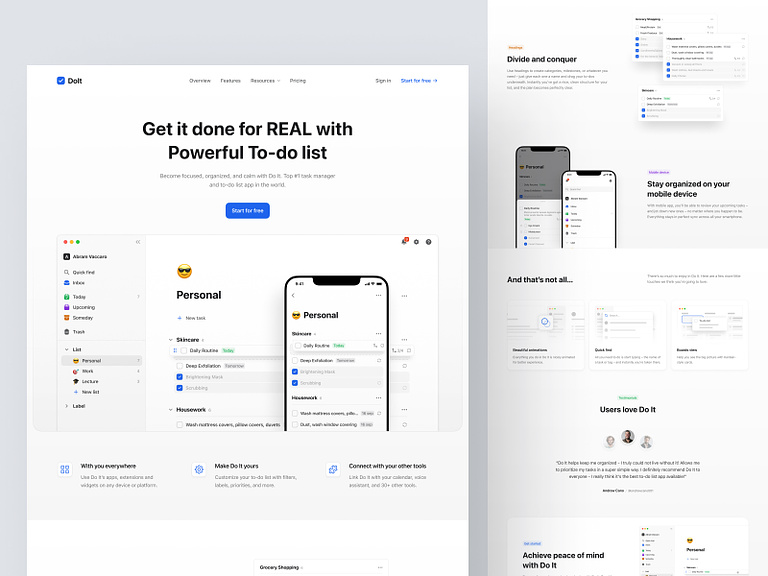
To Do List Landing Page – Do it
📋 Do It – To-Do List Landing Page 🚀
Embark on a journey towards enhanced productivity with “Do It” – the To-Do List Landing Page that brings organization and efficiency to your daily tasks. This sleek and intuitive platform is designed to simplify your life by providing a seamless and visually appealing way to manage your to-do list. Let’s explore the standout features that make “Do It” a must-have tool for anyone seeking productivity and task management.
🎨 Clean and Modern Design – Aesthetic Simplicity
“Do It” boasts a clean and modern design, embracing the beauty of simplicity. The landing page welcomes users with an aesthetically pleasing layout, creating a visually calming environment that encourages focus and clarity in task management.
✨ Intuitive User Interface – Effortless Navigation
Experience the ease of task management with “Do It’s” intuitive user interface. Effortless navigation ensures that users can quickly add, edit, and prioritize tasks without unnecessary complexities. The user-centric design enhances the overall experience of organizing to-do lists.
📅 Date and Time Integration – Time-Stamped Tasks
Stay on top of your schedule with “Do It’s” date and time integration. Each task can be time-stamped, allowing users to allocate specific deadlines and reminders. This feature ensures that important tasks are completed in a timely manner, enhancing time management.
🌈 Color-Coded Categories – Visual Organization
Bring vibrancy to your tasks with color-coded categories. “Do It” allows users to assign different colors to various task categories, providing a visual cue for easy identification. This visual organization system adds a touch of creativity to your to-do list management.
🔄 Drag-and-Drop Functionality – Seamless Reordering
Optimize your task priorities with seamless drag-and-drop functionality. “Do It” enables users to effortlessly reorder tasks by dragging them to the desired position, ensuring that the most important tasks are always at the forefront.
🔔 Reminders and Notifications – Stay On Track
Never miss a deadline with “Do It’s” reminders and notifications. Users can set customizable reminders for each task, receiving timely alerts to stay on track. This proactive feature ensures that important deadlines are met and tasks are completed promptly.
📝 Notes and Details – Comprehensive Task Information
Add depth to your tasks with detailed notes and additional information. “Do It” provides a space for users to include comprehensive details, allowing for a more thorough understanding of each task’s requirements and context.
📈 Progress Tracking – Monitor Your Achievements
Monitor your productivity and accomplishments with “Do It’s” progress tracking feature. The landing page offers a visual representation of completed tasks, motivating users by showcasing their ongoing success and encouraging a sense of achievement.
💻 Responsive Design – Seamless Cross-Device Access
Access your to-do list anytime, anywhere with “Do It’s” responsive design. Whether you’re using a computer, tablet, or smartphone, the landing page adapts seamlessly to different devices, ensuring a consistent and user-friendly experience.
🔐 Secure Data Storage – Privacy Assurance
Prioritize the security of your task data with “Do It’s” secure data storage. The landing page employs robust security measures to safeguard user information, providing peace of mind when entrusting your to-do lists to the platform.
🚀 Fast Loading Speed – Instant Task Management
Experience swift task management with “Do It’s” fast loading speed. The landing page ensures that users can add, edit, and organize tasks without any delays, contributing to a seamless and efficient task management process.
🔚 Conclusion – Elevate Your Productivity
In conclusion, “Do It” is not just a landing page; it’s a productivity companion that elevates your task management experience. With its clean and modern design, intuitive user interface, date and time integration, color-coded categories, drag-and-drop functionality, reminders and notifications, notes and details, progress tracking, responsive design, secure data storage, and fast loading speed, “Do It” sets the stage for enhanced productivity and efficient task organization. Embrace a more organized and accomplished lifestyle with “Do It.” 📋✨
— — — — — — — — — —
Want to collaborate? Email Us: hello@keitoto.com


