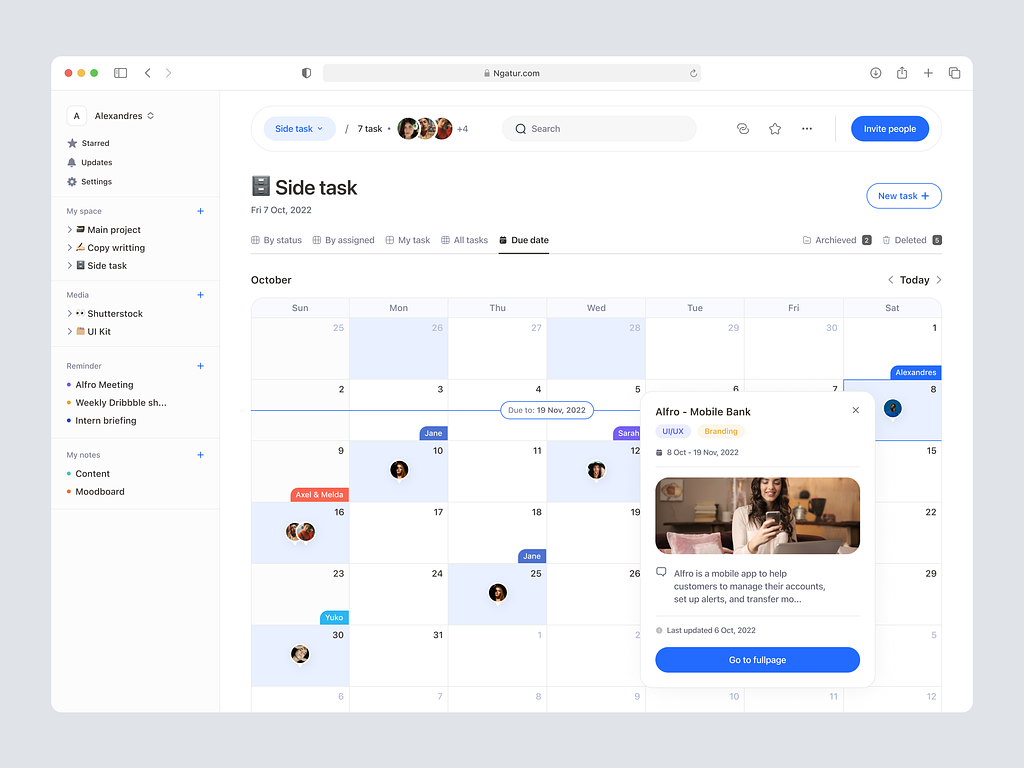
Ngatur – To-do list Dashboard
Ngatur – Organizing Your Life with a Dynamic To-Do List Dashboard 📅🚀
Welcome to Ngatur, where simplicity meets efficiency in task management. Ngatur’s To-Do List Dashboard is a powerful tool designed to help you stay organized, prioritize tasks, and boost productivity. Let’s explore the key features and design elements that make Ngatur’s To-Do List Dashboard a game-changer in the realm of task management.
🌟 Intuitive User Interface – Streamlining Task Management
Ngatur’s To-Do List Dashboard features an intuitive user interface that simplifies task management. The dashboard is designed for ease of use, allowing users to quickly add, edit, and prioritize tasks. The clean layout ensures a clutter-free experience, making it easy to focus on what needs to be done.
📅 Calendar Integration – Time-Driven Task Planning
The dashboard seamlessly integrates with a calendar, enabling users to plan tasks based on deadlines and priorities. Users can set due dates, reminders, and recurring tasks, ensuring that nothing falls through the cracks. Calendar integration enhances time-driven task planning, helping users stay on top of their schedules.
🚀 Task Prioritization – Boosting Productivity
Ngatur recognizes the importance of prioritization in task management. The To-Do List Dashboard allows users to categorize tasks based on urgency and importance. With customizable priority levels, users can focus on high-priority tasks, boosting overall productivity and ensuring that critical deadlines are met.
📝 Notes and Attachments – Adding Context to Tasks
Ngatur goes beyond simple task names. The To-Do List Dashboard enables users to attach notes and relevant files to tasks. This feature adds context and details to each task, ensuring that users have all the information they need at their fingertips. Notes and attachments contribute to a more comprehensive understanding of tasks.
📊 Progress Tracking – Visualizing Task Completion
Ngatur provides a visual representation of task completion through progress tracking. Users can easily see which tasks are pending, in progress, or completed. This visual feedback motivates users and provides a sense of accomplishment as tasks are checked off the list. Progress tracking enhances the overall task management experience.
🔗 Project Organization – Managing Tasks Effectively
For users dealing with multiple projects, Ngatur’s To-Do List Dashboard offers project organization capabilities. Tasks can be grouped into projects, allowing for effective management and clear delineation of responsibilities. Project organization enhances collaboration and coordination, especially in team-based environments.
📅 Recurring Tasks – Simplifying Repetitive Work
Ngatur understands that some tasks are recurring. The dashboard facilitates the creation of recurring tasks with customizable schedules. This feature simplifies the management of repetitive work, ensuring that users can plan and execute routine tasks efficiently.
🌐 Cross-Platform Accessibility – Anytime, Anywhere Task Management
Ngatur’s To-Do List Dashboard is designed for cross-platform accessibility. Whether on a desktop, laptop, tablet, or smartphone, users can access and manage their tasks anytime, anywhere. This flexibility ensures that task management is seamlessly integrated into users’ daily lives.
💡 Conclusion – Ngatur: Simplifying Your Task Management Journey
In conclusion, Ngatur’s To-Do List Dashboard stands as a beacon of efficiency in the world of task management. With an intuitive user interface, calendar integration, task prioritization, notes and attachments, progress tracking, project organization, recurring tasks, and cross-platform accessibility, Ngatur simplifies the task management journey. It’s more than a dashboard; it’s a companion in organizing your life, boosting productivity, and ensuring that no task is left behind. Ngatur: Where simplicity meets effectiveness in task management. 📅🚀
— — — — — — — — — —
Want to collaborate? Email Us: work@keitoto.com


