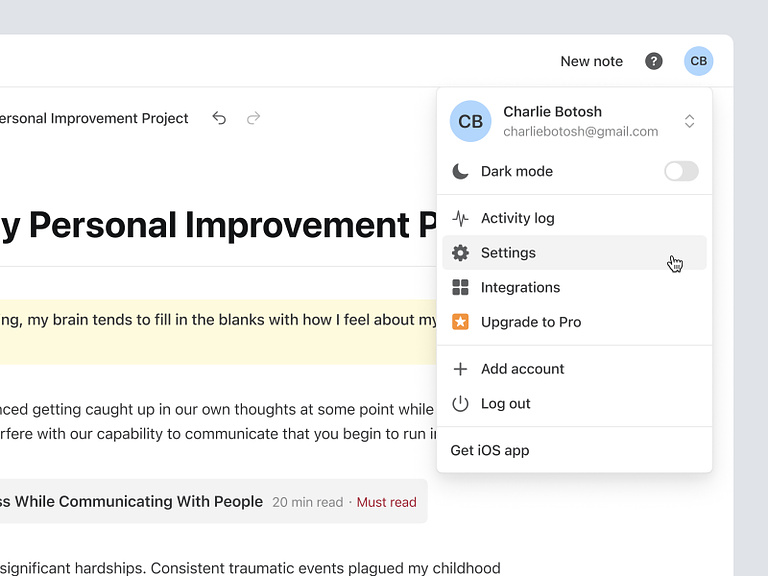
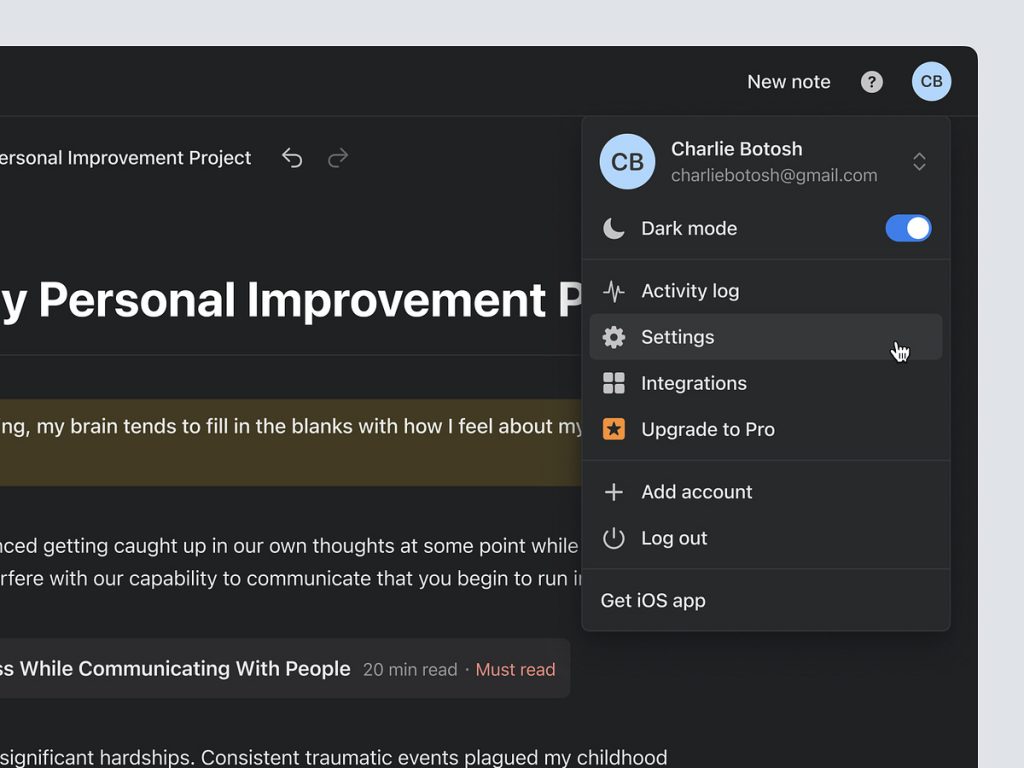
Nulis – User Menu Detail
Nulis – Crafting a User-Centric Menu Detail for Seamless Interaction ✍️🖥️
Embark on a journey of user-centric design with Nulis’ User Menu Detail. This feature is meticulously crafted to provide a seamless and intuitive experience, empowering users with easy access to essential functions. Let’s explore the key elements that make Nulis’ User Menu Detail a cornerstone of user interaction and convenience.
✍️ Personalized User Profile – A Digital Identity
At the heart of Nulis’ User Menu Detail is the user profile. Users can personalize their digital identity by uploading a profile picture and adding essential information. This not only enhances the overall user experience but also creates a sense of ownership and familiarity within the Nulis platform.
🔒 Account Security – Prioritizing User Safety
Security is paramount in Nulis’ User Menu Detail. Users can easily manage their account security settings, including password changes and two-factor authentication setup. The emphasis on account security ensures that users have control over their digital presence and can engage with confidence.
🌐 Language and Region Settings – Tailoring the Experience
Nulis understands the diversity of its user base. The Language and Region Settings in the User Menu Detail allow users to tailor their experience based on language preferences and regional settings. This inclusivity ensures that Nulis caters to a global audience, fostering a user-friendly environment.
📊 Usage Analytics – Insightful User Data
For users keen on tracking their writing habits and engagement, Nulis’ User Menu Detail includes usage analytics. This feature provides insightful data on writing patterns, word counts, and engagement metrics. Users can gain a deeper understanding of their contributions and progress within the Nulis community.
📧 Notification Center – Staying Connected
Stay informed and connected with Nulis’ Notification Center. The User Menu Detail consolidates all notifications in one accessible location. Users can easily manage and review notifications related to comments, likes, and interactions, ensuring they stay updated on their content’s reception within the platform.
🖥️ Theme Customization – Personalizing the Writing Environment
Writing is a personal journey, and Nulis’ User Menu Detail acknowledges this by offering theme customization options. Users can tailor the writing environment to suit their preferences, choosing from a variety of themes that complement their style and enhance the overall aesthetic appeal of the platform.
📚 Saved Drafts and Favorites – Organizing Creativity
The User Menu Detail simplifies content organization with features like Saved Drafts and Favorites. Users can conveniently access their works in progress or revisit favorite pieces with just a few clicks. This organizational tool enhances the efficiency of content management within the Nulis platform.
🔄 Sync Across Devices – Seamless Cross-Platform Experience
Nulis ensures a seamless cross-platform experience with the Sync Across Devices feature. Users can effortlessly transition from desktop to mobile or vice versa, knowing that their writing progress and preferences are synchronized. This continuity facilitates uninterrupted creativity on the go.
💡 Conclusion – User Menu Detail: Where Convenience Meets Creativity
In conclusion, User Menu Detail stands as a testament to the platform’s commitment to user-centric design. With personalized user profiles, robust account security, language and region settings, insightful usage analytics, a comprehensive notification center, theme customization options, easy access to drafts and favorites, and seamless cross-platform synchronization, Nulis ensures that every user interaction is marked by convenience and creativity. It’s not just a menu; it’s a gateway to a personalized and enriched writing experience on Nulis. ✍️🖥️
— — — — — — — — — —
Want to collaborate? Email Us: work@keitoto.com


