
Ride Sharing Mobile App – Confirm Payment Booked πŸ’Έ

Ride Sharing Mobile App – Confirm Payment Booked πŸ’Έ

The Confirm Payment Booked feature in the Ride Sharing Mobile App ensures a smooth and secure finalization process for ride bookings. It provides users with a clear and efficient way to confirm their payment details and complete their ride reservations.

πŸ’³ Payment Confirmation
The Payment Confirmation feature verifies the payment details before finalizing the ride booking. Users review their payment method, amount charged, and any applicable fees to ensure accuracy and avoid discrepancies.

πŸ“‘ Booking Summary
Booking Summary provides users with a detailed overview of their ride reservation, including pick-up and drop-off locations, ride type, estimated fare, and driver details. This transparency helps users confirm that all booking details are correct before proceeding.

πŸ”’ Secure Payment Processing
Secure Payment Processing ensures that all financial transactions are protected through encryption and compliance with security standards. This feature guarantees that users’ payment information is safely handled and that transactions are completed without any risk.

πŸ•’ Booking Confirmation
Booking Confirmation sends a real-time notification or email to users, confirming that their payment has been processed and their ride is successfully booked. This feature reassures users that their reservation is secure and provides them with all necessary details for their upcoming ride.

🎟️ Digital Receipt
The Digital Receipt feature generates a receipt for each completed payment, which is sent to the user’s email or available in-app. This receipt includes a breakdown of the fare, payment method, and booking details for easy reference and record-keeping.

πŸ”„ Edit or Cancel Options
Edit or Cancel Options allow users to modify or cancel their booking if needed. This flexibility ensures that users can make changes to their ride details or payment method before the ride begins, accommodating any last-minute adjustments.

πŸ“± User-Friendly Interface
The User-Friendly Interface makes it easy for users to navigate the payment confirmation process. With clear instructions, intuitive controls, and a straightforward layout, users can quickly review and finalize their payment without confusion.

Conclusion
The Confirm Payment Booked feature in the Ride Sharing Mobile App streamlines the payment and booking process, providing users with a secure and transparent way to complete their ride reservations. With features like payment confirmation, digital receipts, and secure processing, it ensures a smooth and reliable experience.


Want to collaborate? Email Us: work@keitoto.com

Keitoto | Behance | Instagram | UI8 | Dribbble | Pinterest

HR Management Saas Web App Dashboard – Chat Message Page

HR Management Saas Web App Dashboard - Chat Message Page

HR Management SaaS Web App Dashboard – Chat Message Page πŸ’¬

The Chat Message Page within the HR Management SaaS Web App Dashboard streamlines communication between HR teams and employees, fostering effective interaction across various departments. This feature is designed for real-time engagement, offering a user-friendly, secure platform for managing work-related conversations.

πŸ’¬ Real-Time Messaging
The Real-Time Messaging feature allows HR professionals and employees to communicate instantly, ensuring timely responses to inquiries and discussions. This fosters quicker resolutions and improves team collaboration, especially during time-sensitive processes.

πŸ—‚οΈ Organized Conversations
Organized Conversations help users manage multiple threads with ease. Messages are categorized by departments, projects, or individuals, allowing HR personnel to efficiently track communication history and find relevant conversations quickly.

πŸ”” Notifications & Alerts
The Notifications & Alerts feature ensures that users are informed of new messages, updates, or reminders. This real-time notification system helps HR staff stay up-to-date with important conversations without missing any critical information.

πŸ”’ Secure Communication
Secure Communication is a top priority, with encrypted messaging ensuring that sensitive HR data, such as employee information or confidential discussions, remain private and protected from unauthorized access.

πŸ“ File Sharing & Attachments
The File Sharing & Attachments feature allows users to send documents, forms, and other files directly through chat. This eliminates the need for external platforms and simplifies document exchange, making it easier to share and review materials like contracts, resumes, or onboarding documents.

πŸ§‘β€πŸ€β€πŸ§‘ Group Chat Functionality
Group Chat Functionality supports collaboration among teams and departments by allowing multiple users to participate in the same conversation. This feature facilitates broader discussions, such as team meetings or project-related dialogues, directly within the HR dashboard.

πŸ“Œ Pinned Messages
The Pinned Messages feature lets users highlight important information, ensuring that key messages or updates are easy to find and reference at any time.

Conclusion
The Chat Message Page in the HR Management SaaS Web App Dashboard provides a seamless communication platform for HR teams and employees, ensuring secure, real-time interaction. With features like file sharing, notifications, and organized threads, it enhances workplace collaboration and keeps critical conversations streamlined.


Want to collaborate? Email Us: work@keitoto.com

Keitoto | Behance | Instagram | UI8 | Dribbble | Pinterest

Crypto Web3 Website

Crypto Web3 Website

Crypto Web3 Website

The Crypto Web3 Website is designed to provide a cutting-edge platform for engaging with the decentralized web and cryptocurrency ecosystems. This website focuses on offering users a comprehensive and interactive experience with Web3 technologies and digital assets.

🌐 Web3 Integration
The Web3 Integration feature connects users to blockchain networks and decentralized applications (dApps). It facilitates seamless interactions with smart contracts, decentralized finance (DeFi) protocols, and NFT marketplaces, empowering users to explore the decentralized web fully.

πŸ” Secure Wallet Connections
Secure Wallet Connections enable users to link their cryptocurrency wallets to the website securely. This feature ensures that users can manage their digital assets, perform transactions, and access Web3 services with confidence, knowing their data is protected by advanced encryption.

πŸ“ˆ Real-Time Crypto Market Data
The Real-Time Crypto Market Data feature provides up-to-date information on cryptocurrency prices, market trends, and trading volumes. This data is essential for users looking to track their investments and make informed decisions in the volatile crypto market.

🧩 Decentralized Application (dApp) Directory
Decentralized Application (dApp) Directory showcases a curated list of popular and emerging dApps. Users can browse through categories such as finance, gaming, and social, and discover new applications that align with their interests and needs.

πŸ” Advanced Search and Filtering
Advanced Search and Filtering tools help users find specific cryptocurrencies, dApps, or blockchain projects. This feature includes customizable search parameters and filters, making it easier to locate and explore relevant content within the Web3 ecosystem.

πŸ“Š Portfolio Management
The Portfolio Management feature allows users to track their cryptocurrency holdings, monitor portfolio performance, and analyze their investment strategies. This tool provides insights into asset allocation, profit and loss, and overall portfolio health.

πŸ› οΈ User-Friendly Interface
User-Friendly Interface ensures that the website is intuitive and easy to navigate. With a clean design and responsive layout, users can access features and information efficiently, whether they’re using a desktop or mobile device.

πŸ“š Educational Resources
Educational Resources offer users valuable information on blockchain technology, cryptocurrency trading, and Web3 concepts. This section includes guides, tutorials, and articles designed to help users understand and engage with the decentralized web effectively.

Conclusion
The Crypto Web3 Website delivers a sophisticated platform for exploring and interacting with Web3 technologies and cryptocurrency markets. With features like secure wallet connections, real-time market data, and a user-friendly interface, it provides an optimal experience for both novice and experienced users in the decentralized space.


Want to collaborate? Email Us: work@keitoto.com

Keitoto | Behance | Instagram | UI8 | Dribbble | Pinterest

News Mobile App Design – Podcast Player Page

News Mobile App Design - Podcast Player Page

News Mobile App Design – Podcast Player Page πŸŽ™οΈ

The Podcast Player Page in the News Mobile App Design is a dedicated feature that enhances the user experience by offering a streamlined and interactive way to listen to and manage podcasts. This page is designed to provide users with an engaging and intuitive interface for enjoying their favorite audio content.

🎧 Interactive Podcast Player
The Interactive Podcast Player allows users to play, pause, skip, and rewind podcast episodes with ease. It features large, easy-to-use controls and a progress bar to help users navigate through episodes smoothly.

πŸ” Episode Search and Discovery
Episode Search and Discovery lets users find specific episodes or explore new content based on categories, popularity, or recommendations. This feature enhances content discovery and ensures users can easily access the podcasts they’re interested in.

πŸ“… Episode List and Details
The Episode List and Details section provides an organized view of all available episodes, including episode titles, descriptions, and release dates. Users can quickly browse through past episodes and select the one they want to listen to.

⏸️ Bookmark and Resume Playback
Bookmark and Resume Playback features allow users to mark their favorite episodes or bookmark their current playback position. This ensures that users can easily pick up where they left off, even if they switch to a different episode or close the app.

πŸ’¬ Episode Notes and Transcripts
Episode Notes and Transcripts offer additional context and information for each podcast episode. Users can read detailed show notes, view transcripts, or access links and resources mentioned during the episode.

πŸ”” Notifications and Alerts
Notifications and Alerts keep users informed about new episode releases, updates, or special content. This feature helps keep users engaged and encourages them to stay up-to-date with their favorite podcasts.

πŸŒ™ Dark Mode
Dark Mode provides a visually comfortable experience for users who prefer a darker interface, especially in low-light environments. This feature reduces eye strain and enhances readability during extended listening sessions.

Conclusion
The Podcast Player Page in the News Mobile App Design is crafted to deliver a user-friendly and immersive podcast experience. With interactive controls, advanced search features, and personalized playback options, it ensures that users can enjoy their podcasts seamlessly and conveniently.


Want to collaborate? Email Us: work@keitoto.com
Keitoto | Behance | Instagram | UI8 | Dribbble | Pinterest

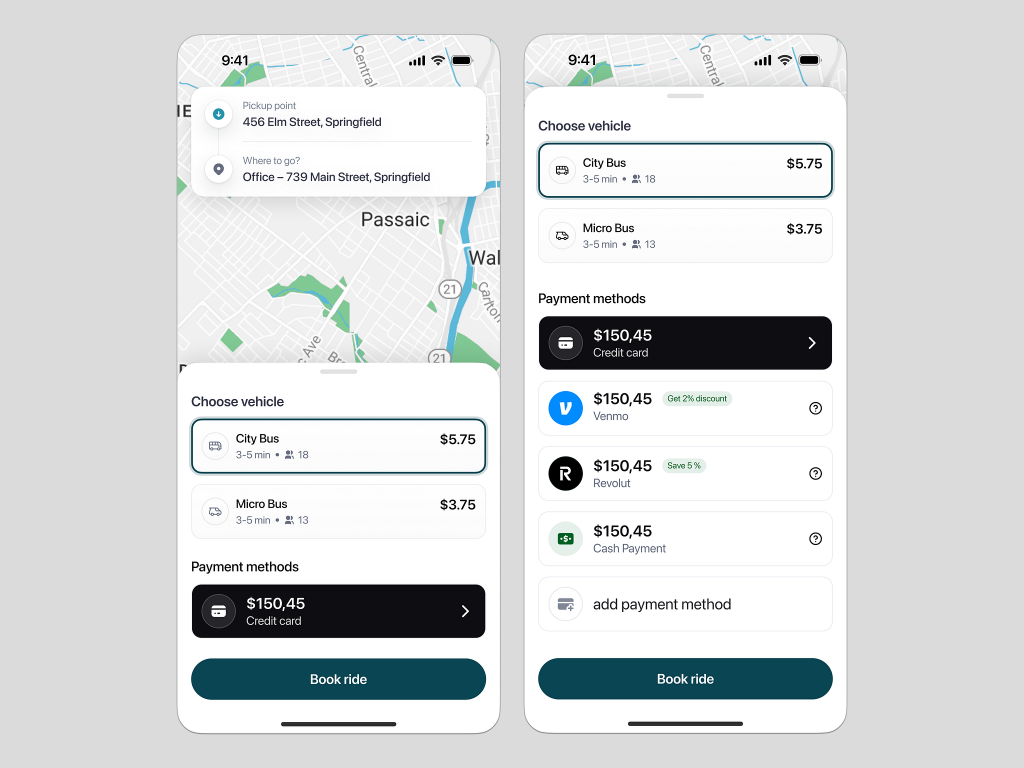
Ride Sharing Mobile App – Select Payment Method πŸ’°

Ride Sharing Mobile App - Select Payment Method πŸ’°

Ride Sharing Mobile App – Select Payment Method πŸ’°

The Select Payment Method feature in the Ride Sharing Mobile App ensures a flexible, secure, and convenient experience for users when paying for their rides. It allows passengers to choose their preferred payment option quickly and with ease.

πŸ’³ Multiple Payment Options
The Multiple Payment Options feature provides users with various choices, including credit/debit cards, digital wallets (like Apple Pay or Google Pay), and direct bank transfers. This ensures convenience and accommodates diverse user preferences.

πŸ”„ Switch Payment Methods Easily
The Switch Payment Methods Easily feature allows users to change their preferred payment method before confirming the ride. This flexibility ensures that passengers can adapt to different situations, such as using a different card or switching to cashless payments.

πŸ”’ Secure Transactions
Secure Transactions are enabled through encryption and PCI-compliant protocols, safeguarding user data and ensuring the privacy of their financial information. Users can confidently complete their payments without worrying about security risks.

πŸ’Έ Promo Codes and Discounts
The Promo Codes and Discounts feature lets users apply promotional offers or ride credits at checkout. This feature encourages loyalty and enhances user satisfaction by providing savings opportunities.

πŸ“Š Payment History
Payment History tracks all previous transactions, providing users with a detailed overview of their spending. This feature allows users to review past rides, receipts, and payment methods used for accountability and record-keeping.

πŸ”” Payment Alerts
Payment Alerts notify users about successful payments, failed transactions, or updates related to their payment methods. Real-time alerts ensure transparency and keep passengers informed throughout the payment process.

Conclusion
The Select Payment Method feature in the Ride Sharing Mobile App offers flexibility, security, and user-friendly options to enhance the overall payment experience. With multiple payment choices, secure transactions, and real-time alerts, it ensures a smooth and reliable ride payment process.


Want to collaborate? Email Us: work@keitoto.com
Keitoto | Behance | Instagram | UI8 | Dribbble | Pinterest

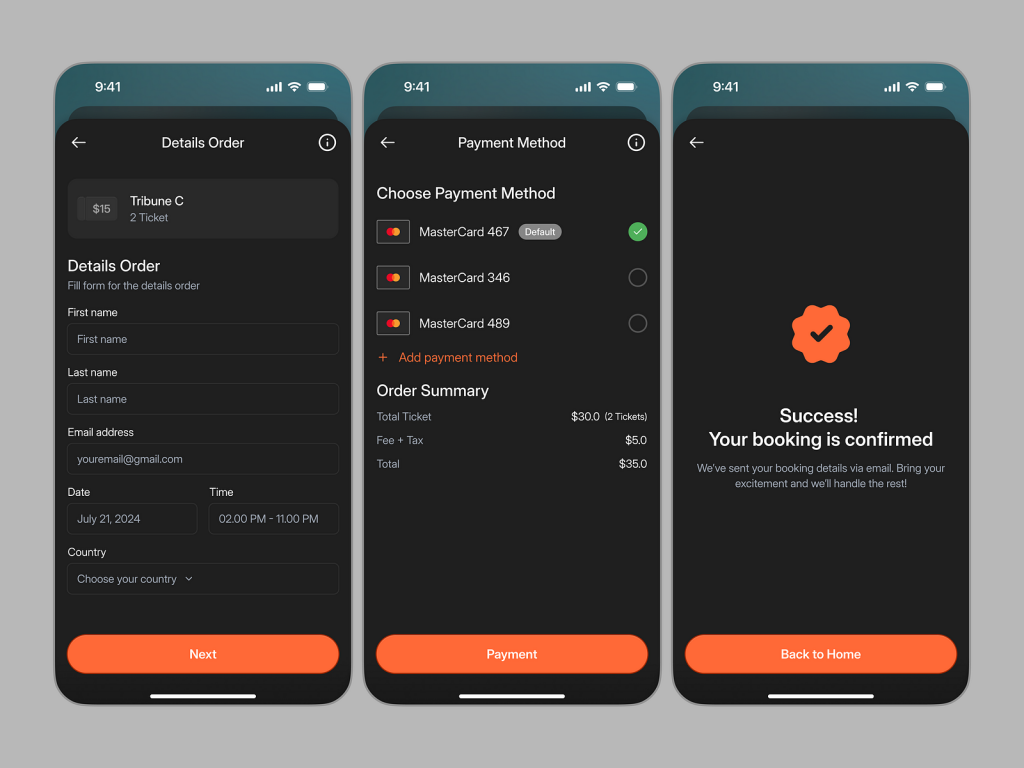
Event UI/UX Mobile App Design – Buy Ticket Β πŸ’°

Event UI/UX Mobile App Design - Buy Ticket Β πŸ’°

Event UI/UX Mobile App Design – Buy Ticket πŸ’°

The Buy Ticket feature in the Event UI/UX Mobile App offers a seamless and user-friendly experience for purchasing event tickets. Designed with simplicity and convenience in mind, this feature ensures that users can quickly and securely complete their ticket transactions.

πŸ›’ Intuitive Ticket Selection
The Intuitive Ticket Selection interface allows users to easily choose their preferred event, ticket type, and seat options. This feature is designed to reduce confusion, providing clear ticket categories and pricing details.

πŸ’³ Multiple Payment Options
Multiple Payment Options are available to make the purchasing process flexible and convenient. Users can select from credit cards, digital wallets, or even direct bank transfers, ensuring a smooth transaction regardless of their preferred payment method.

πŸ”’ Secure Checkout Process
The Secure Checkout Process guarantees that user payment information is protected through encryption and other security protocols. This feature builds trust and ensures that all financial transactions are completed safely.

πŸ“§ Instant Ticket Confirmation
After purchase, the Instant Ticket Confirmation feature sends a confirmation email or in-app notification, providing users with a digital copy of their ticket. This ensures quick access to event tickets, making it easy to attend the event.

πŸ’Ό Ticket Management Dashboard
The Ticket Management Dashboard helps users track their purchased tickets, upcoming events, and past bookings. It organizes all event-related details in one place, providing a convenient overview of tickets and dates.

⏳ Countdown Timer for Flash Sales
The Countdown Timer for Flash Sales feature lets users know about limited-time offers and discounts, adding urgency to their purchasing decisions. This feature drives engagement and boosts ticket sales during promotional periods.

Conclusion
The Buy Ticket feature in the Event UI/UX Mobile App provides a streamlined and secure process for purchasing event tickets. With multiple payment options, real-time confirmation, and secure transactions, this feature enhances the user experience while ensuring a smooth event booking process.


Want to collaborate? Email Us: work@keitoto.com
Keitoto | Behance | Instagram | UI8 | Dribbble | Pinterest

Project Manager Web Platform

Project Manager Web Platform

Project Manager Web Platform

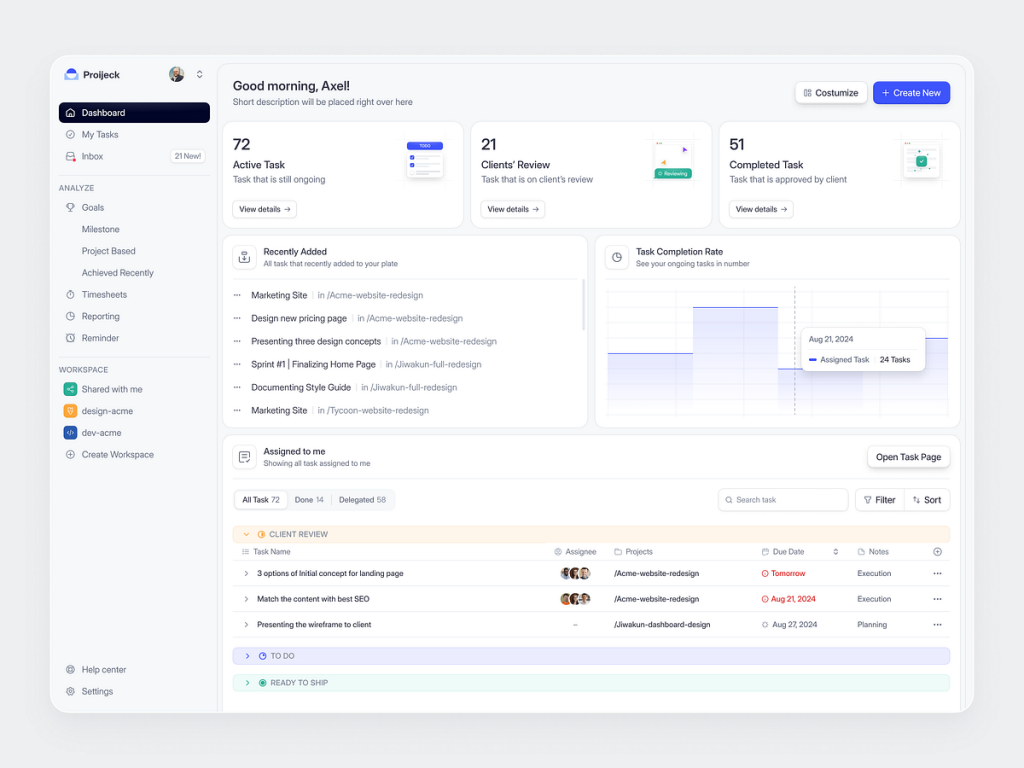
The Project Manager Web Platform is a robust solution designed to help teams and organizations plan, execute, and track their projects with efficiency and collaboration. It’s built to streamline workflows, enhance communication, and ensure timely delivery of projects.

πŸ—‚οΈ Project Overview Dashboard
The Project Overview Dashboard offers a clear, high-level snapshot of all ongoing projects, including progress tracking, timelines, and key milestones. This feature allows project managers to oversee multiple projects in one place, ensuring nothing slips through the cracks.

πŸ“… Task and Deadline Management
Task and Deadline Management allows users to create, assign, and manage tasks with clear deadlines. The platform provides automatic reminders and alerts to ensure that every team member stays on track and deadlines are met.

🀝 Collaborative Workspaces
The Collaborative Workspaces feature enables team members to work together in real-time, sharing files, comments, and updates. This enhances communication and ensures that everyone involved in the project is aligned on objectives and progress.

πŸ“Š Gantt Charts and Timelines
Gantt Charts and Timelines visually represent project timelines, task dependencies, and resource allocation. This feature makes it easy to track the flow of the project and identify any potential bottlenecks or delays.

πŸ”„ Resource Management
Resource Management helps allocate and track the availability and workload of team members, ensuring efficient use of resources. This feature prevents burnout and ensures that tasks are distributed evenly across the team.

πŸ”” Automated Notifications
The Automated Notifications feature sends real-time alerts about approaching deadlines, task completions, and changes in project scope. These notifications ensure that all team members remain informed and responsive.

πŸ“ˆ Analytics and Reporting
Analytics and Reporting tools provide insights into project performance, resource usage, and team productivity. Project managers can generate detailed reports to assess the overall health of a project and make data-driven decisions to optimize workflow.

πŸ” Secure Data Access
Secure Data Access controls ensure that sensitive project information is protected and accessible only to authorized team members. This helps maintain confidentiality and integrity within the platform.

Conclusion
The Project Manager Web Platform offers a powerful suite of tools for managing projects of any size. From real-time collaboration to comprehensive analytics, this platform is designed to optimize project delivery, foster teamwork, and keep all aspects of a project on schedule.


Want to collaborate? Email Us: work@keitoto.com

Keitoto | Behance | Instagram | UI8 | Dribbble | Pinterest

Nextar: AI Code Editor Saas Landing Page – Features Section

Nextar: AI Code Editor Saas Landing Page - Features Section

Nextar: AI Code Editor SaaS Landing Page – Features Section

The Features Section of the Nextar AI Code Editor SaaS Landing Page highlights the innovative tools and functionalities that make Nextar a game-changer for developers. This section is designed to showcase how Nextar simplifies coding tasks, enhances productivity, and offers intelligent solutions powered by AI.

πŸ’» AI-Powered Code Suggestions
AI-Powered Code Suggestions provide real-time, context-aware code completions and recommendations. This feature helps developers write code faster and with fewer errors by predicting the next line of code based on the current context and best practices.

πŸ” Smart Code Search
Smart Code Search allows users to find code snippets, functions, and files quickly and efficiently. This AI-driven search tool understands the intent behind search queries, delivering relevant results that save time and effort in navigating large codebases.

πŸ”§ Automated Code Refactoring
Automated Code Refactoring is designed to improve code quality by automatically suggesting and applying optimizations, such as renaming variables, simplifying complex expressions, and organizing code structure. This feature ensures that your codebase remains clean and maintainable.

⚑ Fast and Lightweight Performance
The Fast and Lightweight Performance feature ensures that Nextar runs smoothly on any device, without consuming excessive resources. This makes it ideal for developers who need a responsive and efficient coding environment, whether they’re working on a high-powered machine or a low-spec laptop.

πŸ”’ Secure Code Collaboration
Secure Code Collaboration allows developers to share and collaborate on code in real-time, with built-in version control and access permissions. This feature ensures that teams can work together securely, without the risk of unauthorized access or data breaches.

πŸ“Š Intelligent Debugging Tools
Intelligent Debugging Tools leverage AI to identify bugs, suggest fixes, and provide detailed explanations of errors. This feature helps developers troubleshoot issues more effectively, reducing the time spent on debugging and increasing overall productivity.

πŸ“… Integrated Project Management
Integrated Project Management brings task tracking, milestones, and team coordination into the coding environment. This feature allows developers to manage their projects without leaving the editor, streamlining workflows and ensuring that all team members are aligned.

🎨 Customizable UI/UX
Customizable UI/UX enables users to tailor the editor’s interface to their preferences, including themes, layouts, and keyboard shortcuts. This feature ensures a personalized coding experience that suits individual workflows and enhances comfort and efficiency.

Conclusion
The Features Section of the Nextar AI Code Editor SaaS Landing Page demonstrates how Nextar empowers developers with advanced AI tools, streamlined workflows, and a secure, customizable environment. It’s designed to revolutionize the coding experience, making development faster, smarter, and more efficient.


Want to collaborate? Email Us: work@keitoto.com
Keitoto | Behance | Instagram | UI8 | Dribbble | Pinterest

HR Management Saas Web App Dashboard – Payroll Page

HR Management Saas Web App Dashboard - Payroll Page

HR Management SaaS Web App Dashboard – Payroll Page

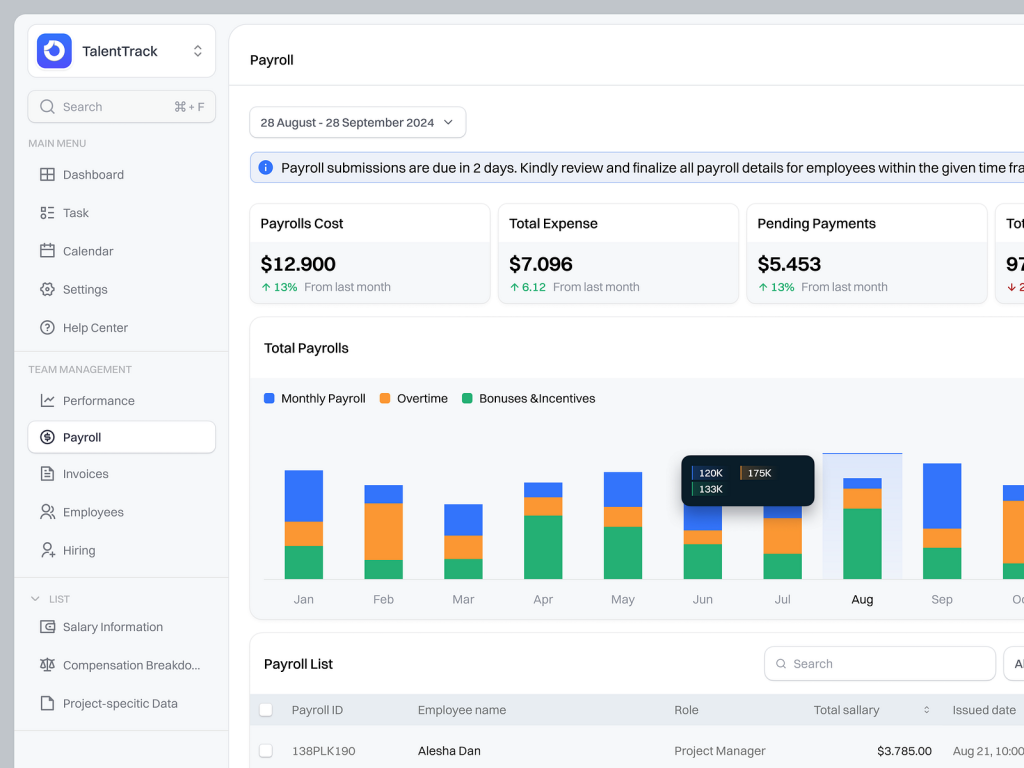
The Payroll Page in the HR Management SaaS Web App Dashboard is a comprehensive feature that streamlines the payroll process, ensuring accurate and timely payments for all employees. It’s designed to make payroll management efficient, transparent, and hassle-free for HR professionals.

πŸ’Ό Comprehensive Payroll Overview
The Comprehensive Payroll Overview feature provides a snapshot of all payroll activities. This includes total payroll costs, number of employees paid, and upcoming payroll cycles, allowing HR managers to quickly assess the status of payroll operations.

πŸ“Š Detailed Employee Payroll Records
Detailed Employee Payroll Records offer an in-depth view of each employee’s payroll data, including salary details, bonuses, deductions, and net pay. This feature makes it easy to review and manage individual payroll information, ensuring accuracy and compliance.

πŸ“… Automated Payroll Scheduling
The Automated Payroll Scheduling feature enables HR managers to set up recurring payroll cycles, ensuring that employees are paid on time without manual intervention. This automation reduces the risk of errors and delays, making payroll management more reliable.

πŸ”” Payroll Notifications and Alerts
Payroll Notifications and Alerts keep HR teams informed about important payroll deadlines, upcoming payment cycles, and any discrepancies that need attention. This feature helps prevent missed payments and ensures that payroll tasks are completed on schedule.

πŸ”„ Integration with Financial Systems
Integration with Financial Systems allows seamless connectivity with accounting and tax software, automating data transfers and ensuring that payroll data is synchronized across platforms. This feature enhances accuracy and simplifies tax reporting.

πŸ” Secure Data Management
Secure Data Management protects sensitive payroll information with advanced encryption and access controls. This ensures that only authorized personnel can view or modify payroll data, maintaining the confidentiality and integrity of employee information.

πŸ“ˆ Payroll Analytics and Reporting
The Payroll Analytics and Reporting feature provides detailed reports on payroll trends, labor costs, and financial planning. HR managers can generate customized reports to analyze payroll expenses and make data-driven decisions for future budgeting.

πŸ› οΈ Easy Payroll Adjustments
Easy Payroll Adjustments allow HR managers to quickly make changes to payroll entries, such as correcting errors, adding bonuses, or updating tax information. This feature ensures that payroll records are always up-to-date and accurate.

Conclusion
The Payroll Page in the HR Management SaaS Web App Dashboard offers a robust solution for managing payroll efficiently and securely. With features like automated scheduling, detailed records, and integration with financial systems, it simplifies payroll operations and ensures that employees are paid accurately and on time.


Want to collaborate? Email Us: work@keitoto.com
Keitoto | Behance | Instagram | UI8 | Dribbble | Pinterest

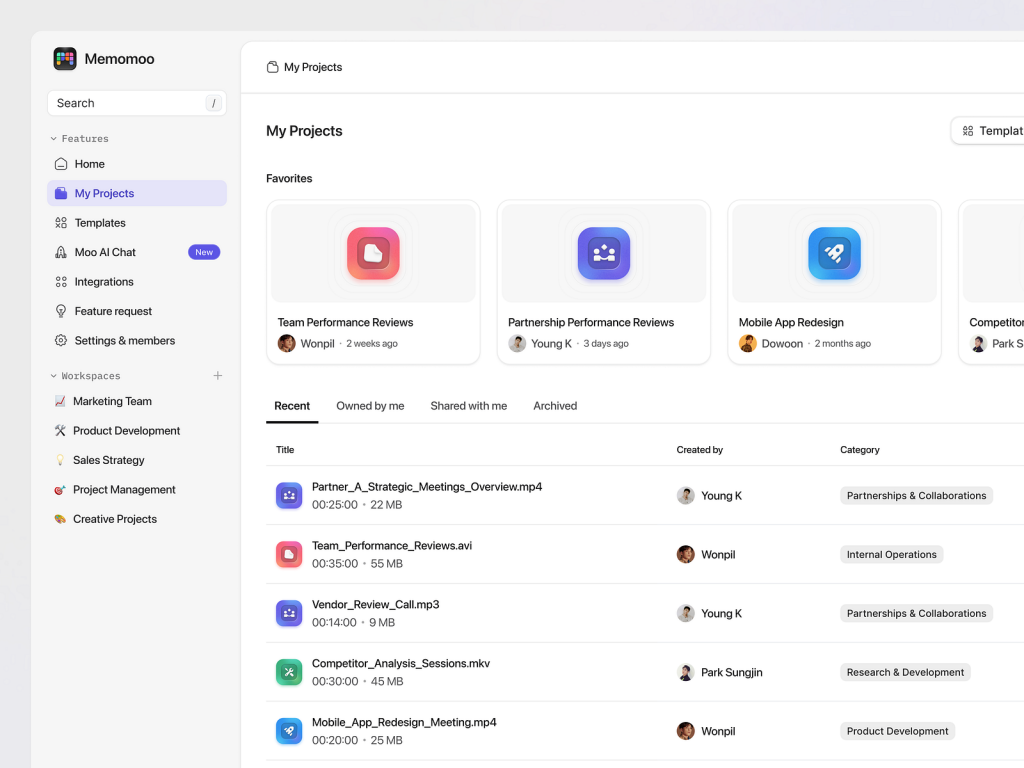
Memomoo: AI-Powered Meeting Note Taker – Project Library πŸš€

Memomoo: AI-Powered Meeting Note Taker – Project Library πŸš€

The Project Library in the Memomoo AI-Powered Meeting Note Taker is designed to organize and manage all your meeting notes and related documents efficiently. This feature ensures that users can easily access, review, and collaborate on project-specific notes, making it an essential tool for teams working on multiple projects simultaneously.

πŸ“ Centralized Project Repository
The Centralized Project Repository feature stores all meeting notes, transcripts, and related files in one accessible location. This allows users to quickly find and retrieve project-specific documents without sifting through disorganized files.

πŸ” Advanced Search and Filter
The Advanced Search and Filter functionality enables users to locate specific notes or documents based on keywords, dates, participants, or tags. This feature saves time and enhances productivity by making it easy to find the exact information needed.

πŸ“Š Visual Project Overview
Visual Project Overview provides a graphical representation of project milestones, meeting timelines, and action items. This feature helps users track the progress of each project and stay updated on upcoming tasks and deadlines.

πŸ”„ Version Control and History
The Version Control and History feature allows users to track changes made to notes and documents over time. This ensures that all edits are recorded, and previous versions can be retrieved if needed, maintaining the integrity of project documentation.

🀝 Collaborative Editing
Collaborative Editing allows team members to edit and update notes in real-time, fostering collaboration and ensuring that everyone is on the same page. This feature is particularly useful for remote teams working on shared projects.

πŸ”” Project-Specific Notifications
The Project-Specific Notifications system sends alerts for upcoming meetings, deadlines, or changes made to project notes. This keeps all team members informed and ensures timely action on critical tasks.

πŸ”’ Secure Access Control
Secure Access Control ensures that only authorized team members can view or edit specific project notes. This feature helps maintain confidentiality and control over sensitive project information.

πŸ“ˆ Project Analytics and Reporting
Project Analytics and Reporting provide insights into project progress, note-taking efficiency, and team collaboration. This feature allows managers to assess the effectiveness of meetings and make informed decisions to improve project outcomes.

Conclusion
The Project Library in Memomoo is a powerful tool for organizing and managing meeting notes across multiple projects. With its advanced search, collaborative editing, and secure access features, it streamlines project documentation, ensuring teams can work efficiently and stay on track.


Want to collaborate? Email Us: work@keitoto.com

Keitoto | Behance | Instagram | UI8 | Dribbble | Pinterest