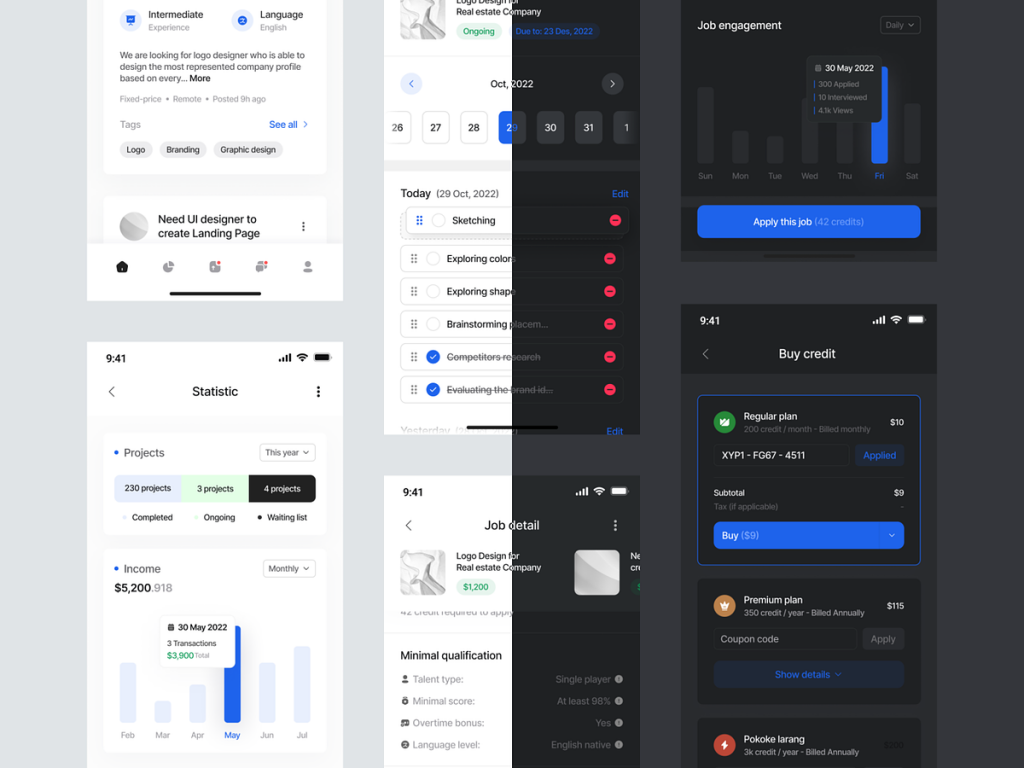
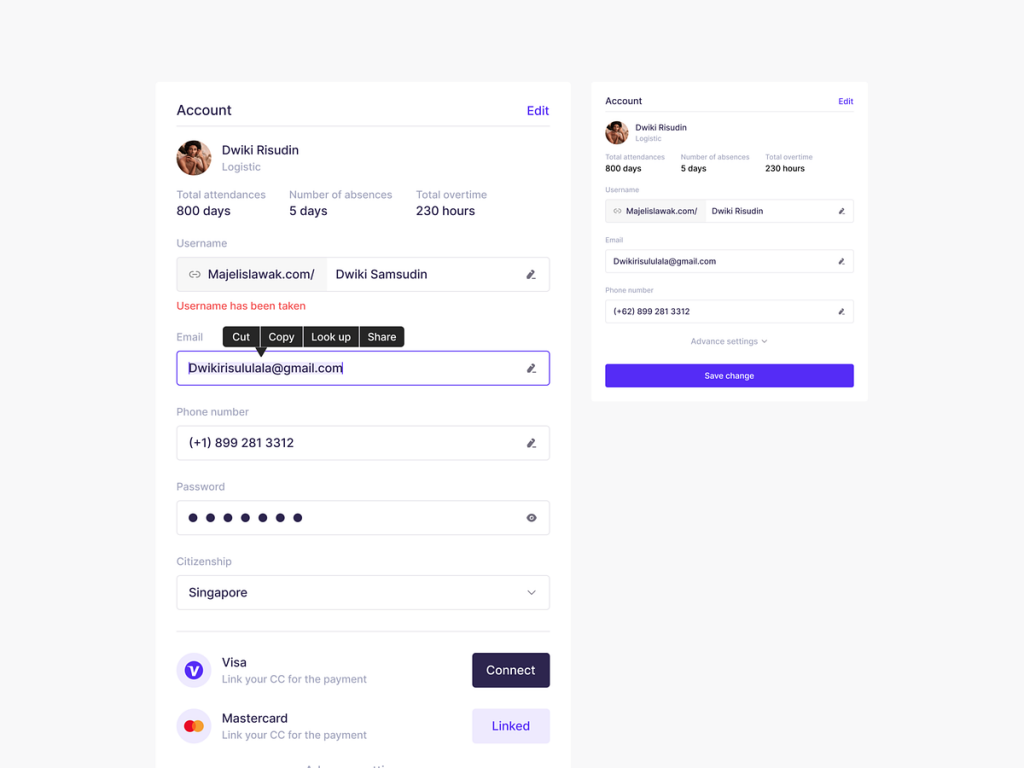
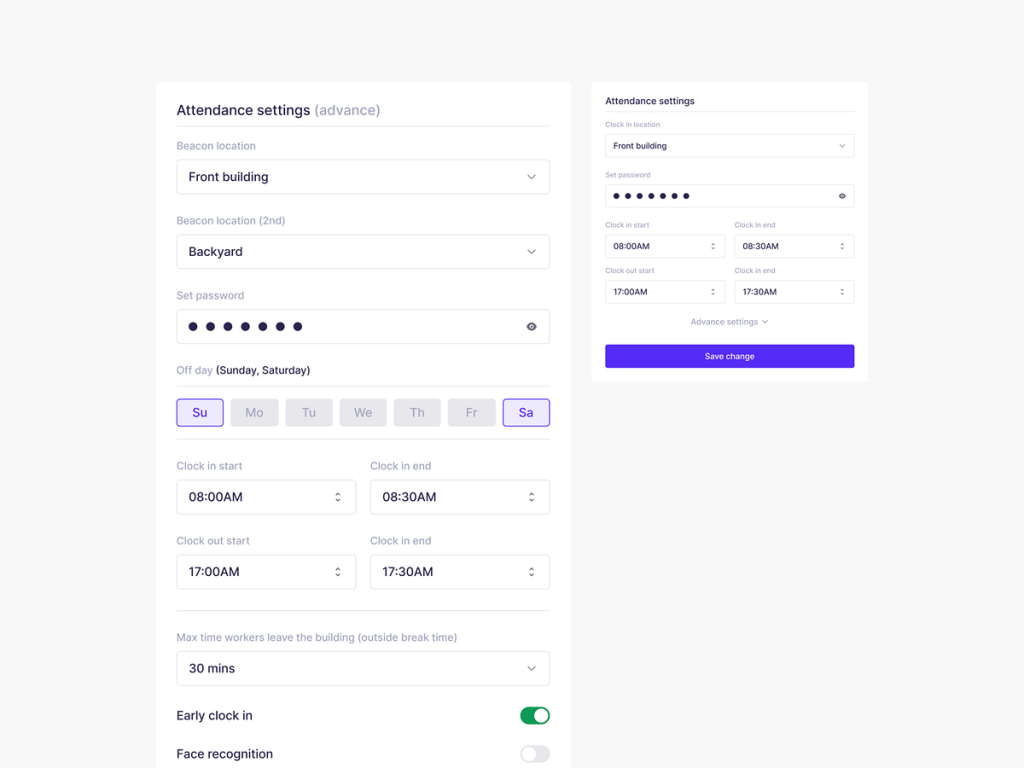
Attendance App – Small components

Attendance App - Small components

Attendance App – Small components

πŸ“… Attendance App – Small Components πŸš€

Revolutionize the way you manage attendance with the small yet powerful components of the Attendance App. This app is meticulously designed to streamline the attendance tracking process, providing a user-friendly experience for both administrators and attendees. Let’s delve into the key components that make the Attendance App a game-changer in attendance management.

πŸ“± Mobile-Friendly Interface – On-the-Go Attendance πŸ“±

The Attendance App offers a mobile-friendly interface, enabling users to mark attendance or check in from their smartphones. This feature caters to the modern, on-the-go lifestyle, making attendance management more convenient and accessible.

🎯 QR Code Scanner – Swift Check-Ins 🎯

Facilitate swift check-ins with the QR code scanner component. Attendees can simply scan their unique QR codes upon arrival, eliminating the need for manual entry. This not only speeds up the process but also reduces the chances of errors.

πŸ“Š Real-Time Analytics – Instant Attendance Insights πŸ“Š

Stay informed with real-time analytics on attendance data. Administrators can access instant insights, including attendance rates, trends, and historical data. This component empowers decision-making and allows for proactive interventions if needed.

πŸ“§ Automated Notifications – Reminders and Updates πŸ“§

Ensure attendees never miss an attendance requirement with automated notifications. The app sends reminders and updates about upcoming sessions or events, promoting attendance consistency and engagement.

πŸ–₯️ Web-Based Dashboard – Centralized Administration πŸ–₯️

Administrators can efficiently manage attendance through the web-based dashboard. This centralized platform provides a comprehensive overview of attendance records, allowing for easy tracking, editing, and reporting.

πŸ“… Scheduling Tool – Effortless Planning πŸ“…

Plan events and sessions effortlessly with the scheduling tool. The Attendance App allows administrators to set up and manage schedules, making it easy for attendees to anticipate and plan for upcoming events.

πŸ”„ Biometric Integration – Secure and Accurate Attendance πŸ”„

Enhance security and accuracy with biometric integration. The app supports biometric authentication for attendees, ensuring that the person marking attendance is indeed the authorized individual, adding an extra layer of verification.

πŸ’» Cross-Platform Compatibility – Seamless Integration πŸ’»

Enjoy the convenience of cross-platform compatibility. The Attendance App seamlessly integrates across various devices and operating systems, providing a consistent experience for both administrators and attendees.

πŸ”’ Data Encryption – Confidentiality Assurance πŸ”’

Prioritize data security with robust encryption measures. The Attendance App employs advanced encryption techniques to safeguard attendee information, ensuring confidentiality and compliance with privacy regulations.

πŸ“ˆ Performance Reports – Data-Driven Insights πŸ“ˆ

Generate detailed performance reports with the app’s reporting feature. Track attendance patterns, identify trends, and make data-driven decisions to enhance the overall efficiency of your events or classes.

πŸ”„ Integration with Existing Systems – Smooth Implementation πŸ”„

Integrate the Attendance App with your existing systems seamlessly. This component ensures a smooth implementation process, allowing for easy adoption without disrupting your current workflow.

πŸš€ Quick Deployment – Immediate Implementation πŸš€

Experience quick deployment with the Attendance App. Administrators can implement the app swiftly, minimizing downtime and maximizing the benefits of efficient attendance tracking.

πŸ”š Conclusion – Elevate Attendance Management πŸ”š

In conclusion, the Attendance App’s small components collectively contribute to an elevated attendance management experience. With its mobile-friendly interface, QR code scanner, real-time analytics, automated notifications, web-based dashboard, scheduling tool, biometric integration, cross-platform compatibility, data encryption, performance reports, integration capabilities, and quick deployment, the app sets a new standard for attendance tracking. Streamline your processes, enhance security, and gain valuable insights with the Attendance App. πŸ“…πŸš€

β€” β€” β€” β€” β€” β€” β€” β€” β€” β€”

Want to collaborate? Email Us: hello@keitoto.com
Keitoto | Behance | Instagram | UI8 | Dribbble | Pinterest

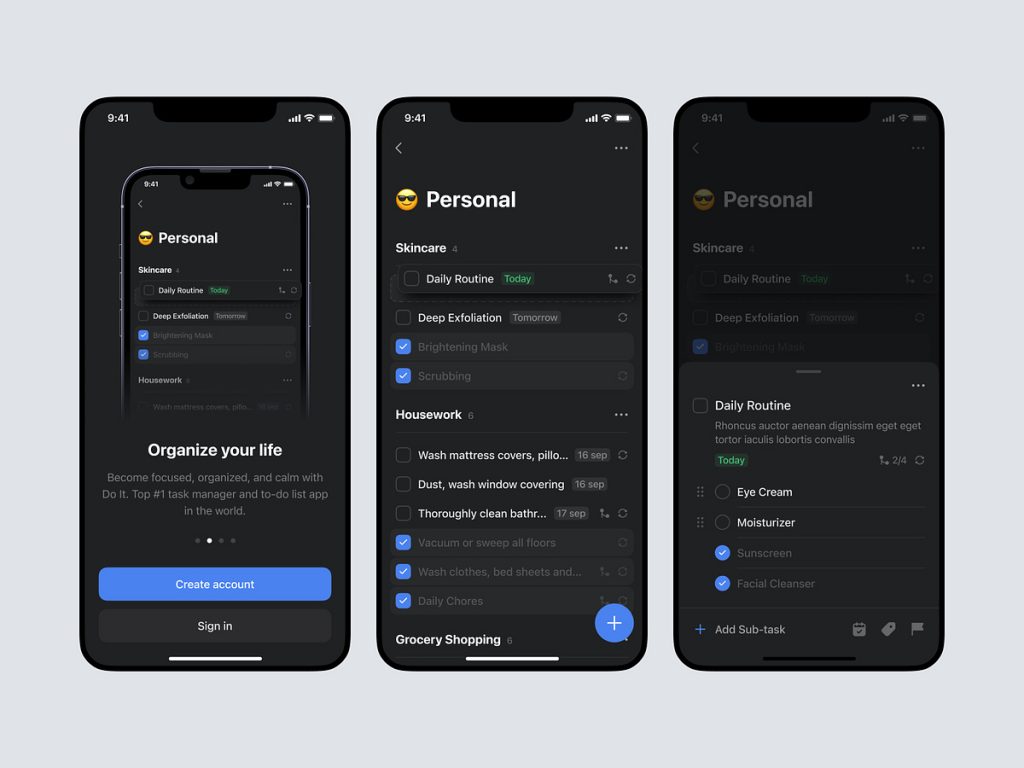
To Do List Landing Page – Do it

To Do List Landing Page - Do it

To Do List Landing Page – Do it

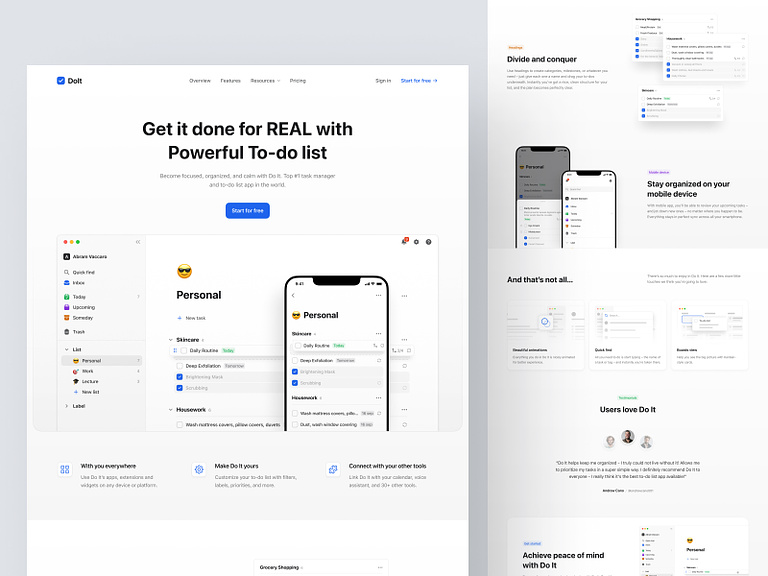
πŸ“‹ Do It – To-Do List Landing Page πŸš€

Embark on a journey towards enhanced productivity with “Do It” – the To-Do List Landing Page that brings organization and efficiency to your daily tasks. This sleek and intuitive platform is designed to simplify your life by providing a seamless and visually appealing way to manage your to-do list. Let’s explore the standout features that make “Do It” a must-have tool for anyone seeking productivity and task management.

🎨 Clean and Modern Design – Aesthetic Simplicity

“Do It” boasts a clean and modern design, embracing the beauty of simplicity. The landing page welcomes users with an aesthetically pleasing layout, creating a visually calming environment that encourages focus and clarity in task management.

✨ Intuitive User Interface – Effortless Navigation

Experience the ease of task management with “Do It’s” intuitive user interface. Effortless navigation ensures that users can quickly add, edit, and prioritize tasks without unnecessary complexities. The user-centric design enhances the overall experience of organizing to-do lists.

πŸ“… Date and Time Integration – Time-Stamped Tasks

Stay on top of your schedule with “Do It’s” date and time integration. Each task can be time-stamped, allowing users to allocate specific deadlines and reminders. This feature ensures that important tasks are completed in a timely manner, enhancing time management.

🌈 Color-Coded Categories – Visual Organization

Bring vibrancy to your tasks with color-coded categories. “Do It” allows users to assign different colors to various task categories, providing a visual cue for easy identification. This visual organization system adds a touch of creativity to your to-do list management.

πŸ”„ Drag-and-Drop Functionality – Seamless Reordering

Optimize your task priorities with seamless drag-and-drop functionality. “Do It” enables users to effortlessly reorder tasks by dragging them to the desired position, ensuring that the most important tasks are always at the forefront.

πŸ”” Reminders and Notifications – Stay On Track

Never miss a deadline with “Do It’s” reminders and notifications. Users can set customizable reminders for each task, receiving timely alerts to stay on track. This proactive feature ensures that important deadlines are met and tasks are completed promptly.

πŸ“ Notes and Details – Comprehensive Task Information

Add depth to your tasks with detailed notes and additional information. “Do It” provides a space for users to include comprehensive details, allowing for a more thorough understanding of each task’s requirements and context.

πŸ“ˆ Progress Tracking – Monitor Your Achievements

Monitor your productivity and accomplishments with “Do It’s” progress tracking feature. The landing page offers a visual representation of completed tasks, motivating users by showcasing their ongoing success and encouraging a sense of achievement.

πŸ’» Responsive Design – Seamless Cross-Device Access

Access your to-do list anytime, anywhere with “Do It’s” responsive design. Whether you’re using a computer, tablet, or smartphone, the landing page adapts seamlessly to different devices, ensuring a consistent and user-friendly experience.

πŸ” Secure Data Storage – Privacy Assurance

Prioritize the security of your task data with “Do It’s” secure data storage. The landing page employs robust security measures to safeguard user information, providing peace of mind when entrusting your to-do lists to the platform.

πŸš€ Fast Loading Speed – Instant Task Management

Experience swift task management with “Do It’s” fast loading speed. The landing page ensures that users can add, edit, and organize tasks without any delays, contributing to a seamless and efficient task management process.

πŸ”š Conclusion – Elevate Your Productivity

In conclusion, “Do It” is not just a landing page; it’s a productivity companion that elevates your task management experience. With its clean and modern design, intuitive user interface, date and time integration, color-coded categories, drag-and-drop functionality, reminders and notifications, notes and details, progress tracking, responsive design, secure data storage, and fast loading speed, “Do It” sets the stage for enhanced productivity and efficient task organization. Embrace a more organized and accomplished lifestyle with “Do It.” πŸ“‹βœ¨

β€” β€” β€” β€” β€” β€” β€” β€” β€” β€”

Want to collaborate? Email Us: hello@keitoto.com
Keitoto | Behance | Instagram | UI8 | Dribbble | Pinterest

Fredrinn – Course Analyst Dashboard ✨

Fredrinn - Course Analyst Dashboard ✨

Fredrinn - Course Analyst Dashboard ✨

Fredrinn – Course Analyst Dashboard ✨

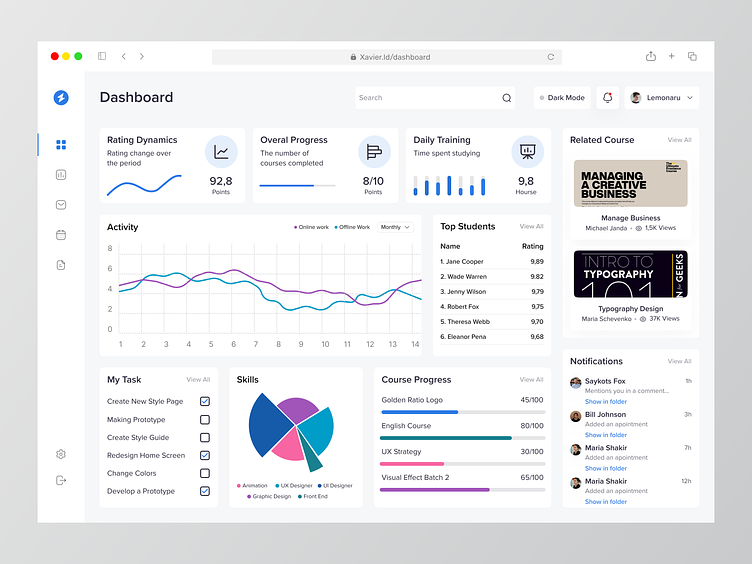
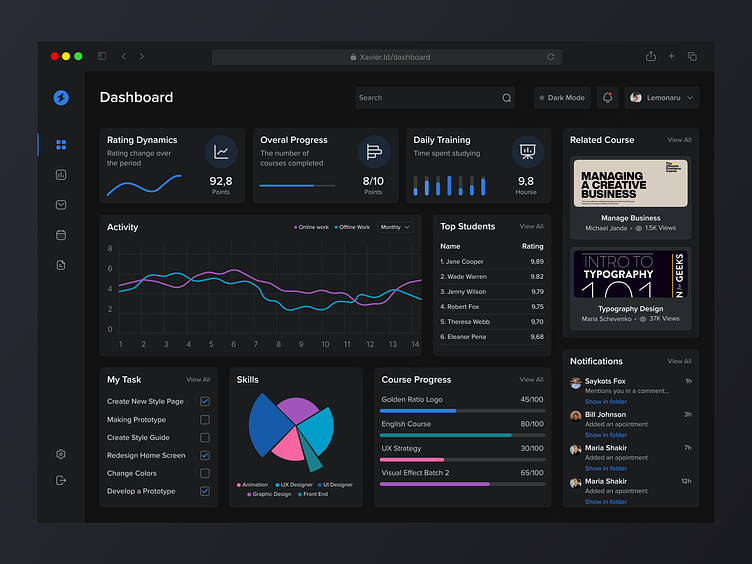
πŸ“Š Fredrinn – Course Analyst Dashboard ✨

Step into the future of education with Fredrinn’s Course Analyst Dashboard, a cutting-edge tool designed to empower educators and institutions with comprehensive insights and analytics. This innovative dashboard redefines the way educational data is harnessed, providing a holistic view of course performance. Let’s explore the standout features that make Fredrinn’s Course Analyst Dashboard an invaluable asset in the realm of academia.

🌐 Centralized Data Hub – Streamlined Information Flow

Fredrinn’s Course Analyst Dashboard acts as a centralized data hub, streamlining the flow of information from various educational sources. This centralized approach ensures that educators and administrators have a unified platform for accessing and analyzing crucial data without the need to navigate through multiple systems.

πŸ“ˆ Performance Analytics – Visualizing Student Success

Unleash the power of performance analytics with intuitive visualizations. The dashboard offers dynamic charts and graphs to illustrate student and course performance trends. Educators can easily identify patterns, strengths, and areas for improvement, fostering data-driven decision-making.

🎯 Student Engagement Metrics – Fostering Active Learning

Delve into student engagement with comprehensive metrics that go beyond traditional assessments. Fredrinn’s dashboard measures interaction with course materials, participation levels, and collaborative activities, providing educators with valuable insights into the effectiveness of their teaching methods.

πŸ“š Course Content Effectiveness – Data-Driven Curriculum Refinement

Evaluate the impact of course content with data-driven insights. The dashboard analyzes how students engage with learning materials, helping educators refine and optimize the curriculum for maximum effectiveness. This feature ensures that course content aligns seamlessly with learning objectives.

πŸ“Š Assessment Results – Real-Time Performance Evaluation

Monitor assessment results in real-time, allowing for swift intervention and support. Fredrinn’s dashboard provides educators with immediate access to assessment outcomes, enabling them to address challenges promptly and tailor their teaching strategies to meet the diverse needs of students.

πŸ‘©β€πŸ« Educator Performance Metrics – Enhancing Teaching Strategies

Support educators with performance metrics designed to enhance teaching strategies. The dashboard offers insights into teaching methodologies, student feedback, and overall effectiveness. This data empowers educators to continuously refine their approach and adapt to the evolving needs of their students.

πŸ“… Progress Tracking – Celebrating Milestones

Track student progress and celebrate milestones throughout the academic journey. Fredrinn’s dashboard visualizes individual student achievements, creating a positive and motivating atmosphere. This feature promotes a sense of accomplishment and encourages students to reach their full potential.

πŸ” Customizable Reports – Tailored Analytics

Tailor analytics to specific institutional goals with customizable reports. Fredrinn understands the unique requirements of educational institutions and allows for the creation of reports that align precisely with their objectives. This flexibility ensures that stakeholders receive insights that matter most to them.

πŸ’¬ Collaborative Features – Fostering Communication

Foster collaboration among educators, administrators, and support staff. Fredrinn’s dashboard includes collaborative features that facilitate seamless communication, allowing stakeholders to share insights, discuss strategies, and collectively work towards elevating the educational experience.

πŸ”’ Data Security – Confidentiality at the Core

Prioritize data security with Fredrinn’s unwavering commitment to confidentiality. The Course Analyst Dashboard adheres to stringent security measures, ensuring that sensitive educational data is protected and compliant with privacy regulations.

πŸš€ User-Friendly Interface – Effortless Navigation

Navigate the Course Analyst Dashboard effortlessly with its user-friendly interface. Fredrinn places a premium on intuitive design, ensuring that users can access critical information with ease. This user-friendly approach enhances the overall user experience.

πŸ”š Conclusion – Shaping the Future of Education

In conclusion, Fredrinn’s Course Analyst Dashboard is not just a tool; it’s a catalyst for shaping the future of education. With its centralized data hub, performance analytics, student engagement metrics, course content effectiveness, real-time assessment results, educator performance metrics, progress tracking, customizable reports, collaborative features, data security, and user-friendly interface, the dashboard empowers educational institutions to drive positive change, foster student success, and embrace a data-centric approach to teaching and learning. Experience the transformative power of education with Fredrinn. βœ¨πŸŽ“

β€” β€” β€” β€” β€” β€” β€” β€” β€” β€”

Want to collaborate? Email Us: hello@keitoto.com
Keitoto | Behance | Instagram | UI8 | Dribbble | Pinterest

Crixalis – Mobile Bank

Crixalis - Mobile Bank

Crixalis – Mobile Bank

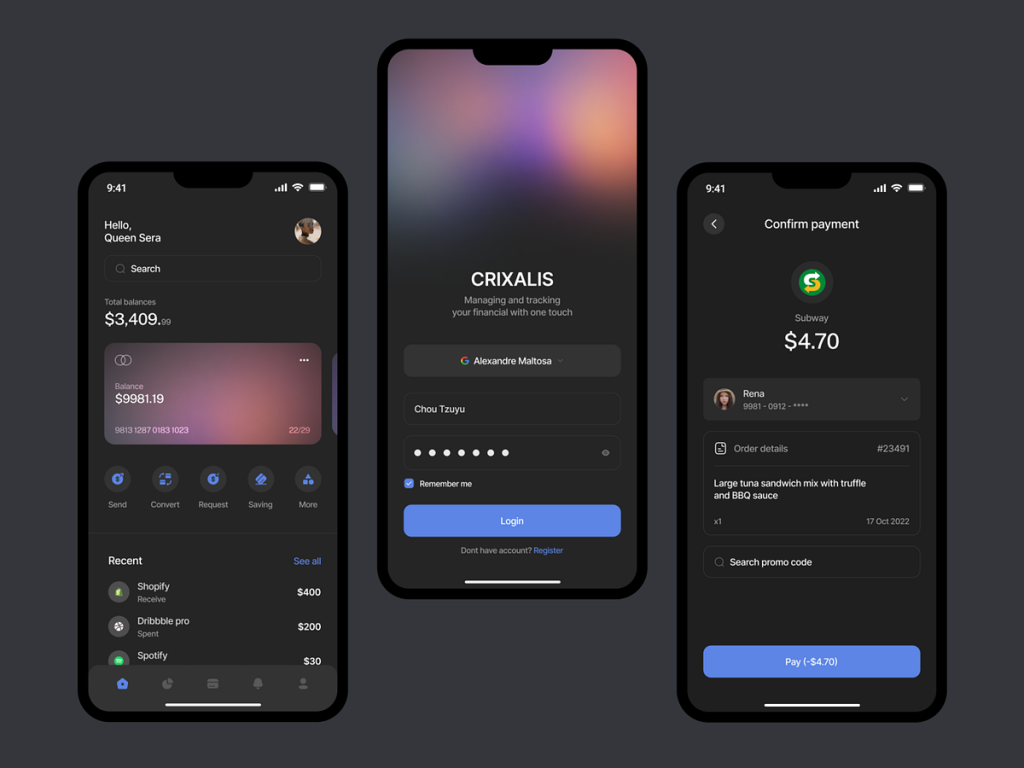
πŸ’³ Crixalis – Mobile Bank πŸ“±

Embark on a revolutionary financial journey with Crixalis, the Mobile Bank designed to make banking smarter, simpler, and more secure. This innovative mobile banking app is not just a financial tool; it’s a comprehensive solution that empowers users to take control of their finances with ease. Let’s delve into the key features that define Crixalis as the future of mobile banking.

🌐 Intuitive User Interface – Seamless Navigation

Crixalis boasts an intuitive user interface that ensures seamless navigation. From account overviews to transaction histories, users can effortlessly access and manage their financial information. The app’s design prioritizes user experience, making banking tasks simple and efficient.

πŸ”’ Robust Security Measures – Fortifying Financial Safety

Crixalis prioritizes the security of user data and transactions. Advanced encryption, multi-factor authentication, and biometric login options ensure robust security measures, fortifying the financial safety of users in an era where digital security is paramount.

πŸ’Έ Instant Transactions – Swift and Efficient

Experience the power of instant transactions with Crixalis. Whether it’s transferring funds, paying bills, or making purchases, the app facilitates swift and efficient transactions, providing users with real-time control over their finances.

πŸ“Š Financial Insights – Smart Budgeting

Crixalis goes beyond basic banking by offering smart financial insights. Users can track their spending patterns, set budgeting goals, and receive personalized financial advice. This feature empowers users to make informed decisions and achieve their financial objectives.

🌍 Global Accessibility – Banking Anywhere, Anytime

With Crixalis, users can access their accounts anytime, anywhere. The app’s global accessibility ensures that users can perform banking tasks on the go, whether they are traveling, working, or simply enjoying leisure time.

πŸ’³ Contactless Payments – Modern Convenience

Crixalis embraces modern convenience with contactless payment options. Users can make secure and contactless transactions using their smartphones or linked cards, providing a hassle-free and hygienic payment experience.

πŸ“± Mobile Check Deposits – Effortless Banking

Eliminate the need for physical visits to the bank with Crixalis’ mobile check deposit feature. Users can effortlessly deposit checks by capturing images through the app, streamlining the deposit process and saving valuable time.

πŸ“ˆ Investment Opportunities – Wealth Building

Crixalis isn’t just about spending and saving; it’s also about building wealth. The app provides access to investment opportunities, allowing users to explore and invest in a diverse range of financial instruments directly from their mobile devices.

πŸ“± Chat Support – Instant Assistance

Receive instant assistance with Crixalis’ integrated chat support. Users can connect with customer support representatives directly through the app, resolving queries and concerns promptly without the need for phone calls or visits to the bank.

🌐 Seamless Integration – Financial Ecosystem

Crixalis seamlessly integrates with various financial ecosystems. Users can link their accounts, investments, and financial tools within the app, creating a unified and comprehensive financial management platform.

πŸ” Personalized Banking Experience – Tailored to You

Crixalis tailors the banking experience to individual preferences. From customizable account dashboards to personalized alerts and notifications, the app ensures that each user’s banking journey is uniquely tailored to their needs and preferences.

πŸ”š Conclusion – Crixalis: Redefining Financial Empowerment

In conclusion, Crixalis isn’t just a Mobile Bank; it’s a force redefining financial empowerment in the digital age. With its intuitive user interface, robust security measures, instant transactions, financial insights, global accessibility, contactless payments, mobile check deposits, investment opportunities, chat support, seamless integration, personalized banking experience, and a commitment to user-centric innovation, Crixalis stands at the forefront of the mobile banking revolution. Experience the future of banking with Crixalis and witness the transformation of your financial journey. πŸ’³πŸ“±

β€” β€” β€” β€” β€” β€” β€” β€” β€” β€”

Want to collaborate? Email Us: hello@keitoto.com
Keitoto | Behance | Instagram | UI8 | Dribbble | Pinterest

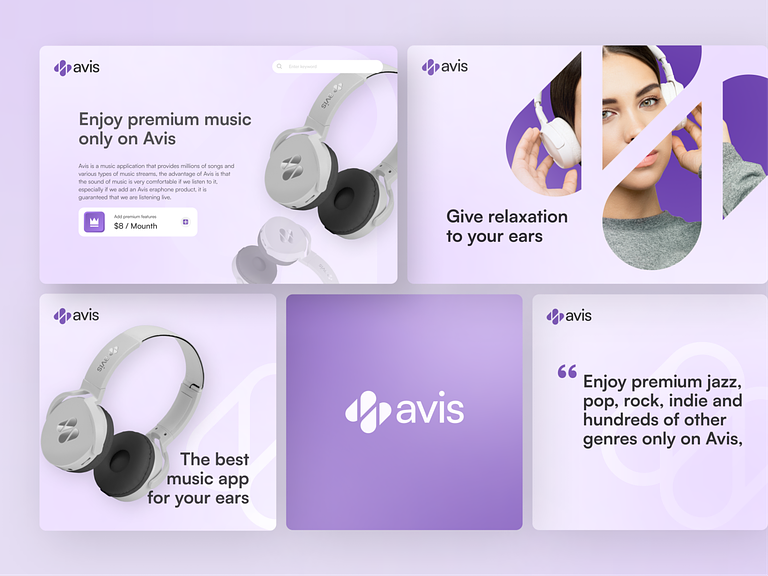
Avis – Music App Branding

Avis - Music App Branding

Avis – Music App Branding

🎡 Avis – Music App Branding 🎢

Immerse yourself in the harmonious world of Avis, where music meets innovation. Avis is not just a music app; it’s an experience designed to elevate your auditory journey. Let’s explore the key elements of Avis’ music app branding that sets it apart in the realm of digital soundscapes.

🎨 Dynamic Visual Identity – Sonic Aesthetics

Avis introduces a dynamic visual identity that mirrors the diverse and vibrant world of music. The logo is a fusion of sleek lines and fluid curves, symbolizing the rhythmic and multifaceted nature of sound. The color palette is carefully chosen to evoke emotions associated with different genres, creating a visual symphony.

🎧 Personalized Playlists – Tailored Soundtracks

Avis puts the user in control with personalized playlists that curate tailored soundtracks based on individual preferences. Whether it’s a playlist for workouts, relaxation, or road trips, Avis adapts to your mood, ensuring a seamless and personalized listening experience.

πŸ“Έ Visual Integration – Album Art Appreciation

Visual integration is a key aspect of Avis’ branding, with a strong emphasis on album art appreciation. The app seamlessly incorporates high-resolution album artwork, transforming the interface into a visual gallery that complements the auditory experience. Each album cover is a piece of visual art, enhancing the overall aesthetic.

πŸ” Intelligent Search – Discover the Unheard

Avis empowers users with an intelligent search feature that goes beyond the mainstream. Discover the unheard and explore niche genres with ease. The search algorithm adapts to user preferences, encouraging musical exploration and expanding horizons.

🌐 Social Connectivity – Share the Vibes

Connect with fellow music enthusiasts through Avis’ social features. Share your favorite tracks, playlists, and musical discoveries with friends and followers. Avis transforms music into a shared experience, fostering a sense of community among users.

🎢 Smart Recommendations – Your Musical Companion

Avis becomes your musical companion with smart recommendations powered by advanced algorithms. The app learns your preferences over time, offering suggestions that align with your taste while introducing you to new and exciting tracks.

🌈 Themed Interfaces – Mood-Enhancing Design

Avis introduces themed interfaces that adapt to the user’s mood. Whether it’s a calming blue for relaxation or energetic red for workout sessions, the app’s design dynamically shifts to enhance the overall mood and experience.

🌍 Global Soundscapes – Cultural Inclusivity

Celebrate cultural diversity with Avis’ global soundscapes. The app transcends borders, featuring curated playlists that highlight musical traditions from around the world. Avis embraces cultural inclusivity, allowing users to explore and appreciate music beyond their own cultural backgrounds.

πŸš€ Cross-Platform Accessibility – Seamless Transition

Avis ensures a seamless transition between devices with cross-platform accessibility. Whether you’re on your smartphone, tablet, or desktop, your music journey continues effortlessly. The app’s design and functionality remain consistent across devices, offering a unified experience.

πŸ”’ Privacy and Security – Soundful Trust

Avis prioritizes user privacy and security, creating a soundful trust between the app and its users. Personal data is handled with utmost confidentiality, ensuring that your music preferences remain a private and enjoyable aspect of your digital life.

πŸ”š Conclusion – Avis: Resonance Redefined

In conclusion, Avis is more than a music app; it’s an embodiment of resonance redefined. With its dynamic visual identity, personalized playlists, visual integration, intelligent search, social connectivity, smart recommendations, themed interfaces, global soundscapes, cross-platform accessibility, and a commitment to privacy and security, Avis transforms the act of listening into an immersive and personalized journey. Experience the symphony of Avis and let your music resonate in harmony. πŸŽ΅πŸš€

β€” β€” β€” β€” β€” β€” β€” β€” β€” β€”

Want to collaborate? Email Us: hello@keitoto.com
Keitoto | Behance | Instagram | UI8 | Dribbble | Pinterest

Mbutdamel – Job Seeker Mobile App

Mbutdamel - Job Seeker Mobile App

Mbutdamel – Job Seeker Mobile App

πŸ” Mbutdamel – Job Seeker Mobile App πŸ“±

Embark on a transformative journey in your career search with Mbutdamel, the Job Seeker Mobile App. This innovative application is designed to streamline the job-seeking process, providing users with a user-friendly interface and powerful features to enhance their employment journey. Let’s explore the key features that make Mbutdamel a valuable companion for those navigating the job market.

🌟 Intuitive User Interface – Seamless Navigation

Mbutdamel boasts an intuitive user interface that ensures seamless navigation. Users can effortlessly explore various sections of the app, from job listings to personalized profiles, creating an intuitive and user-friendly experience from the moment they start their job search.

🎯 Job Matching Algorithm – Tailored Recommendations

Experience the power of a sophisticated job matching algorithm. Mbutdamel analyzes user profiles, skills, and preferences to provide tailored job recommendations. This personalized approach ensures that users are presented with opportunities that align with their qualifications and career goals.

πŸ“„ Dynamic Resume Builder – Stand Out Professionally

Crafting a standout resume is made easy with Mbutdamel’s dynamic Resume Builder. Users can create and customize their resumes directly within the app, highlighting their skills, experiences, and achievements. This feature ensures that job applications are accompanied by professional and compelling resumes.

πŸ”” Real-Time Job Alerts – Stay Informed

Never miss an opportunity with real-time job alerts. Mbutdamel sends notifications for relevant job openings based on user preferences and search criteria, keeping job seekers informed about new opportunities as soon as they become available.

πŸ—ΊοΈ Location-Based Job Search – Localized Opportunities

Tailor your job search to specific locations with the app’s location-based feature. Whether users are seeking opportunities in their local area or exploring job markets in different regions, Mbutdamel provides localized job search options to meet diverse preferences.

🀝 Networking Opportunities – Connect Professionally

Unlock networking opportunities within the Mbutdamel community. The app facilitates professional connections, allowing users to network with recruiters, industry professionals, and other job seekers. Networking becomes a strategic aspect of the job search process.

πŸ“Š Skill Assessment Tools – Showcase Proficiency

Highlight your skills effectively with built-in skill assessment tools. Mbutdamel allows users to showcase their proficiency in various skills through assessments, providing employers with a comprehensive view of their capabilities and enhancing their overall employability.

🌐 Company Profiles – In-Depth Insights

Gain in-depth insights into potential employers with comprehensive company profiles. Mbutdamel provides detailed information about hiring companies, their culture, and employee reviews, empowering users to make informed decisions about their job applications.

πŸ“ˆ Career Progress Tracking – Monitor Advancements

Keep track of your career progress with Mbutdamel’s career progress tracking feature. Users can monitor their job application history, interview invitations, and overall career advancements, providing valuable insights into their job-seeking journey.

πŸ”’ Data Security – Confidential Job Search

Mbutdamel prioritizes the confidentiality and security of user data. Job seekers can confidently explore opportunities, knowing that their personal information and job search activities are handled with the utmost privacy and security.

πŸ”š Conclusion – Empowering Job Seekers

In conclusion, Mbutdamel is more than just a Job Seeker Mobile App; it’s an empowering platform designed to support individuals in their quest for meaningful employment. With its intuitive interface, job matching algorithm, dynamic resume builder, real-time job alerts, location-based search, networking opportunities, skill assessment tools, company profiles, career progress tracking, and data security, Mbutdamel revolutionizes the job-seeking experience. Download Mbutdamel today and take the next step toward a brighter professional future. πŸ“±πŸŒ

β€” β€” β€” β€” β€” β€” β€” β€” β€” β€”

Want to collaborate? Email Us: hello@keitoto.com
Keitoto | Behance | Instagram | UI8 | Dribbble | Pinterest

Do it – To Do List Mobile App Dark

Do it - To Do List Mobile App Dark

Do it – To Do List Mobile App Dark

πŸŒ‘ Do It – Dark Mode To-Do List App 🌌

Embark on a journey of productivity in a sleek and sophisticated atmosphere with the Do It To-Do List Mobile App in Dark Mode. This version of the app not only enhances visual appeal but also reduces eye strain in low-light environments. Let’s explore the key features that make the Do It Dark Mode the ideal companion for those who value both style and efficiency.

🌌 Stylish Dark Interface – Visual Comfort

Immerse yourself in a stylish and visually comfortable dark interface. The deep, dark hues create a sophisticated ambiance that not only looks great but also minimizes glare, ensuring a pleasant experience for users who prefer a subdued backdrop.

πŸ“ Task Management Excellence – Organize with Ease

Continue enjoying the exceptional task management features of Do It in Dark Mode. Organize your to-do list effortlessly, set priorities, and schedule tasks with the same intuitive interface that users love. The dark background adds a touch of elegance to your productivity routine.

πŸ”΅ Accent Colors – Subtle Highlights

Accent colors in the Do It Dark Mode are carefully chosen to provide subtle highlights against the dark backdrop. These accents guide your attention to important elements without being intrusive, maintaining a balanced and refined visual hierarchy.

πŸ“… Calendar Integration – Time Management Made Easy

Efficiently manage your schedule with integrated calendars. The Dark Mode seamlessly incorporates calendar features, allowing you to sync tasks with your schedule and stay on top of your commitments. The dark theme complements the calendar interface, creating a unified and polished look.

πŸŒ™ Night Mode – Eyes at Ease

Switch to Night Mode for an even softer experience during nighttime or low-light usage. The Night Mode further reduces screen brightness and minimizes blue light emission, promoting eye comfort and contributing to a better overall user experience.

πŸ”„ Synchronization Across Devices – Seamless Connectivity

Experience seamless synchronization across all your devices. Whether you’re managing tasks on your smartphone, tablet, or desktop, the Do It Dark Mode ensures that your to-do list stays consistent and up-to-date, enhancing connectivity in your busy lifestyle.

🎨 Customizable Themes – Personalized Aesthetics

Tailor the app to your personal preferences with customizable themes. The Do It Dark Mode not only offers a sleek default appearance but also allows users to choose from various themes to match their individual aesthetics and moods.

πŸ”’ Secure and Private – Data Protection

Rest easy knowing that your task lists are secure and private. Do It Dark Mode, like its counterpart, prioritizes data protection and confidentiality. Your sensitive information remains guarded, allowing you to focus on your tasks with peace of mind.

πŸš€ Speed and Performance – Efficient Functionality

The Dark Mode not only elevates the visual aesthetics but also contributes to efficient functionality. Enjoy a smooth and fast user experience, whether you’re adding new tasks, checking off completed items, or navigating through the app.

πŸ”š Conclusion – Productivity in Elegance

In conclusion, the Do It To-Do List Mobile App in Dark Mode is the epitome of productivity in elegance. With its stylish dark interface, task management excellence, accent colors, calendar integration, Night Mode, synchronization across devices, customizable themes, secure data protection, and efficient performance, this version of the app is designed for users who appreciate a refined and visually pleasing task management experience. Elevate your productivity with the sophisticated charm of the Do It Dark Mode. πŸŒ‘πŸ“±

β€” β€” β€” β€” β€” β€” β€” β€” β€” β€”

Want to collaborate? Email Us: hello@keitoto.com
Keitoto | Behance | Instagram | UI8 | Dribbble | Pinterest