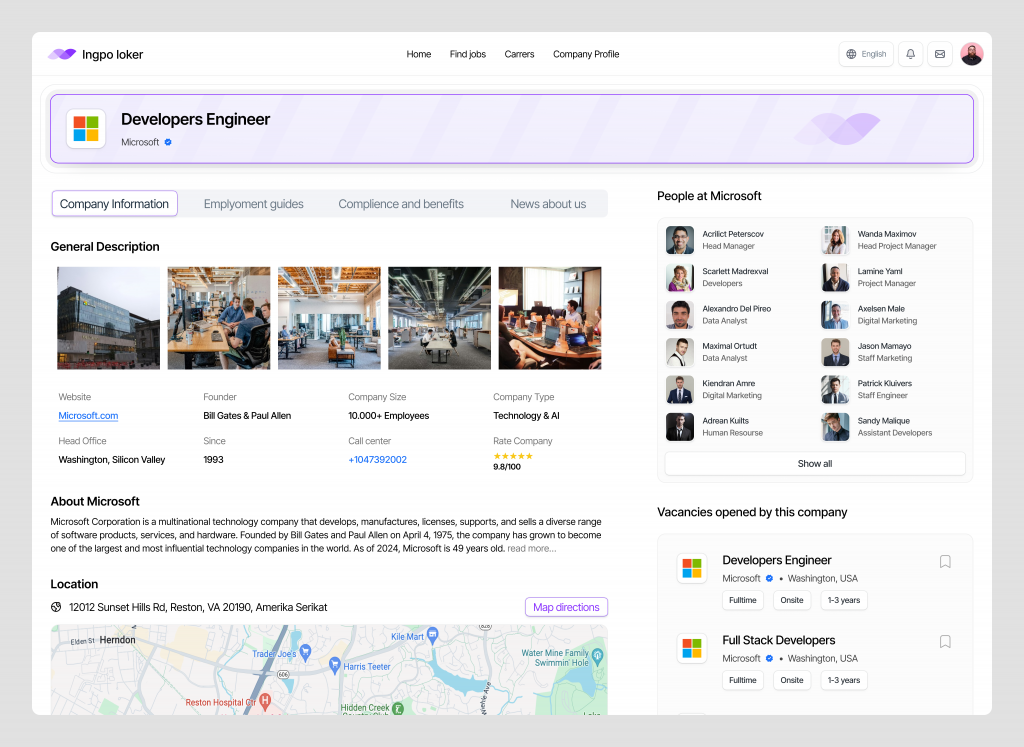
Ingpo loker – Company Profile Dasboard

Ingpo loker - Company Profile Dasboard

Ingpo Loker: Company Profile Dashboard

The Company Profile Dashboard in Ingpo Loker is designed to give job seekers an in-depth understanding of potential employers, helping them make informed decisions about where they want to work.

๐Ÿข Company Overview
Start with a comprehensive overview of the company, including its name, industry, size, and headquarters location. This section provides a quick snapshot to help you understand the basics of the organization.

๐Ÿ“Š Key Statistics
Explore key company statistics such as the number of employees, annual revenue, and market position. These metrics offer valuable insights into the companyโ€™s scale and financial health.

๐ŸŒŸ Company Culture
Gain insights into the company culture through employee testimonials, company values, and workplace environment descriptions. This section highlights what makes the company unique and what itโ€™s like to work there.

๐Ÿ“ˆ Growth and Opportunities
Learn about the companyโ€™s growth trajectory and future plans. Information on recent expansions, new projects, and strategic goals gives you an idea of the companyโ€™s direction and the opportunities for career advancement.

๐Ÿ’ผ Open Positions
View a list of currently available positions at the company. The dashboard integrates job listings directly into the company profile, making it easy to explore and apply for roles that interest you.

๐Ÿ“ Office Locations
Discover the various office locations of the company. Whether youโ€™re interested in working remotely or relocating, this feature provides details on where the company operates and the available work settings.

๐Ÿ”— Social Media and Online Presence
Stay updated with the companyโ€™s latest news and activities by accessing their social media profiles, official website, and other online platforms directly from the dashboard. This helps you stay informed about the companyโ€™s public image and community engagement.

๐ŸŽฏ Company Mission and Vision
Understand the companyโ€™s mission and vision statements. This section outlines the organizationโ€™s core objectives and long-term goals, helping you align your personal career aspirations with the companyโ€™s purpose.

๐Ÿ‘ฅ Leadership Team
Get to know the companyโ€™s leadership team. Profiles of key executives and department heads provide insight into the people driving the companyโ€™s strategy and culture.

๐Ÿ“š Resources and News
Access the latest company news, press releases, and articles. This section keeps you informed about the companyโ€™s recent developments and media coverage.

Conclusion
The Company Profile Dashboard in Ingpo Loker offers a detailed view of potential employers, equipping job seekers with the information they need to make thoughtful career decisions. From company culture to growth opportunities, this dashboard provides a complete picture of what itโ€™s like to work at the company.


Want to collaborate? Email Us: work@keitoto.com
Keitoto | Behance | Instagram | UI8 | Dribbble | Pinterest

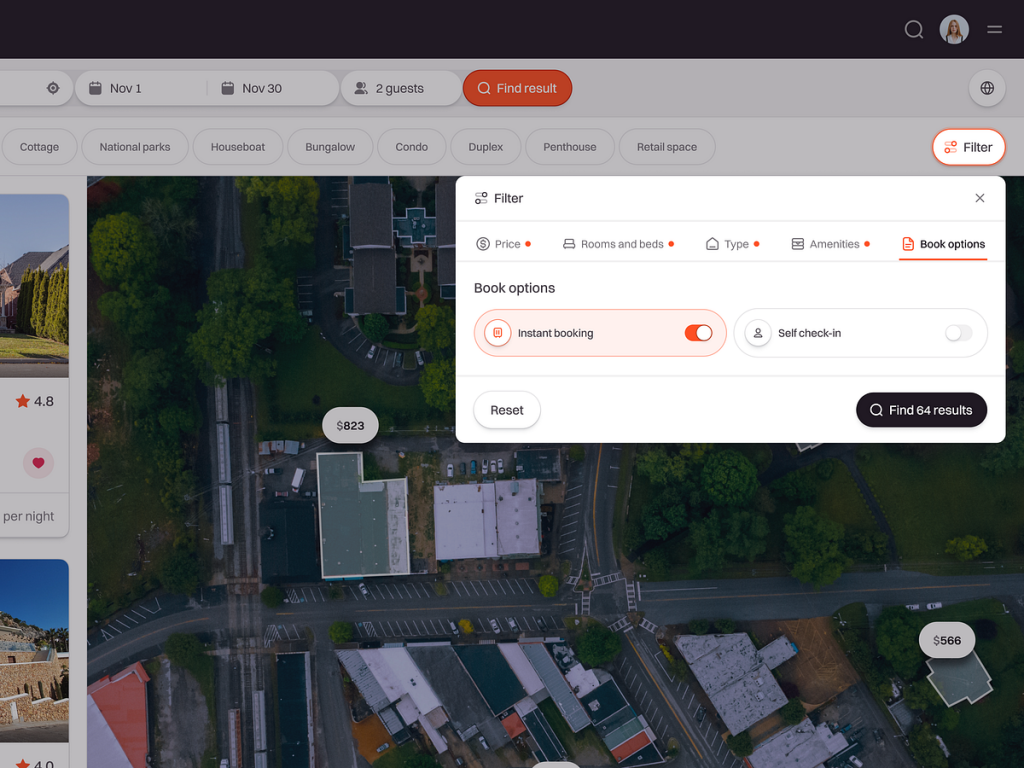
Teraluxe: SaaS Dashboard Real Estate Web App – Book Options ๐Ÿ›„

๐Ÿ›„ Teraluxe: SaaS Dashboard Real Estate Web App – Book Options ๐Ÿ›„

The Book Options feature in the Teraluxe Real Estate Web App is designed to streamline the booking process for property viewings and consultations, offering users a seamless and efficient way to manage their real estate interests.

๐Ÿ“… Schedule a Viewing
Effortlessly book property viewings directly through the dashboard. Select your preferred date and time from the available slots, ensuring that your schedule aligns with the propertyโ€™s availability.

๐Ÿ”” Appointment Reminders
Never miss a scheduled viewing with automated reminders sent to your email or mobile device. These notifications keep you informed of upcoming appointments and any changes to your booking.

๐Ÿ›๏ธ Property Tour Options
Choose between different tour options, such as in-person visits, virtual tours, or 360-degree walkthroughs. This flexibility allows you to experience the property in a way that suits your needs, whether you’re nearby or considering a remote purchase.

๐Ÿ’ผ Book a Consultation
Set up a consultation with a real estate agent or property manager. This feature allows you to discuss details, ask questions, and get expert advice before making any decisions.

๐Ÿ”„ Reschedule or Cancel
Easily reschedule or cancel your bookings through the dashboard. The app provides flexibility, enabling you to adjust your plans as needed without hassle.

๐Ÿ“„ Booking History
Keep track of all your past and upcoming bookings in one place. The booking history feature provides a comprehensive view of your interactions, making it easier to manage multiple properties or consultations.

๐Ÿข Multiple Property Bookings
If you’re interested in more than one property, the Book Options feature allows you to schedule viewings for multiple properties in a single session, optimizing your time and efforts.

๐Ÿ”’ Secure Booking Process
Rest assured that your bookings are handled securely. The dashboard integrates with secure payment systems for any required deposits or fees, protecting your financial information.

Conclusion
The Book Options feature in the Teraluxe Real Estate Web App simplifies the process of scheduling viewings and consultations, offering a user-friendly interface with flexible options tailored to your real estate needs. Whether you’re booking a tour, setting up a consultation, or managing multiple appointments, Teraluxe ensures a smooth and efficient experience.


Want to collaborate? Email Us: work@keitoto.com

Keitoto | Behance | Instagram | UI8 | Dribbble | Pinterest

Event UI/UX Mobile App Design – Choose Seat ๐ŸŽซ

Event UI/UX Mobile App Design - Choose Seat ๐ŸŽซ

๐ŸŽซ Event UI/UX Mobile App Design – Choose Seat ๐ŸŽซ

The Choose Seat feature in our Event UI/UX Mobile App is designed to provide a seamless and interactive seating selection process, ensuring that you find the perfect spot for your next event.

๐Ÿ—บ๏ธ Interactive Seating Map
Navigate through an intuitive, interactive seating map that displays the event venue layout. Zoom in and out to explore different sections and view available seats in real-time, making the selection process both engaging and straightforward.

๐ŸŽŸ๏ธ Seat Categories
Easily distinguish between different seating categories, such as VIP, premium, and general admission. Each category is color-coded on the map, helping you quickly identify the best options based on your preferences and budget.

๐Ÿ” Filter Options
Customize your search with filter options that allow you to sort seats by price, proximity to the stage, accessibility, and more. These filters ensure that you can find a seat that perfectly matches your needs.

๐Ÿ‘ฅ Group Seating
Planning to attend with friends or family? The app highlights available blocks of seats, making it easy to reserve multiple seats together for a group experience.

๐Ÿ’ธ Pricing Information
View detailed pricing information for each seat directly on the map. The app displays both individual seat prices and total cost for multiple seats, helping you make an informed decision.

โœ… Seat Selection and Reservation
Once youโ€™ve found your ideal seat, simply tap to select it. The app immediately reserves the seat for you, preventing others from booking it while you complete your purchase.

๐Ÿ“ Seat Details
Access detailed information about each seat, including its distance from the stage, viewing angles, and any additional perks or amenities. This helps you choose the best seat for your event experience.

๐Ÿ”„ Easy Changes
If you change your mind, the app allows you to easily deselect and choose a different seat before finalizing your reservation, providing flexibility in your selection process.

๐Ÿ“… Seat Availability Updates
Stay updated with real-time seat availability. The app continuously refreshes the seating map, ensuring you have the most current information while making your selection.

Conclusion
The Choose Seat feature in our Event UI/UX Mobile App offers a user-friendly, interactive experience that makes selecting the perfect seat for any event both simple and enjoyable. With real-time updates, customizable filters, and detailed seat information, you can ensure a great experience from start to finish.


Want to collaborate? Email Us: work@keitoto.com
Keitoto | Behance | Instagram | UI8 | Dribbble | Pinterest

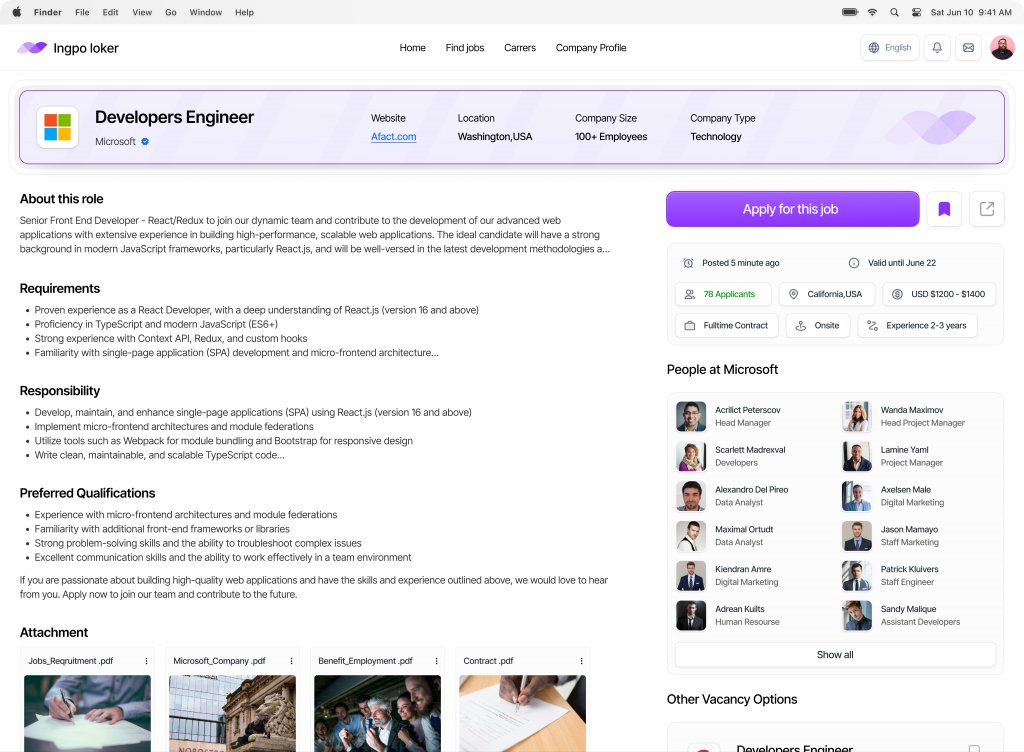
Ingpo loker – Detail Job Dasboard

Ingpo Loker: Detail Job Dashboard

The Detail Job Dashboard in Ingpo Loker provides a comprehensive view of each job listing, allowing you to explore every aspect of a potential opportunity before applying.

๐Ÿ“„ Job Overview
Start with a clear summary of the job, including the title, company name, location, and salary range. This overview gives you a quick snapshot to determine if the role aligns with your interests.

๐Ÿ” Job Description
Dive deeper into the job responsibilities, requirements, and qualifications. The detailed job description outlines what the employer is looking for and what youโ€™ll be doing in the role.

๐Ÿข Company Profile
Learn more about the hiring company through the integrated company profile. This section provides insights into the companyโ€™s mission, culture, size, and industry, helping you assess if itโ€™s the right fit for you.

๐Ÿ› ๏ธ Required Skills
Review the key skills and competencies needed for the job. The dashboard highlights essential and preferred skills, so you can gauge how well your qualifications match the position.

๐Ÿ“… Application Deadline
Stay informed about important dates. The dashboard displays the application deadline, ensuring you apply on time.

๐Ÿ”” Job Alerts
Set up job alerts for similar positions directly from the detail page. This feature keeps you updated on new opportunities that match your career goals.

๐Ÿ’พ Save Job
Interested in the job but not ready to apply? Use the “Save Job” feature to bookmark the listing for future reference.

๐Ÿ“ Application Instructions
Get clear instructions on how to apply, including required documents, submission formats, and the application process. This ensures you provide all the necessary information to make a strong impression.

๐Ÿ–‡๏ธ Attachments and Documents
Access any attached documents, such as company brochures, benefits details, or additional job-related information. This helps you get a complete picture of the opportunity.

๐Ÿ“ฑ Mobile-Friendly View
The Detail Job Dashboard is fully optimized for mobile devices, ensuring you can access all job details on the go, whether youโ€™re on your smartphone or tablet.

Conclusion
The Detail Job Dashboard in Ingpo Loker is your gateway to understanding every facet of a job listing. With detailed descriptions, company insights, and easy application options, it equips you with everything you need to make informed decisions in your job search.


Want to collaborate? Email Us: work@keitoto.com
Keitoto | Behance | Instagram | UI8 | Dribbble | Pinterest

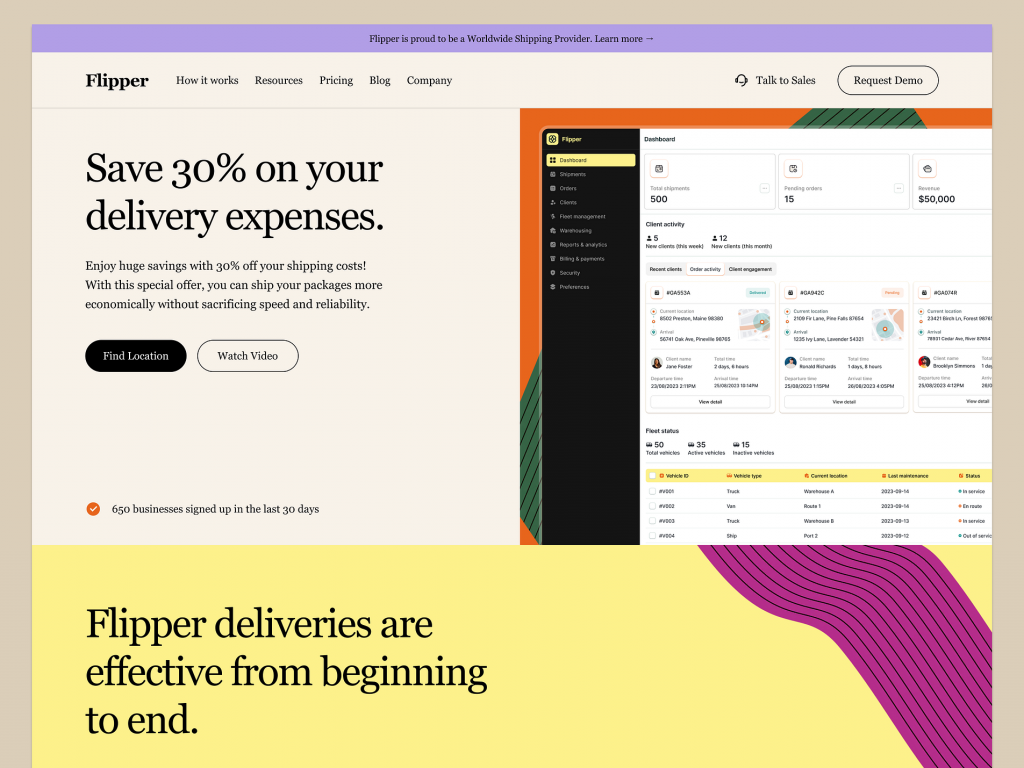
SaaS Website for Delivery Management Software

SaaS Website for Delivery Management Software

๐Ÿ”Ž Ride Sharing Mobile App – Search Location ๐Ÿ”Ž

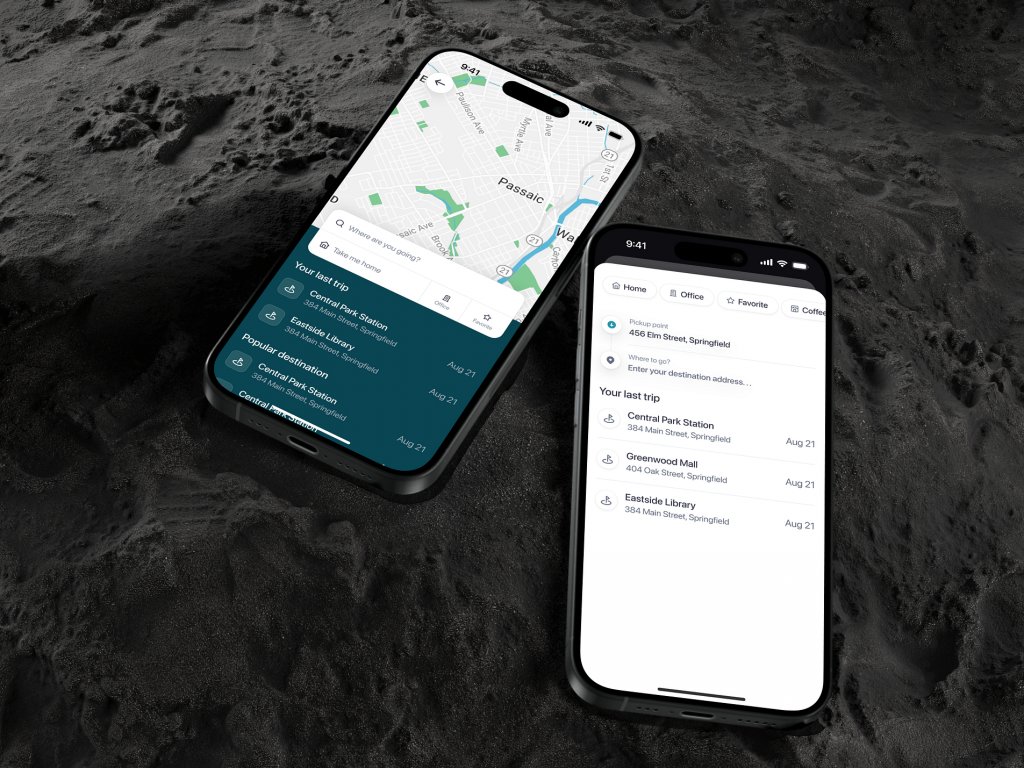
The Search Location feature of our Ride Sharing Mobile App is designed to simplify your travel planning by providing a seamless way to find and select your desired destinations.

๐Ÿ—บ๏ธ Location Search Bar
Quickly find your destination using the intuitive search bar at the top of the app. Start typing, and the app will instantly provide suggestions based on your input, including recent locations, popular spots, and saved addresses.

๐Ÿ“ Current Location
Effortlessly set your current location as the pickup point with a single tap. The app uses GPS to accurately detect your position, ensuring a smooth ride from start to finish.

โญ Saved Locations
Access your saved locations like home, work, or favorite places with ease. These saved spots are always at your fingertips, making it faster to book a ride to frequently visited places.

๐ŸŒŸ Suggested Locations
Get location suggestions based on your travel history and popular destinations in your area. The app intelligently recommends places, helping you discover new spots and return to your favorites.

๐Ÿข Search by Landmarks
Search for well-known landmarks, businesses, or public places instead of specific addresses. This feature is perfect for when you’re unfamiliar with the exact location but know the landmark you want to reach.

๐Ÿ“… Schedule a Ride
Found your location? Now you can instantly book your ride or schedule it for a later time, ensuring your transportation is ready when you are.

๐Ÿ”” Location Alerts
Set alerts for specific locations. The app notifies you when you’re near a saved or popular spot, making it easy to decide when to book a ride.

Conclusion
The Search Location feature in our Ride Sharing Mobile App enhances your ride-booking experience by making it easier and faster to find and select your desired destinations. Whether youโ€™re headed to a saved location, a popular spot, or exploring new areas, our app ensures a smooth and efficient search process.


Want to collaborate? Email Us: work@keitoto.com
Keitoto | Behance | Instagram | UI8 | Dribbble | Pinterest

Ride Sharing Mobile App – Search Location ๐Ÿ”Ž

Ride Sharing Mobile App - Search Location ๐Ÿ”Ž

๐Ÿ”Ž Ride Sharing Mobile App – Search Location ๐Ÿ”Ž

The Search Location feature of our Ride Sharing Mobile App is designed to simplify your travel planning by providing a seamless way to find and select your desired destinations.

๐Ÿ—บ๏ธ Location Search Bar
Quickly find your destination using the intuitive search bar at the top of the app. Start typing, and the app will instantly provide suggestions based on your input, including recent locations, popular spots, and saved addresses.

๐Ÿ“ Current Location
Effortlessly set your current location as the pickup point with a single tap. The app uses GPS to accurately detect your position, ensuring a smooth ride from start to finish.

โญ Saved Locations
Access your saved locations like home, work, or favorite places with ease. These saved spots are always at your fingertips, making it faster to book a ride to frequently visited places.

๐ŸŒŸ Suggested Locations
Get location suggestions based on your travel history and popular destinations in your area. The app intelligently recommends places, helping you discover new spots and return to your favorites.

๐Ÿข Search by Landmarks
Search for well-known landmarks, businesses, or public places instead of specific addresses. This feature is perfect for when you’re unfamiliar with the exact location but know the landmark you want to reach.

๐Ÿ“… Schedule a Ride
Found your location? Now you can instantly book your ride or schedule it for a later time, ensuring your transportation is ready when you are.

๐Ÿ”” Location Alerts
Set alerts for specific locations. The app notifies you when you’re near a saved or popular spot, making it easy to decide when to book a ride.

Conclusion
The Search Location feature in our Ride Sharing Mobile App enhances your ride-booking experience by making it easier and faster to find and select your desired destinations. Whether youโ€™re headed to a saved location, a popular spot, or exploring new areas, our app ensures a smooth and efficient search process.


Want to collaborate? Email Us: work@keitoto.com
Keitoto | Behance | Instagram | UI8 | Dribbble | Pinterest

Ingpo loker – Job Finder Dashboard

Ingpo loker - Job Finder Dashboard

Ingpo Loker: Job Finder Dashboard

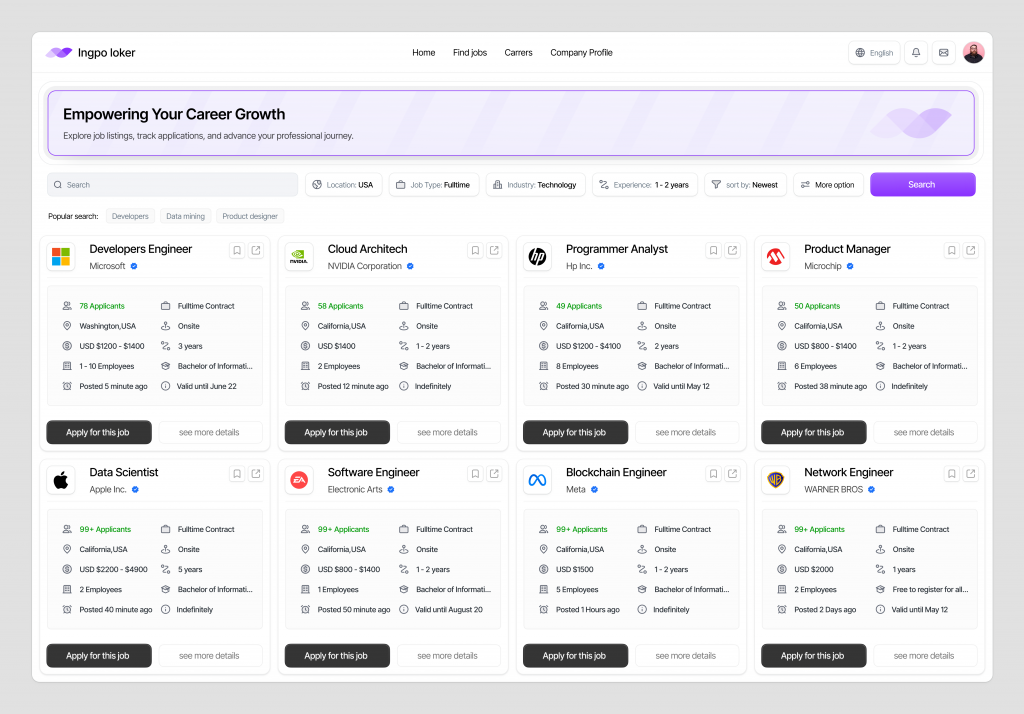
Welcome to Ingpo Loker, your ultimate Job Finder Dashboard designed to streamline your job search and enhance your career prospects. This dashboard is packed with features that help you navigate the job market, apply for positions, and manage your job applications with ease.

๐Ÿ” Job Search
Effortlessly search for jobs using filters like location, industry, salary range, and job type. The dashboard offers a personalized search experience, displaying the most relevant job listings based on your preferences.

๐Ÿ“„ Job Details and Descriptions
View detailed job descriptions, including company information, job requirements, and application instructions. The dashboard provides all the information you need to make informed decisions about which positions to apply for.

๐Ÿ’ผ Saved Jobs
Save jobs that catch your eye for easy access later. The saved jobs feature allows you to organize potential opportunities and revisit them when youโ€™re ready to apply.

๐Ÿ“ Application Tracker
Keep track of all your job applications in one place. The application tracker shows the status of each application, so you know exactly where you stand with potential employers.

๐Ÿ“… Interview Scheduling
Manage your interview schedule directly from the dashboard. Receive notifications about upcoming interviews, and reschedule if needed, all within the platform.

๐Ÿ”” Job Alerts
Set up job alerts to receive notifications about new job postings that match your criteria. Never miss an opportunity with real-time updates delivered straight to your dashboard.

๐Ÿ“Š Personalized Job Recommendations
Based on your profile, job search history, and preferences, the dashboard provides personalized job recommendations, helping you discover opportunities you might not have considered.

๐Ÿ“ Resume and Profile Management
Easily upload and manage your resume, cover letter, and other important documents. Update your profile to reflect your latest skills and experiences, ensuring employers see the most up-to-date version of you.

๐ŸŒ Company Insights
Gain insights into potential employers with detailed company profiles, including employee reviews, company culture, and salary information, helping you make better-informed decisions.

๐Ÿ“ฑ Mobile Access
Access the Ingpo Loker dashboard from any device. Whether on a desktop, tablet, or mobile phone, your job search tools are always at your fingertips.

Conclusion
The Ingpo Loker Job Finder Dashboard is your all-in-one platform for finding the right job, managing applications, and advancing your career. With intuitive features and personalized tools, Ingpo Loker makes job hunting more efficient and effective.


Want to collaborate? Email Us: work@keitoto.com
Keitoto | Behance | Instagram | UI8 | Dribbble | Pinterest

Restaurant Booking Mobile App – Reservation Flow ๐Ÿฝ๏ธ

Restaurant Booking Mobile App - Reservation Flow ๐Ÿฝ๏ธ

๐Ÿฝ๏ธ Restaurant Booking Mobile App – Reservation Flow ๐Ÿฝ๏ธ

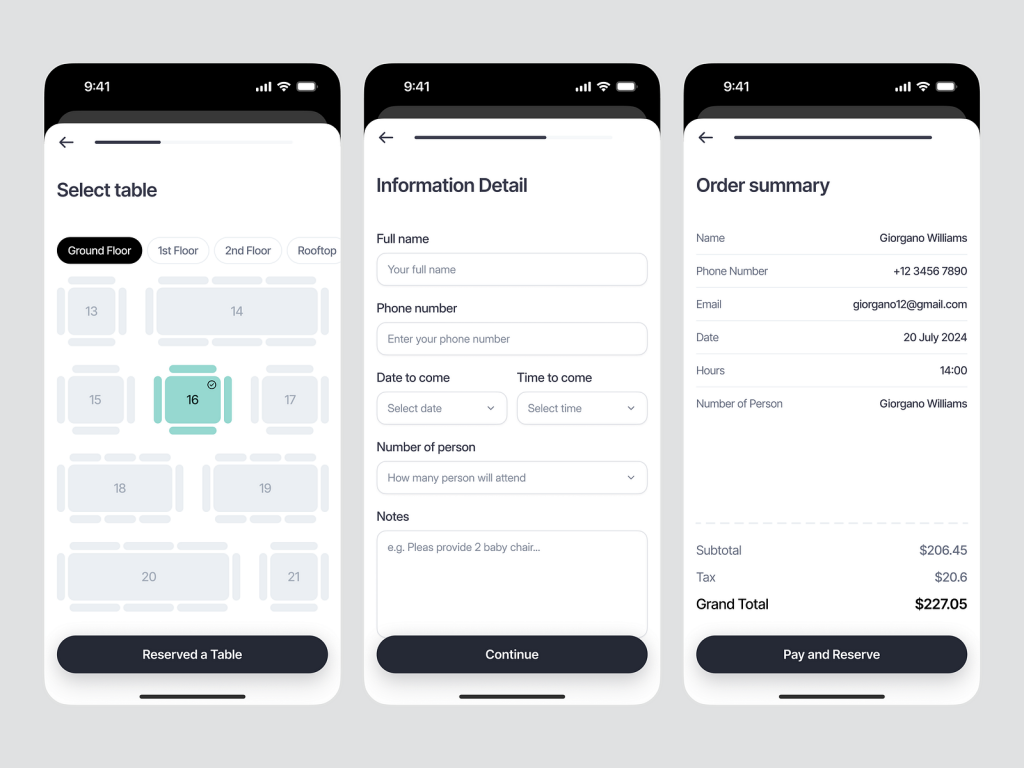
Welcome to the Reservation Flow of our Restaurant Booking Mobile App, designed to make dining out effortless and enjoyable. This streamlined process guides users through selecting the perfect restaurant, reserving a table, and managing their booking with ease.

๐Ÿ” Restaurant Search
Start by finding the ideal restaurant. The Reservation Flow begins with a powerful search feature that lets you filter restaurants by location, cuisine, price range, and user ratings. Discover new dining spots or return to your favorites with just a few taps.

๐Ÿ“… Choose Date and Time
Select your preferred dining time with a simple, intuitive date and time picker. The app displays real-time availability, ensuring you can reserve the exact slot that fits your schedule.

๐Ÿ‘ฅ Select Party Size
Specify the number of guests with ease. Whether itโ€™s an intimate dinner for two or a large group gathering, the app accommodates various party sizes and provides suggestions for the best seating options.

๐Ÿ“ Special Requests
Add any special requests, such as dietary restrictions, seating preferences, or occasions like birthdays or anniversaries. The app ensures these details are communicated to the restaurant, enhancing your dining experience.

๐Ÿ’ณ Payment and Confirmation
Secure your reservation with an optional payment feature. Pay in advance or upon arrival, depending on the restaurantโ€™s policy. Instantly receive a confirmation with all the reservation details, including the restaurantโ€™s address, contact information, and booking reference number.

๐Ÿ”” Reservation Reminders
Stay on top of your plans with automated reminders. The app sends notifications leading up to your reservation, so you never miss your dining experience.

๐Ÿ“ฑ Manage Reservations
Easily view, modify, or cancel your reservations within the app. The Reservation Flow allows you to make changes on the go, providing flexibility for any last-minute adjustments.

โญ Rate and Review
After your meal, share your experience by rating the restaurant and leaving a review. Your feedback helps other users and enhances the restaurantโ€™s service quality.

Conclusion
The Reservation Flow in our Restaurant Booking Mobile App is designed to offer a seamless, user-friendly experience. From finding the perfect spot to securing your table and beyond, every step is tailored to ensure your dining out is as smooth and enjoyable as possible.


Want to collaborate? Email Us: work@keitoto.com
Keitoto | Behance | Instagram | UI8 | Dribbble | Pinterest

Ride Sharing Mobile App – Homepage ย ๐Ÿš˜

Ride Sharing Mobile App - Homepage ย ๐Ÿš˜

๐Ÿš˜ Ride Sharing Mobile App – Homepage ๐Ÿš˜

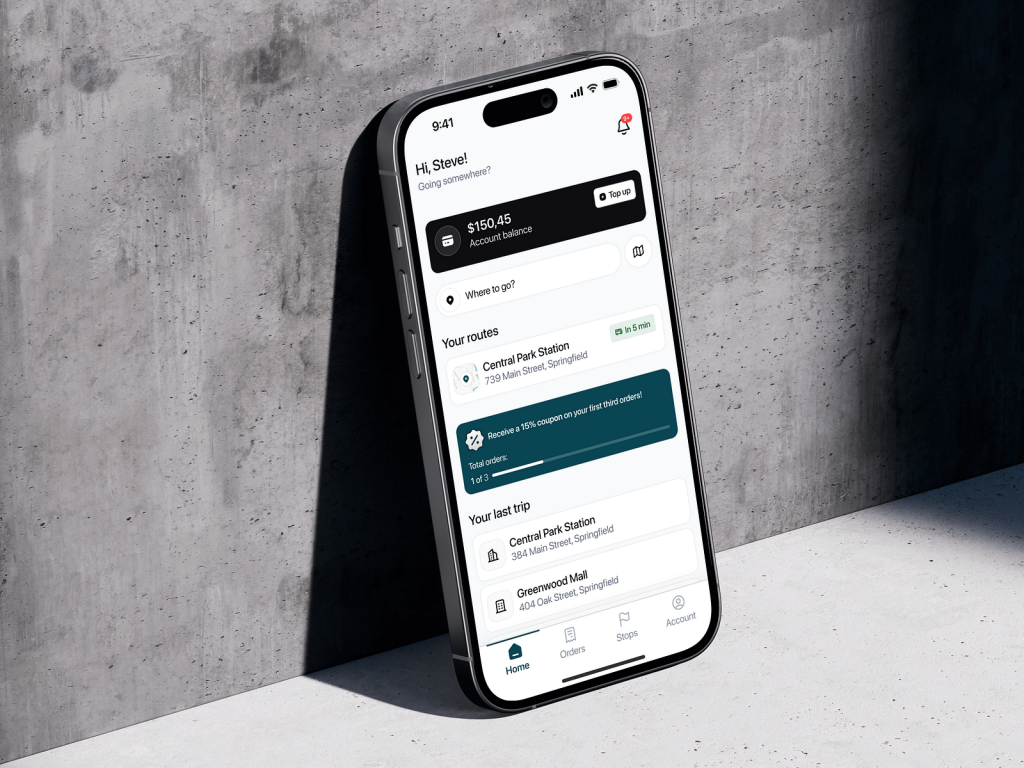
Welcome to the Ride Sharing Mobile App, your gateway to seamless and convenient travel. The Homepage is designed to provide you with quick access to essential features, ensuring a smooth and efficient ride-sharing experience.

๐Ÿ—บ๏ธ Quick Ride Request
Easily request a ride with just a few taps. The homepage features a prominent “Request Ride” button, allowing you to input your destination and choose your preferred ride option effortlessly.

๐Ÿ“ Real-Time Map View
Stay updated with a real-time map view displaying your current location and available drivers nearby. Track the arrival of your ride in real-time, so you always know when to expect your driver.

๐Ÿš– Ride Options
Choose from various ride options tailored to your needs. Whether you’re looking for a budget-friendly ride, a luxury experience, or a carpool option, the homepage lets you select the ride that best suits you.

๐Ÿ’ฌ Driver and Ride Details
Get instant access to your driver’s details, including name, rating, and vehicle information, right from the homepage. This ensures you feel safe and informed before starting your journey.

โญ Favorite Locations
Access your favorite locations quickly. The homepage allows you to save and select frequently visited places like home, work, or your favorite coffee shop with just one tap.

๐Ÿ’ธ Fare Estimate
Get an upfront fare estimate for your ride before you book. The homepage provides a clear breakdown of the estimated cost, so you can plan your travel budget effectively.

โšก Promotions and Offers
Discover the latest promotions and offers right on the homepage. Stay informed about discounts, special deals, and loyalty rewards to maximize your savings.

๐Ÿ› ๏ธ Settings and Preferences
Easily access your settings and preferences from the homepage. Customize your ride experience, update your payment methods, and manage notifications with ease.

๐Ÿ“… Scheduled Rides
Plan ahead by scheduling rides in advance. The homepage provides a simple interface to book rides for future dates and times, ensuring youโ€™re always on time for important appointments.

๐Ÿšจ Safety Features
Stay safe with built-in safety features accessible from the homepage. Quickly share your trip details with a trusted contact, access emergency assistance, or report any issues directly from the app.

๐Ÿ“Š Trip History
Review your trip history directly from the homepage. Easily access details of past rides, including receipts, route maps, and driver information for future reference.

Conclusion
The Homepage of our Ride Sharing Mobile App is designed to provide a user-friendly experience, offering quick access to essential features and ensuring that every ride is safe, convenient, and tailored to your needs. Start your journey with ease and confidence.


Want to collaborate? Email Us: work@keitoto.com

Keitoto | Behance | Instagram | UI8 | Dribbble | Pinterest