Propwise: Property Management Web App – Calendar Page πŸ“†

πŸ“† Propwise: Property Management Web App – Calendar Page πŸ“†

Welcome to Propwise, the premier property management web app designed to simplify your property management tasks. Our Calendar Page is a powerful tool that ensures you stay organized and on top of all your important dates and appointments.

πŸ“… Overview of Upcoming Events πŸ“…
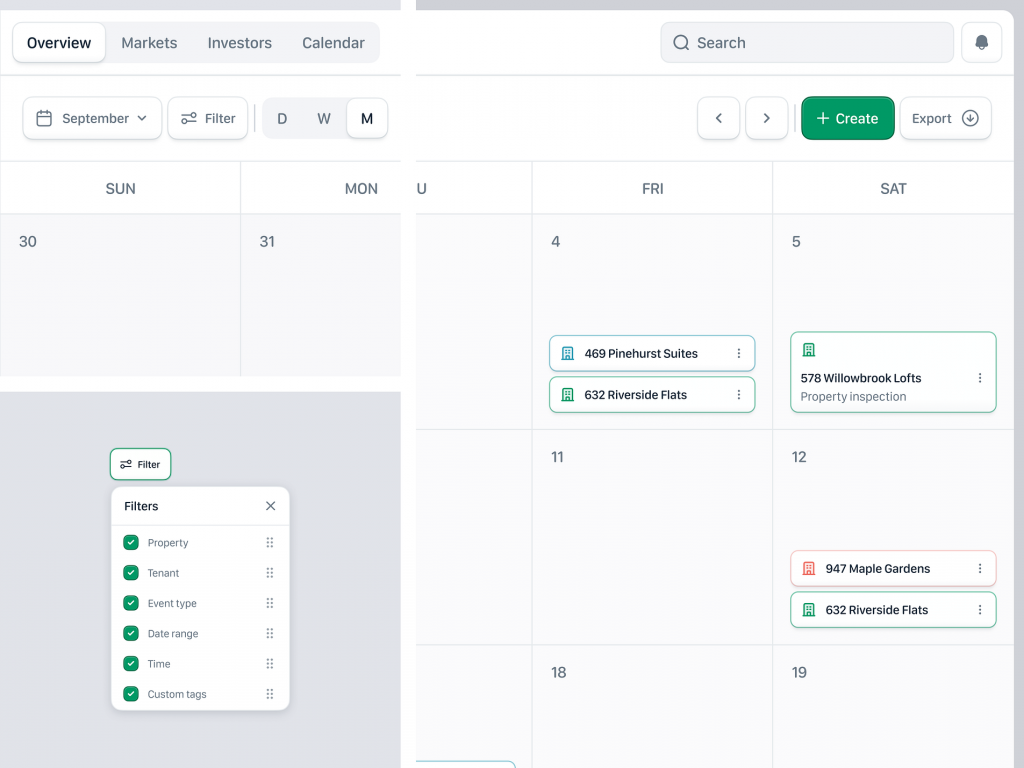
The Calendar Page provides a comprehensive view of all your upcoming events, from lease renewals to maintenance schedules. Each event is color-coded for easy identification, allowing you to see at a glance what’s on the horizon.

πŸ”” Automated Reminders πŸ””
Never miss a crucial deadline with our automated reminders. The calendar sends timely notifications for upcoming inspections, tenant move-ins and move-outs, rent due dates, and more, ensuring you stay proactive.

πŸ—“οΈ Customizable Views πŸ—“οΈ
Choose from daily, weekly, or monthly views to suit your preferences. The flexible interface allows you to zoom in on a specific day or get an overview of your month’s activities, making it easy to plan ahead.

πŸ“‚ Event Categories πŸ“‚
Organize your events by category to streamline your schedule. Whether it’s rent collection, maintenance, or tenant meetings, our calendar categorizes each event, helping you prioritize tasks effectively.

πŸ”„ Sync with External Calendars πŸ”„
Integrate Propwise’s calendar with your existing calendars, such as Google Calendar or Outlook. This synchronization ensures all your important dates are in one place, eliminating the risk of double-booking or missed appointments.

πŸ“± Mobile-Friendly Access πŸ“±
Manage your schedule on the go with our mobile-friendly design. Access your calendar from any device, ensuring you stay updated no matter where you are.

πŸ“ Easy Event Creation and Editing πŸ“
Add new events or edit existing ones with ease. Our intuitive interface allows you to quickly input event details, set reminders, and categorize tasks, keeping your calendar up-to-date with minimal effort.

πŸ“Š Analytics and Reporting πŸ“Š
Gain insights into your scheduling patterns with built-in analytics. Track the frequency of events, identify busy periods, and optimize your management practices based on data-driven insights.

πŸ”’ Secure Data Management πŸ”’
Your data’s security is our top priority. The calendar page features robust security measures, including encryption and secure login protocols, ensuring your sensitive information remains protected.

🌐 Multi-User Collaboration 🌐
Collaborate seamlessly with your team. The calendar supports multi-user access, allowing property managers, maintenance staff, and other team members to coordinate effectively and stay informed about scheduled events.

πŸ“… Recurring Events πŸ“…
Set up recurring events for regular tasks. Whether it’s monthly rent collection or weekly property inspections, the recurring event feature ensures these important activities are never overlooked.

πŸ” Advanced Search and Filters πŸ”
Find specific events quickly with advanced search and filter options. Locate events by date, category, or keyword, making it easy to retrieve information when you need it.

Conclusion
Propwise’s Calendar Page is designed to streamline your property management activities, ensuring you never miss an important date or deadline. With features like automated reminders, customizable views, mobile access, and secure data management, the Calendar Page is an essential tool for efficient property management. Stay organized and in control with Propwise.


Want to collaborate? Email Us: work@keitoto.com
Keitoto | Behance | Instagram | UI8 | Dribbble | Pinterest

Smart Calendar AI Integrated Mobile Ap – Schedule πŸ“†

Smart Calendar AI Integrated Mobile Ap - Schedule πŸ“†

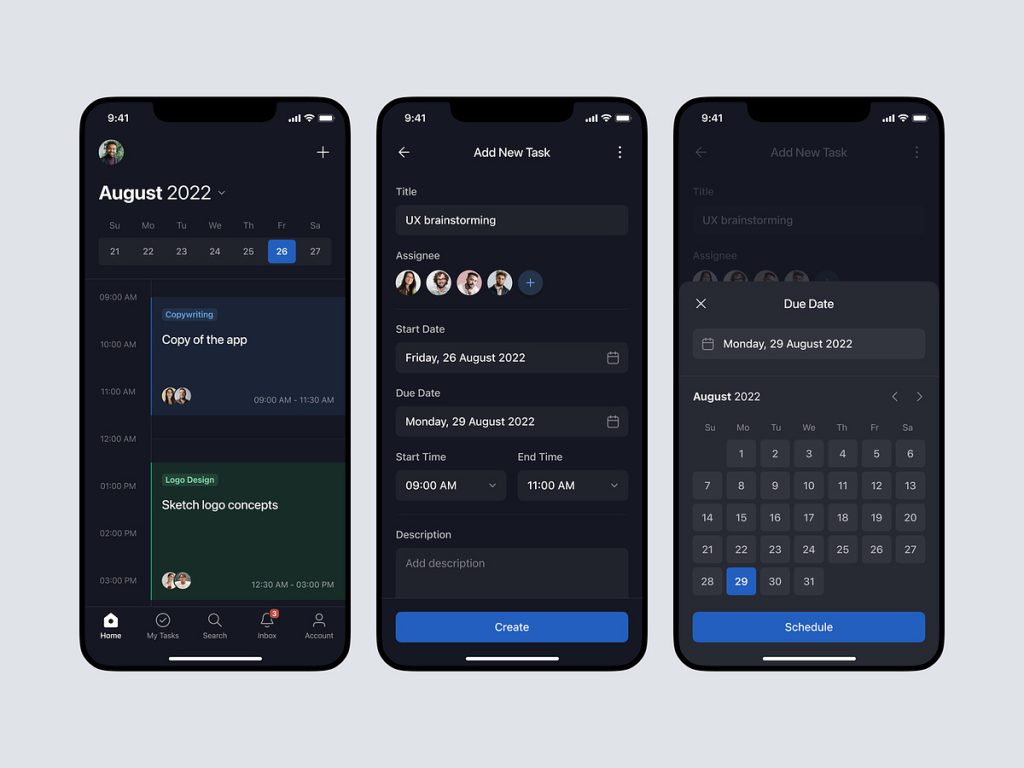
πŸ“† Smart Calendar AI Integrated Mobile App – Schedule πŸ“†

Welcome to Smart Calendar, the AI-powered mobile app designed to revolutionize the way you manage your schedule. Our advanced features ensure that you stay organized, productive, and on top of your commitments effortlessly.

πŸ—“οΈ Comprehensive Schedule Management πŸ—“οΈ
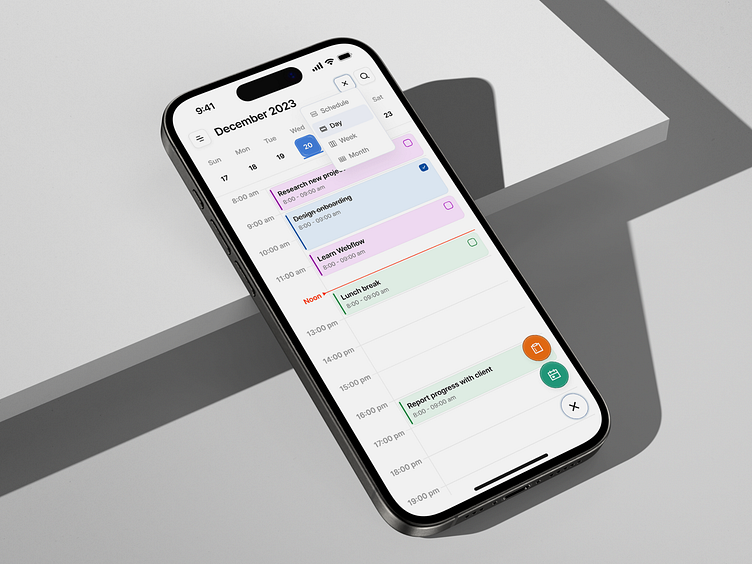
Organize your day with ease. Smart Calendar allows you to create, view, and manage your daily, weekly, and monthly schedules all in one place.

πŸ”” Automated Reminders πŸ””
Never miss an appointment with automated reminders. Set notifications for meetings, deadlines, and personal events to stay informed and prepared.

πŸ€– AI-Powered Suggestions πŸ€–
Our AI analyzes your habits and provides intelligent suggestions for scheduling tasks and meetings. Receive optimal time recommendations based on your availability and priorities.

πŸ“± Seamless Integration πŸ“±
Integrate Smart Calendar with your existing calendars, email accounts, and productivity apps. Sync your events across all platforms for a unified scheduling experience.

πŸ“Š Visual Timelines πŸ“Š
Visualize your schedule with intuitive timelines and calendar views. Easily navigate through your plans and make adjustments with drag-and-drop functionality.

🌍 Time Zone Support 🌍
Manage events across different time zones effortlessly. Smart Calendar automatically adjusts and displays the correct time for international meetings and trips.

πŸ’Ό Meeting Coordination πŸ’Ό
Simplify meeting planning with AI-powered coordination. Find suitable time slots, send invitations, and receive confirmations, all within the app.

πŸ“… Recurring Events πŸ“…
Set up and manage recurring events with ease. Schedule regular meetings, workouts, or reminders, and let Smart Calendar handle the rest.

πŸ” Search and Filters πŸ”
Quickly find events and tasks with advanced search and filter options. Locate past and upcoming events based on keywords, categories, or dates.

πŸ“… Customizable Views πŸ“…
Personalize your calendar view to match your preferences. Choose from daily, weekly, or monthly layouts and adjust color-coding for different event types.

✍️ Note Attachments ✍️
Attach notes, files, and links to your events. Keep all relevant information in one place for easy access during meetings and appointments.

πŸ“± Mobile-Friendly Design πŸ“±
Access your schedule on-the-go with our mobile-friendly design. The app is optimized for smartphones and tablets, ensuring a smooth experience wherever you are.

πŸ’¬ 24/7 Customer Support πŸ’¬
Our dedicated support team is available 24/7 to assist with any scheduling-related queries or issues. We are committed to providing exceptional customer service and support.

Conclusion
Smart Calendar’s AI-integrated mobile app offers a comprehensive and user-friendly solution for managing your schedule. With features like AI-powered suggestions, automated reminders, seamless integration, and customizable views, Smart Calendar ensures you stay organized and productive. Enhance your scheduling experience and simplify your life with Smart Calendar today.


Want to collaborate? Email Us: work@keitoto.com
Keitoto | Behance | Instagram | UI8 | Dribbble | Pinterest

Propwise Property Management SaaS Dashboard – Modals

Propwise: Property Management SaaS Web App Dashboard - Modals

🏠 Propwise: Property Management SaaS Web App Dashboard – Modals 🏠

Propwise is an advanced property management SaaS web application designed to streamline real estate operations. A standout feature of Propwise is its dynamic dashboard, which includes various modals to enhance user interaction and functionality.

πŸ“Š Dashboard Overview πŸ“Š
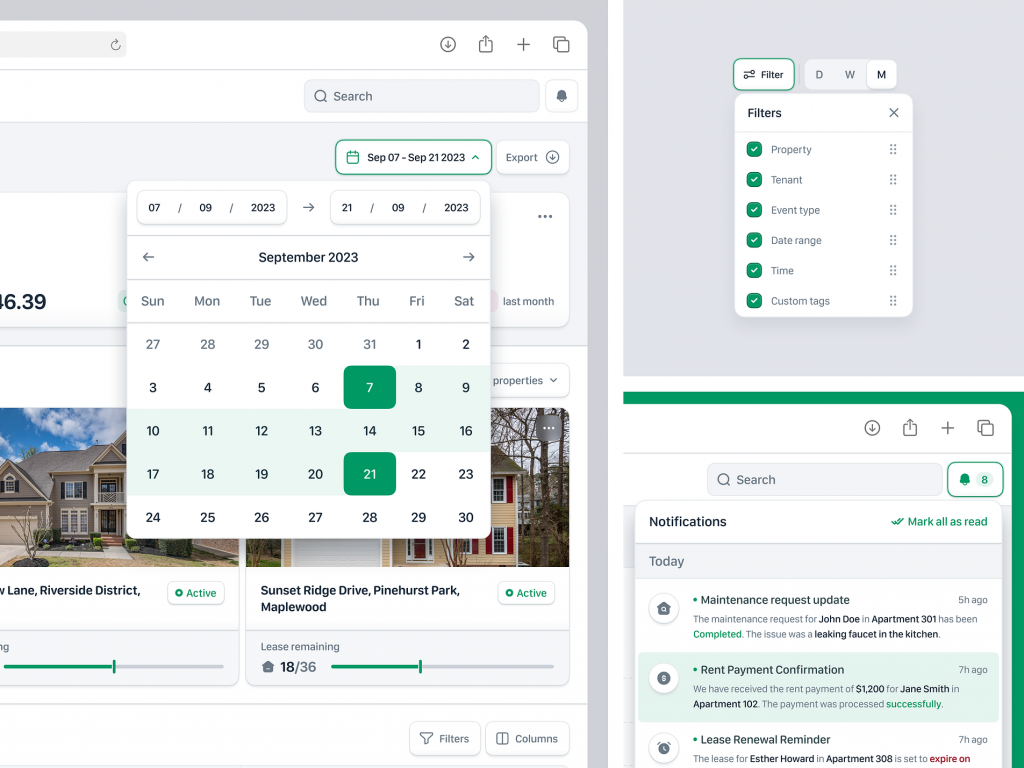
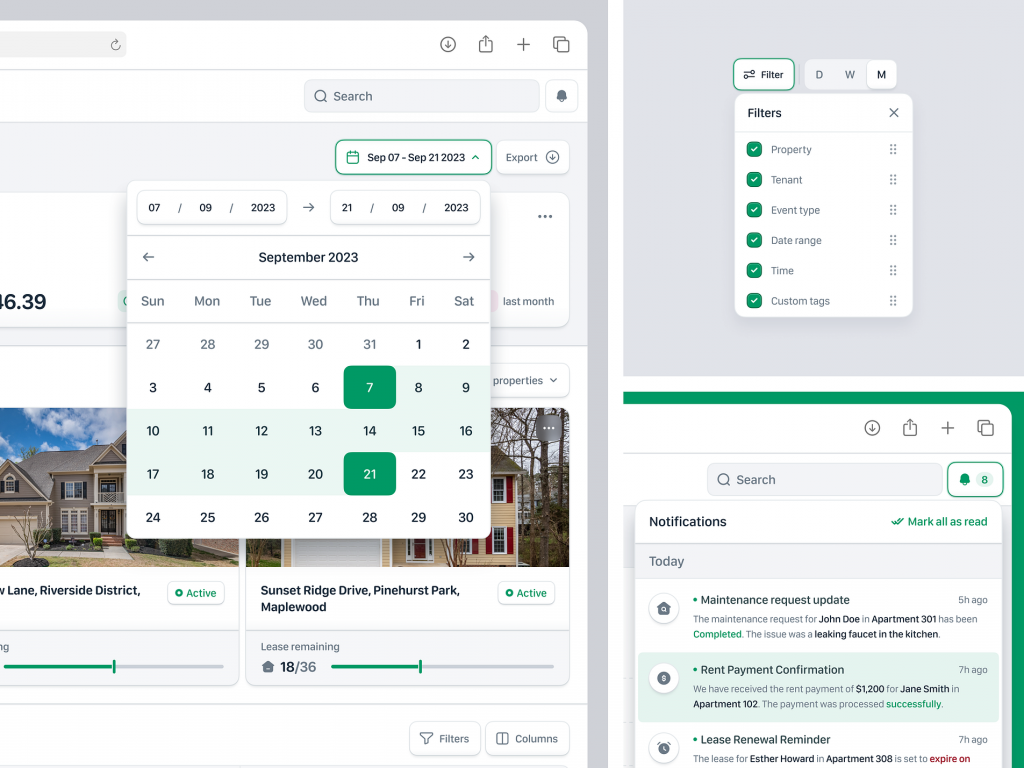
The dashboard of Propwise offers a comprehensive view of property management activities. It features an intuitive layout, ensuring that users can easily navigate and access important information at a glance. The use of modals within the dashboard is pivotal for improving user experience, as they provide contextual information and functionality without leaving the main screen.

πŸ” Quick View Modals πŸ”
Quick view modals allow users to obtain detailed information about a specific property or tenant without navigating away from the dashboard. By clicking on an item, a modal pops up, displaying key details such as tenant history, payment status, and maintenance requests. This feature saves time and enhances efficiency by reducing the need for multiple page loads.

πŸ›  Maintenance Request Modals πŸ› 
Maintenance request modals enable property managers to swiftly address and track maintenance issues. Users can create new requests, assign tasks to maintenance staff, and monitor the progress all from within a modal window. This streamlined process ensures that maintenance issues are handled promptly and efficiently, improving tenant satisfaction.

πŸ’Ό Tenant Interaction Modals πŸ’Ό
Tenant interaction modals facilitate seamless communication between property managers and tenants. These modals allow managers to send messages, update lease agreements, and handle inquiries directly. The ability to manage tenant interactions through modals enhances communication and ensures that all interactions are logged and accessible.

πŸ“ˆ Reporting and Analytics Modals πŸ“ˆ
Reporting and analytics modals provide users with insights into their property portfolio’s performance. Users can generate reports, view analytics, and export data without disrupting their workflow. This feature empowers property managers to make data-driven decisions and optimize their operations.

πŸ” Security and Permissions Modals πŸ”
Security and permissions modals allow administrators to manage user access and permissions effectively. Within these modals, administrators can assign roles, set permissions, and ensure that sensitive information is only accessible to authorized personnel. This ensures a secure and compliant property management environment.

Conclusion
Propwise’s use of modals within its dashboard design significantly enhances the user experience by providing quick access to information and functionality. These modals streamline various aspects of property management, ensuring that users can efficiently manage their properties while maintaining high levels of tenant satisfaction and operational efficiency.

β€” β€” β€” β€” β€” β€” β€” β€” β€” β€”

Want to collaborate? Email Us: work@keitoto.com
Keitoto | Behance | Instagram | UI8 | Dribbble | Pinterest

Ngetrek – Time Tracking Web App

Ngetrek - Time Tracking Web App

Ngetrek – Time Tracking Web App

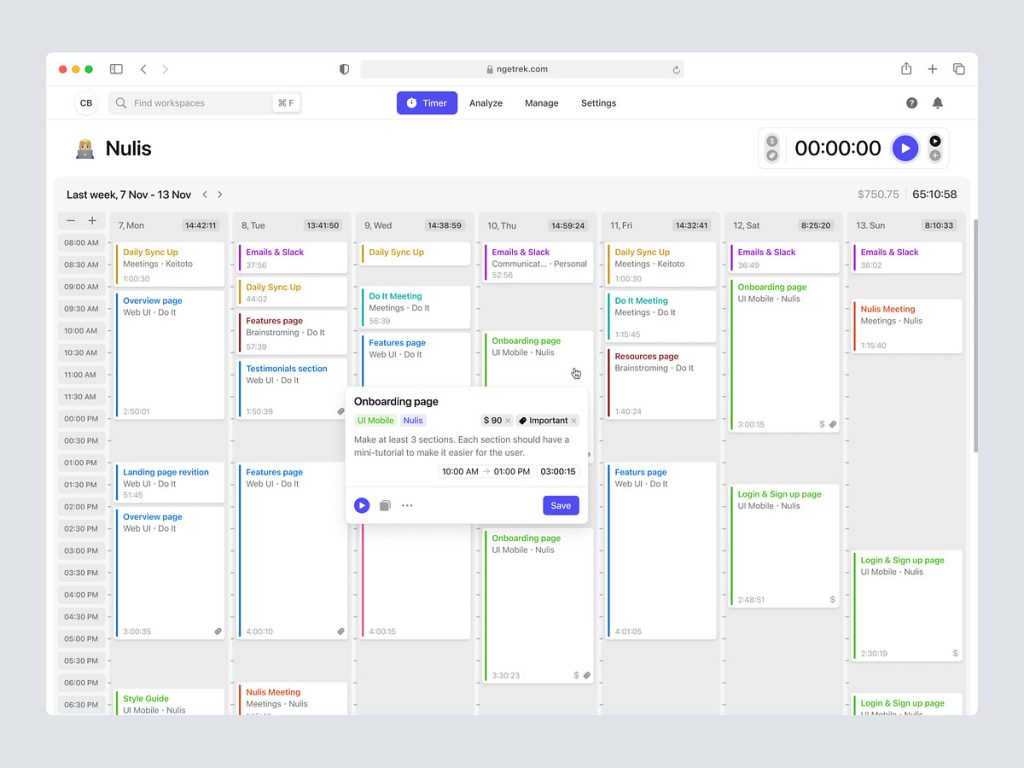
In today’s fast-paced work environment, efficient time management is essential for productivity and success. Ngetrek simplifies the process with its intuitive and feature-rich time tracking web app, designed to streamline time management and boost productivity for individuals and teams.

⏱️ User-Friendly Interface

At the core of Ngetrek’s time tracking web app is its user-friendly interface, which makes it easy for users to track their time effortlessly. The interface is clean, intuitive, and clutter-free, allowing users to focus on their tasks without distractions. With clearly labeled buttons, intuitive navigation menus, and interactive visual elements, users can quickly learn how to use the app and start tracking their time with minimal effort.

πŸ“Š Comprehensive Time Tracking

Ngetrek offers comprehensive time tracking capabilities, allowing users to track their time across various tasks, projects, and clients. Users can create customizable categories and subcategories to organize their time tracking data effectively. Whether working on multiple projects simultaneously or juggling different clients, Ngetrek ensures that users can accurately track their time and gain insights into their productivity patterns.

πŸ“… Flexible Scheduling

The web app includes flexible scheduling features that empower users to plan and manage their time more effectively. Users can create schedules, set reminders, and establish goals to stay on track with their tasks and deadlines. By visualizing their schedule in advance, users can prioritize their time and allocate resources efficiently, resulting in improved time management and productivity.

πŸ“ˆ Performance Insights

Ngetrek provides valuable performance insights to help users analyze their time usage and identify areas for improvement. Through detailed reports, charts, and analytics, users can gain visibility into their productivity trends, time allocation, and task completion rates. This data-driven approach enables users to make informed decisions about how to optimize their time and maximize their efficiency.

πŸ”’ Secure Data Management

Security is a top priority for Ngetrek, and the web app employs robust security measures to protect users’ time tracking data. With encrypted connections, secure authentication protocols, and regular data backups, users can trust that their sensitive information is safe and secure at all times. Ngetrek adheres to industry best practices for data security and privacy, giving users peace of mind when using the app.

πŸš€ Conclusion

In conclusion, Ngetrek’s time tracking web app offers a comprehensive solution for individuals and teams seeking to improve their time management and productivity. With its user-friendly interface, comprehensive time tracking, flexible scheduling, performance insights, and secure data management features, Ngetrek empowers users to take control of their time and achieve their goals more efficiently. Whether freelancers, small businesses, or large organizations, Ngetrek helps users optimize their time and make the most of every moment.

β€” β€” β€” β€” β€” β€” β€” β€” β€” β€”

Want to collaborate? Email Us: work@keitoto.com
Keitoto | Behance | Instagram | UI8 | Dribbble | Pinterest

Nyurvei – Survey schedule and send components

Nyurvei - Survey schedule and send components

Nyurvei – Survey schedule and send components

Nyurvei – Streamlining Survey Scheduling and Sending Components πŸ“ŠπŸš€

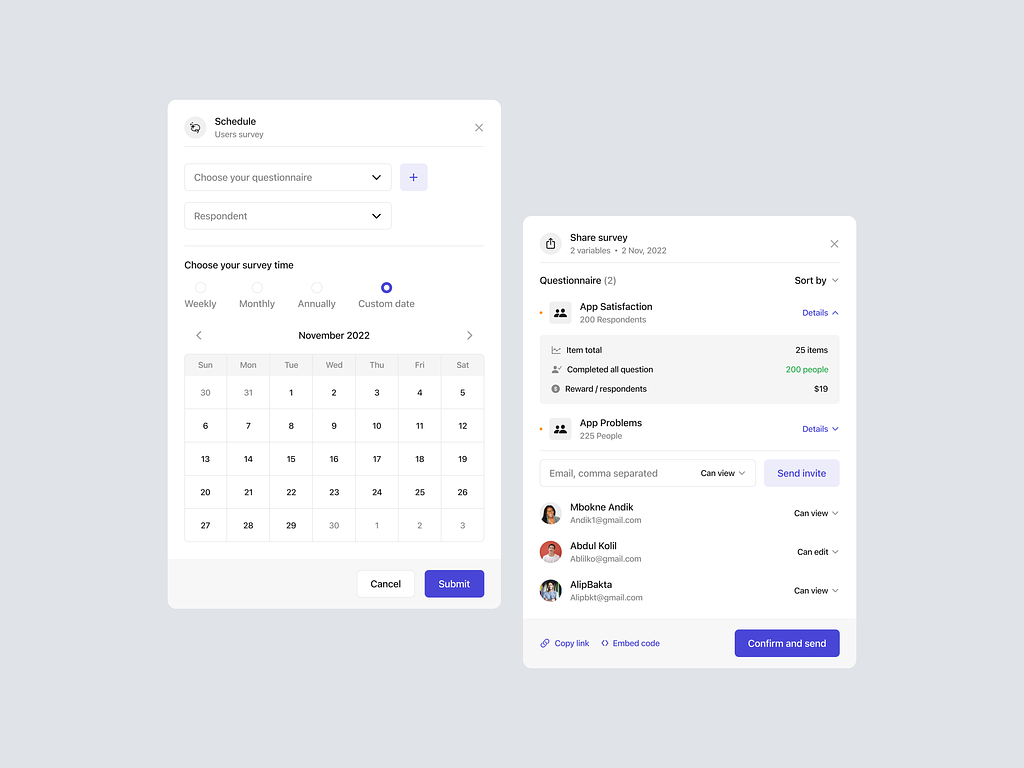
Embark on a journey of efficient survey management with Nyurvei’s Survey Schedule and Send components. These features are carefully designed to simplify the process of scheduling surveys and sending them to the target audience. Let’s delve into the key elements that make Nyurvei’s Survey Schedule and Send components pivotal for effective data collection.

πŸ—“οΈ Survey Scheduling – Time Management Excellence

Nyurvei’s Survey Schedule component empowers users to strategically plan when surveys are deployed. The intuitive scheduling interface allows users to set specific dates and times for survey distribution. Whether it’s a one-time survey or a recurring series, the Survey Schedule ensures that surveys reach participants at the right moment.

πŸ“§ Email and Notification Integration – Seamless Outreach

The Send component seamlessly integrates with email and notifications. Users can choose to send surveys via email, leveraging Nyurvei’s built-in email system. Additionally, participants can receive notifications within the Nyurvei platform, ensuring that they are promptly informed about new surveys. This dual approach maximizes outreach and participant engagement.

🎯 Targeted Audience Selection – Precision in Survey Deployment

Nyurvei’s Survey Schedule and Send components offer a targeted approach to audience selection. Users can specify the demographic or criteria for survey recipients, ensuring that surveys reach the intended audience. This precision enhances the relevance of collected data and ensures that insights are aligned with specific goals.

πŸ“± Mobile-Friendly Interface – Access Anytime, Anywhere

Recognizing the diversity of participant devices, Nyurvei ensures a mobile-friendly interface for survey recipients. The Survey Schedule and Send components are optimized for various screen sizes, allowing participants to access and respond to surveys conveniently on their smartphones or tablets. This accessibility enhances response rates and overall survey engagement.

πŸ“Š Real-Time Monitoring – Insights at Your Fingertips

Nyurvei’s survey management goes beyond scheduling and sending. The platform provides real-time monitoring capabilities, allowing users to track survey responses and engagement metrics as they unfold. This feature provides valuable insights into participant behavior, enabling quick adjustments to survey strategies if needed.

πŸ”’ Security Measures – Protecting Participant Data

Security is a top priority in Nyurvei’s Survey Schedule and Send components. The platform implements robust measures to protect participant data during survey deployment. From secure transmission channels to data encryption, Nyurvei ensures that participant information is safeguarded throughout the survey process.

πŸ”„ Automated Reminders – Encouraging Participation

To enhance participant engagement, Nyurvei incorporates automated reminders within the Survey Schedule component. Users can set reminder intervals, prompting participants who haven’t completed the survey to do so. This thoughtful feature increases response rates and ensures a comprehensive dataset.

πŸ’‘ Conclusion – Nyurvei’s Survey Management: From Schedule to Insights

In conclusion, Nyurvei’s Survey Schedule and Send components represent a comprehensive solution for survey management. With precise survey scheduling, seamless email and notification integration, targeted audience selection, a mobile-friendly interface, real-time monitoring, robust security measures, and automated reminders, Nyurvei ensures a smooth journey from survey deployment to insightful data collection. It’s not just about surveys; it’s about orchestrating a seamless and efficient process that maximizes participant engagement and delivers valuable insights. πŸ“ŠπŸš€

β€” β€” β€” β€” β€” β€” β€” β€” β€” β€”

Want to collaborate? Email Us: work@keitoto.com
Keitoto | Behance | Instagram | UI8 | Dribbble | Pinterest

Ngatur – To-do list Dashboard

Ngatur - To-do list Dashboard

Ngatur – To-do list Dashboard

Ngatur – Organizing Your Life with a Dynamic To-Do List Dashboard πŸ“…πŸš€

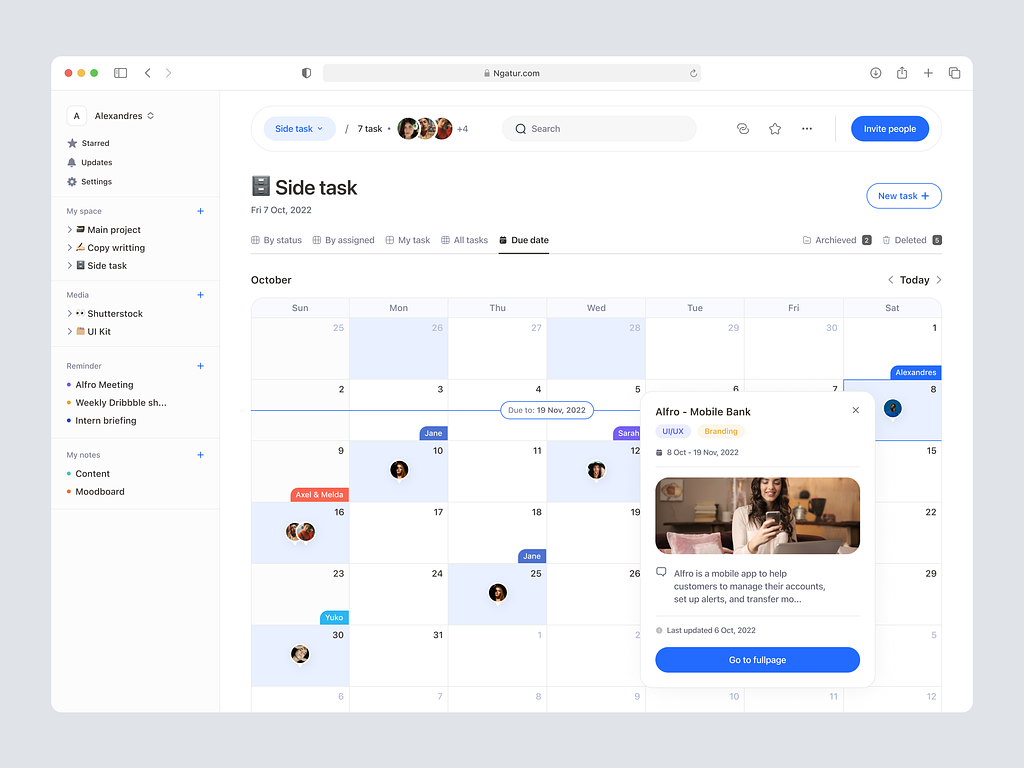
Welcome to Ngatur, where simplicity meets efficiency in task management. Ngatur’s To-Do List Dashboard is a powerful tool designed to help you stay organized, prioritize tasks, and boost productivity. Let’s explore the key features and design elements that make Ngatur’s To-Do List Dashboard a game-changer in the realm of task management.

🌟 Intuitive User Interface – Streamlining Task Management

Ngatur’s To-Do List Dashboard features an intuitive user interface that simplifies task management. The dashboard is designed for ease of use, allowing users to quickly add, edit, and prioritize tasks. The clean layout ensures a clutter-free experience, making it easy to focus on what needs to be done.

πŸ“… Calendar Integration – Time-Driven Task Planning

The dashboard seamlessly integrates with a calendar, enabling users to plan tasks based on deadlines and priorities. Users can set due dates, reminders, and recurring tasks, ensuring that nothing falls through the cracks. Calendar integration enhances time-driven task planning, helping users stay on top of their schedules.

πŸš€ Task Prioritization – Boosting Productivity

Ngatur recognizes the importance of prioritization in task management. The To-Do List Dashboard allows users to categorize tasks based on urgency and importance. With customizable priority levels, users can focus on high-priority tasks, boosting overall productivity and ensuring that critical deadlines are met.

πŸ“ Notes and Attachments – Adding Context to Tasks

Ngatur goes beyond simple task names. The To-Do List Dashboard enables users to attach notes and relevant files to tasks. This feature adds context and details to each task, ensuring that users have all the information they need at their fingertips. Notes and attachments contribute to a more comprehensive understanding of tasks.

πŸ“Š Progress Tracking – Visualizing Task Completion

Ngatur provides a visual representation of task completion through progress tracking. Users can easily see which tasks are pending, in progress, or completed. This visual feedback motivates users and provides a sense of accomplishment as tasks are checked off the list. Progress tracking enhances the overall task management experience.

πŸ”— Project Organization – Managing Tasks Effectively

For users dealing with multiple projects, Ngatur’s To-Do List Dashboard offers project organization capabilities. Tasks can be grouped into projects, allowing for effective management and clear delineation of responsibilities. Project organization enhances collaboration and coordination, especially in team-based environments.

πŸ“… Recurring Tasks – Simplifying Repetitive Work

Ngatur understands that some tasks are recurring. The dashboard facilitates the creation of recurring tasks with customizable schedules. This feature simplifies the management of repetitive work, ensuring that users can plan and execute routine tasks efficiently.

🌐 Cross-Platform Accessibility – Anytime, Anywhere Task Management

Ngatur’s To-Do List Dashboard is designed for cross-platform accessibility. Whether on a desktop, laptop, tablet, or smartphone, users can access and manage their tasks anytime, anywhere. This flexibility ensures that task management is seamlessly integrated into users’ daily lives.

πŸ’‘ Conclusion – Ngatur: Simplifying Your Task Management Journey

In conclusion, Ngatur’s To-Do List Dashboard stands as a beacon of efficiency in the world of task management. With an intuitive user interface, calendar integration, task prioritization, notes and attachments, progress tracking, project organization, recurring tasks, and cross-platform accessibility, Ngatur simplifies the task management journey. It’s more than a dashboard; it’s a companion in organizing your life, boosting productivity, and ensuring that no task is left behind. Ngatur: Where simplicity meets effectiveness in task management. πŸ“…πŸš€

β€” β€” β€” β€” β€” β€” β€” β€” β€” β€”

Want to collaborate? Email Us: work@keitoto.com
Keitoto | Behance | Instagram | UI8 | Dribbble | Pinterest

Projekan – Project Management Mobile App

Projekan - Project Management Mobile App

Projekan – Project Management Mobile App

πŸ“± Projekan – Project Management Mobile App πŸš€πŸ“Š

Empower your project management experience with Projekan, the innovative mobile app designed to streamline tasks, enhance collaboration, and boost productivity. Let’s explore the key features and design elements that make Projekan a game-changer in the world of project management.

🌐 Dashboard Overview – Project Snapshot

As you launch Projekan, the dashboard provides a comprehensive snapshot of ongoing projects. Animated charts, progress bars, and dynamic project tiles deliver an instant overview of the project landscape, ensuring users are informed at a glance.

πŸ“… Calendar Integration – Time Management

Integrate project timelines seamlessly with an animated calendar feature. Users can view project milestones, deadlines, and team schedules intuitively. Animated date selectors and dynamic event markers enhance the visual representation of project timelines.

πŸ”„ Task Management – Interactive To-Do Lists

Effortlessly manage tasks with interactive to-do lists. Animated task cards, drag-and-drop functionality, and dynamic progress indicators make task management intuitive and engaging. Users can update task statuses with a simple swipe or tap.

πŸ‘₯ Team Collaboration – Animated Communication

Foster collaboration with animated communication features. Real-time updates, comment threads, and team discussions are visually represented with animated message bubbles. Users can react to messages with animated emojis, adding a touch of dynamism to team interactions.

πŸ“ˆ Gantt Chart View – Visual Project Planning

Experience visual project planning with an animated Gantt chart view. Users can adjust timelines, dependencies, and project milestones through dynamic drag-and-drop actions. Animated bars and connectors provide a clear representation of project timelines.

πŸ”— File Sharing – Seamless Collaboration

Facilitate seamless collaboration through animated file-sharing features. Users can upload, download, and preview project files with dynamic file icons and intuitive gestures. The animation ensures a visually engaging experience while managing project assets.

πŸ“Š Progress Analytics – Animated Insights

Access project analytics through animated charts and graphs. The app visualizes project progress, team contributions, and task completion rates with dynamic data representations. Animated transitions between different analytics views enhance the overall data exploration experience.

πŸ“± Mobile Responsiveness – Device Mockups

Assure users of a consistent experience across devices with animated device mockups. Visual icons of smartphones and tablets showcase Projekan’s mobile responsiveness. The animation demonstrates the app’s adaptability to various platforms.

πŸ’¬ Notifications – Interactive Alerts

Stay informed with interactive notifications. Animated alerts with project icons and dynamic transitions ensure users are instantly notified about updates, mentions, and upcoming deadlines. Users can interact with notifications to navigate directly to relevant project sections.

🌐 Cloud Integration – Seamless Connectivity

Highlight Projekan’s seamless connectivity with cloud services through animated integrations. Visual representations of cloud icons and dynamic syncing animations assure users of real-time data updates and secure cloud storage.

πŸ”„ Kanban Board – Agile Task Management

Switch to agile task management with animated Kanban boards. Users can visualize task workflows, drag cards between boards, and experience the fluidity of agile project management through dynamic animations.

✨ Conclusion – Elevating Project Management

In conclusion, Projekan’s Project Management Mobile App is a visual marvel that seamlessly blends functionality with engagement. Through dynamic visuals, interactive elements, and user-friendly design, Projekan transforms project management into an immersive and efficient experience. Elevate your project management journey with Projekan! πŸš€πŸ“ŠπŸ“±

β€” β€” β€” β€” β€” β€” β€” β€” β€” β€”

Want to collaborate? Email Us: hello@keitoto.com

Keitoto | Behance | Instagram | UI8 | Dribbble | Pinterest

Event & Festival App

Event & Festival App

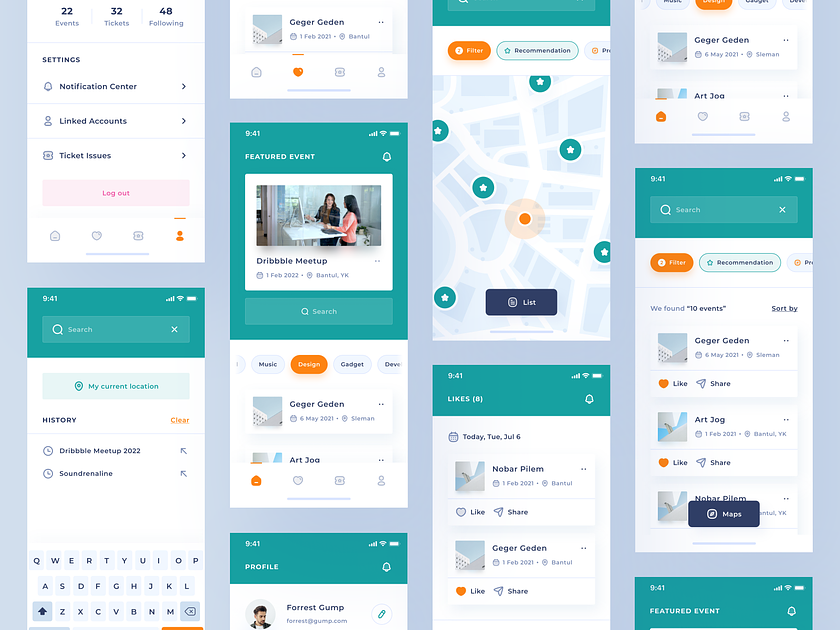
Welcome to our Event & Festival App – your all-in-one companion for immersive experiences, seamless event planning, and vibrant festival exploration. Immerse yourself in a world where events come to life, and festivals become unforgettable moments with the power of our intuitive and feature-rich mobile application.

Dynamic Event Discovery: At the core of our Event & Festival App is a dynamic event discovery feature that allows users to explore a diverse range of events and festivals. Whether you’re looking for music festivals, cultural events, or community gatherings, our app provides a curated platform for discovering and attending events that match your interests.

Personalized Event Recommendations: Navigate through personalized event recommendations tailored to your preferences. Our app employs intelligent algorithms to analyze your past event choices, ensuring that you receive suggestions that align with your tastes. This personalized touch enhances your event discovery experience and introduces you to new and exciting opportunities.

Interactive Event Maps and Schedules: Explore interactive event maps and schedules that guide you through the festival grounds seamlessly. Our app provides real-time information about stage locations, activity zones, and event schedules, ensuring that you never miss a moment of the action. The interactive maps enhance your overall event navigation experience.

Effortless Ticketing and Registration: Experience effortless ticketing and registration processes directly through the app. Whether it’s purchasing tickets for a concert or registering for a workshop at a festival, our streamlined ticketing system ensures a hassle-free experience. Enjoy the convenience of secure and easy transactions right at your fingertips.

Live Updates and Notifications: Engage with live updates and notifications that keep you informed about event changes, special announcements, and exclusive offers. Our app ensures that you stay connected with real-time information, creating a more immersive and interactive experience during events and festivals.

Social Integration for Shared Experiences: Immerse yourself in shared experiences through social integration. Connect with friends, share your event plans, and discover what others are excited about. Our app enhances the social aspect of events and festivals, turning them into memorable shared moments with those who matter most.

Responsive Design for On-the-Go Access: Experience the flexibility of our Event & Festival App with its responsive design. Whether you’re using a smartphone or tablet, our app adapts to provide an optimal viewing experience. This responsiveness ensures that you can access event information, purchase tickets, and plan your festival experience conveniently on the go.

In conclusion, welcome to our Event & Festival App – where the excitement of events and festivals is at your fingertips. Explore, discover, and let our app redefine the way you experience and engage with the vibrant world of events and festivals. Your unforgettable experiences await!


Want to collaborate? Email Us:Β hello@keitoto.com
KeitotoΒ |Β BehanceΒ |Β InstagramΒ |Β UI8

Seektask – Team Task Management Dashboard – Calendar

Seektask – Team Task Management Dashboard – Calendar

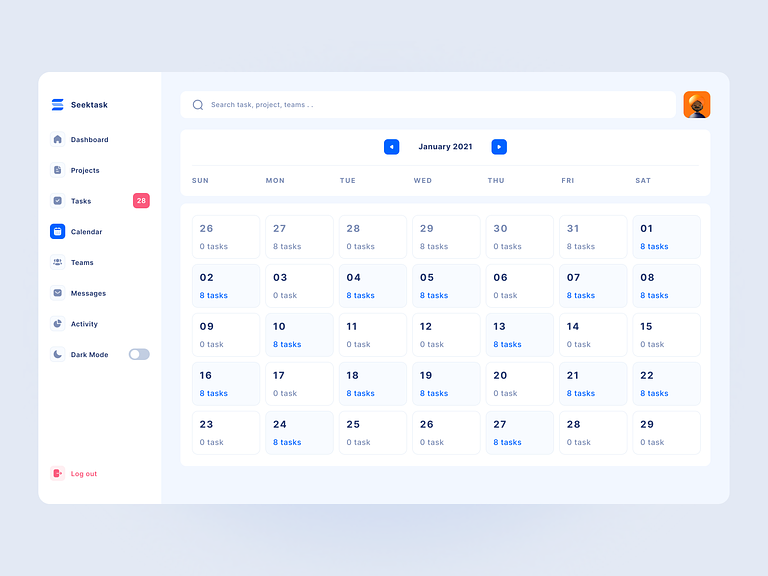
Welcome to Seektask – your ultimate destination for streamlined and collaborative task management. Immerse yourself in our Team Task Management Dashboard with an integrated Calendar feature, meticulously designed to enhance your team’s productivity, foster collaboration, and elevate the way you organize and execute tasks.

Unified Task and Calendar Integration: At the heart of Seektask’s Team Task Management Dashboard with Calendar is the seamless integration of tasks and schedules. This innovative feature is more than just a calendar; it’s a dynamic tool that unifies your team’s tasks and timelines, providing a comprehensive view of project schedules and deadlines in one centralized location.

Intuitive Calendar Interface for Easy Planning: Navigate through an intuitive calendar interface that simplifies task planning and scheduling. The design ensures that users can effortlessly create, assign, and manage tasks directly from the calendar view. Whether you are a project manager coordinating timelines or a team member planning daily tasks, Seektask’s integrated calendar offers a user-friendly experience.

Real-Time Collaboration with Calendar Updates: Experience real-time collaboration with instant updates on the calendar. Team members can view task deadlines, project milestones, and team events in real-time, fostering enhanced visibility into project timelines. This collaborative approach ensures that everyone is well-informed, leading to improved communication and coordinated efforts within the team.

Holistic View of Project Timelines: Engage with the calendar to gain a holistic view of project timelines. The Team Task Management Dashboard with Calendar provides an overview of tasks, deadlines, and milestones, enabling project managers to make informed decisions about resource allocation and project priorities. This holistic perspective ensures that your team stays on track and achieves project objectives efficiently.

Responsive Design for Any Device: Experience the flexibility of Seektask’s Team Task Management Dashboard with Calendar, featuring a responsive design. Whether accessed on a desktop, tablet, or smartphone, the calendar adapts to provide an optimal viewing experience. This responsiveness ensures that you can stay connected and manage your team’s tasks and schedules seamlessly, regardless of your location or device.

Efficient Task and Time Management: The integrated Calendar feature in Seektask’s dashboard transforms task and time management into a cohesive and efficient process. From planning daily activities to coordinating long-term project timelines, the calendar provides a visual representation of your team’s workload, helping you allocate resources effectively and meet project deadlines.

In conclusion, welcome to Seektask – where the Team Task Management Dashboard with Calendar is not just a feature; it’s a game-changer for efficient task and time management. Explore, plan, and let Seektask redefine the way your team collaborates, plans tasks, and achieves success with a calendar that seamlessly integrates into your task management workflows.


Want to collaborate? Email Us:Β hello@keitoto.com
KeitotoΒ |Β BehanceΒ |Β InstagramΒ |Β UI8

Notoboto – Project Management Dashboard

Notoboto - Project Management Dashboard

Notoboto – Project Management Dashboard

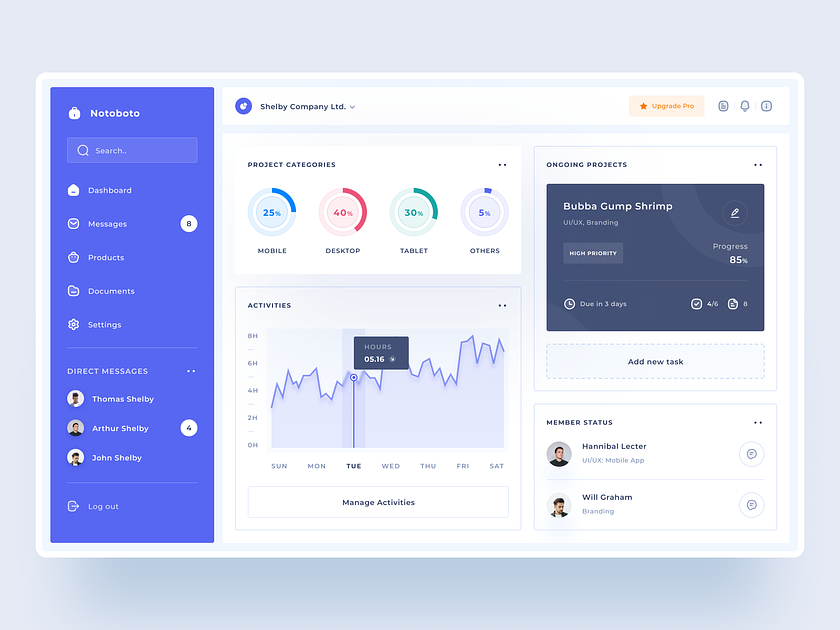
Welcome to Tolkon your hub for streamlined project management and unparalleled efficiency. Immerse yourself in our Project Management Dashboard, where innovation meets organization, transforming the way teams collaborate and deliver successful projects.

Notoboto’s Project Management Dashboard is not just a tool; it’s a comprehensive solution designed to elevate your project management experience. Dive into a visual journey that showcases the dashboard’s intuitive design, user-friendly interface, and powerful features, ensuring that managing projects becomes a seamless and enjoyable process.

As you explore the dashboard, witness the transformative impact it can have on your project workflows. Engage with captivating visuals that highlight key features, such as task tracking, resource allocation, and real-time collaboration tools. Notoboto is poised to be your digital companion, offering a centralized space for effective project planning and execution.

Navigate through the user-friendly interface to discover the range of functionalities tailored to meet the diverse needs of project teams. Whether you’re a project manager overseeing multiple initiatives or a team member focused on specific tasks, Notoboto’s responsive design ensures an optimal viewing experience on various devices.

The Project Management Dashboard is a central command center that empowers teams to collaborate seamlessly. From Gantt charts depicting project timelines to Kanban boards facilitating task management, Notoboto provides a holistic view of your projects. The dashboard fosters transparent communication and efficient decision-making, ensuring your team stays on track and achieves project milestones with precision.

Welcome to Notoboto – where the Project Management Dashboard is more than a visual aid; it’s a catalyst for enhancing collaboration, optimizing workflows, and achieving project success. Explore, collaborate, and witness the transformation of your project management journey with Notoboto, your trusted ally in unlocking the full potential of your team’s capabilities.


Want to collaborate? Email Us:Β hello@keitoto.com
KeitotoΒ |Β BehanceΒ |Β InstagramΒ |Β UI8