Event UI/UX Mobile App Design – Buy Ticket Β πŸ’°

Event UI/UX Mobile App Design - Buy Ticket Β πŸ’°

Event UI/UX Mobile App Design – Buy Ticket πŸ’°

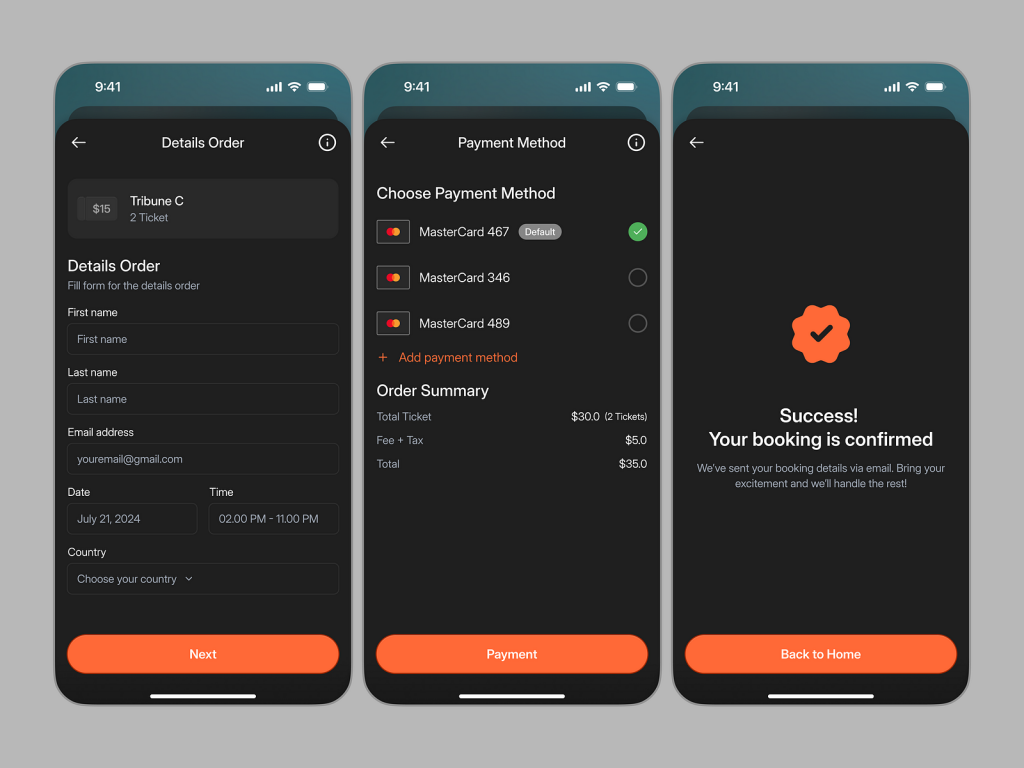
The Buy Ticket feature in the Event UI/UX Mobile App offers a seamless and user-friendly experience for purchasing event tickets. Designed with simplicity and convenience in mind, this feature ensures that users can quickly and securely complete their ticket transactions.

πŸ›’ Intuitive Ticket Selection
The Intuitive Ticket Selection interface allows users to easily choose their preferred event, ticket type, and seat options. This feature is designed to reduce confusion, providing clear ticket categories and pricing details.

πŸ’³ Multiple Payment Options
Multiple Payment Options are available to make the purchasing process flexible and convenient. Users can select from credit cards, digital wallets, or even direct bank transfers, ensuring a smooth transaction regardless of their preferred payment method.

πŸ”’ Secure Checkout Process
The Secure Checkout Process guarantees that user payment information is protected through encryption and other security protocols. This feature builds trust and ensures that all financial transactions are completed safely.

πŸ“§ Instant Ticket Confirmation
After purchase, the Instant Ticket Confirmation feature sends a confirmation email or in-app notification, providing users with a digital copy of their ticket. This ensures quick access to event tickets, making it easy to attend the event.

πŸ’Ό Ticket Management Dashboard
The Ticket Management Dashboard helps users track their purchased tickets, upcoming events, and past bookings. It organizes all event-related details in one place, providing a convenient overview of tickets and dates.

⏳ Countdown Timer for Flash Sales
The Countdown Timer for Flash Sales feature lets users know about limited-time offers and discounts, adding urgency to their purchasing decisions. This feature drives engagement and boosts ticket sales during promotional periods.

Conclusion
The Buy Ticket feature in the Event UI/UX Mobile App provides a streamlined and secure process for purchasing event tickets. With multiple payment options, real-time confirmation, and secure transactions, this feature enhances the user experience while ensuring a smooth event booking process.


Want to collaborate? Email Us: work@keitoto.com

Keitoto | Behance | Instagram | UI8 | Dribbble | Pinterest

Event UI/UX Mobile App Design – Choose Seat 🎫

Event UI/UX Mobile App Design - Choose Seat 🎫

🎫 Event UI/UX Mobile App Design – Choose Seat 🎫

The Choose Seat feature in our Event UI/UX Mobile App is designed to provide a seamless and interactive seating selection process, ensuring that you find the perfect spot for your next event.

πŸ—ΊοΈ Interactive Seating Map
Navigate through an intuitive, interactive seating map that displays the event venue layout. Zoom in and out to explore different sections and view available seats in real-time, making the selection process both engaging and straightforward.

🎟️ Seat Categories
Easily distinguish between different seating categories, such as VIP, premium, and general admission. Each category is color-coded on the map, helping you quickly identify the best options based on your preferences and budget.

πŸ” Filter Options
Customize your search with filter options that allow you to sort seats by price, proximity to the stage, accessibility, and more. These filters ensure that you can find a seat that perfectly matches your needs.

πŸ‘₯ Group Seating
Planning to attend with friends or family? The app highlights available blocks of seats, making it easy to reserve multiple seats together for a group experience.

πŸ’Έ Pricing Information
View detailed pricing information for each seat directly on the map. The app displays both individual seat prices and total cost for multiple seats, helping you make an informed decision.

βœ… Seat Selection and Reservation
Once you’ve found your ideal seat, simply tap to select it. The app immediately reserves the seat for you, preventing others from booking it while you complete your purchase.

πŸ“ Seat Details
Access detailed information about each seat, including its distance from the stage, viewing angles, and any additional perks or amenities. This helps you choose the best seat for your event experience.

πŸ”„ Easy Changes
If you change your mind, the app allows you to easily deselect and choose a different seat before finalizing your reservation, providing flexibility in your selection process.

πŸ“… Seat Availability Updates
Stay updated with real-time seat availability. The app continuously refreshes the seating map, ensuring you have the most current information while making your selection.

Conclusion
The Choose Seat feature in our Event UI/UX Mobile App offers a user-friendly, interactive experience that makes selecting the perfect seat for any event both simple and enjoyable. With real-time updates, customizable filters, and detailed seat information, you can ensure a great experience from start to finish.


Want to collaborate? Email Us: work@keitoto.com
Keitoto | Behance | Instagram | UI8 | Dribbble | Pinterest

Event UI/UX Mobile App Design – Homepage πŸ—“οΈ

Event UI/UX Mobile App Design - Homepage πŸ—“οΈ

πŸ—“οΈ Event UI/UX Mobile App Design – Homepage πŸ—“οΈ

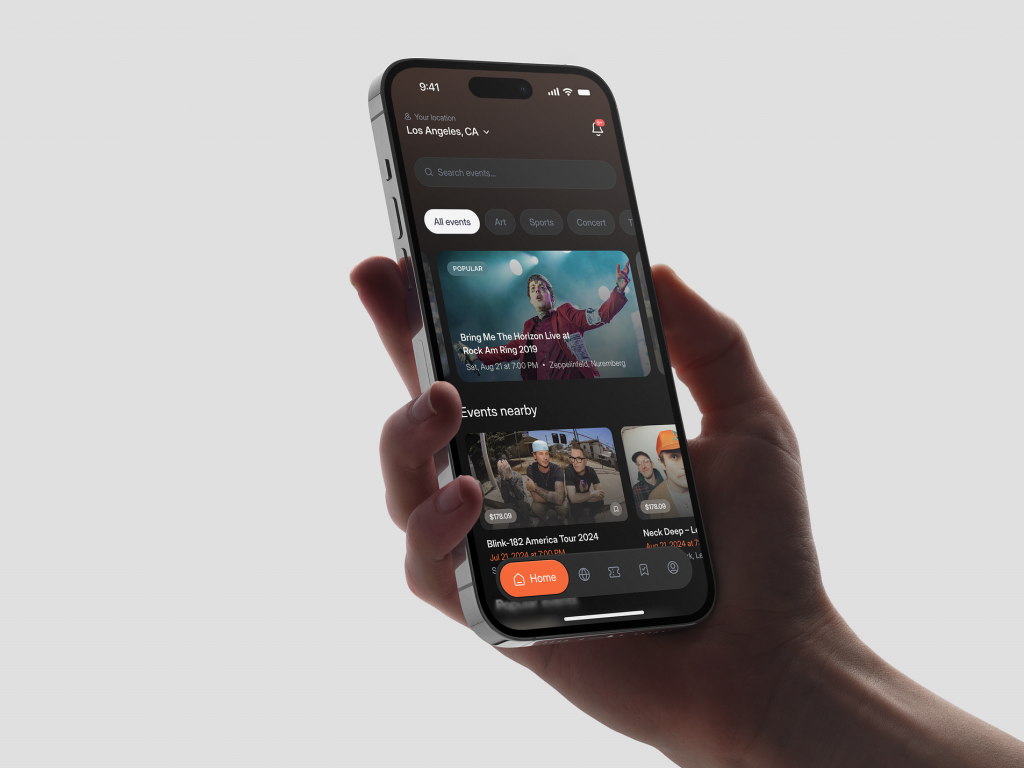
Welcome to our Event UI/UX Mobile App, your essential tool for discovering, managing, and attending events. The Homepage is designed to offer a seamless and engaging user experience, helping you stay connected with the events that matter most.

πŸ“… Featured Events
Discover top events with the Featured Events section. Curated to highlight the most popular and trending events, this section ensures you never miss out on what’s happening around you.

πŸ” Search and Filter
Find events effortlessly using the search and filter functionalities. Search by keywords, categories, dates, and locations to quickly locate events that suit your interests.

πŸ“Œ Personalized Recommendations
Enjoy personalized event recommendations based on your interests and previous activities. Our intelligent algorithm suggests events that align with your preferences, making it easier to find relevant events.

πŸ—“οΈ Upcoming Events
Stay updated with a list of upcoming events. This section shows events happening soon, ensuring you are always aware of what’s next on your calendar.

πŸ–ΌοΈ Rich Media Content
Experience events through rich media content. The Homepage includes high-quality images, videos, and descriptions, providing a comprehensive preview of each event.

πŸ”” Real-Time Notifications
Receive real-time notifications about event updates, changes, and reminders. Customize your notification settings to stay informed about the events you care about.

πŸ—ΊοΈ Interactive Map
Explore events using the interactive map feature. See the locations of upcoming events and get directions directly from the app, making it easy to navigate to your desired destination.

πŸ“… Calendar Integration
Integrate the app with your personal calendar. Sync events with your existing calendar to manage your schedule efficiently and avoid double bookings.

⭐ Favorites and Bookmarks
Save your favorite events and bookmark them for later. Easily access saved events and keep track of the ones you are interested in.

πŸ’¬ User Reviews and Ratings
Read user reviews and ratings for events. Get insights from other attendees to help you decide which events to attend.

🀝 Social Integration
Share events with friends and family through social media integration. Promote events you are attending and see which events your friends are interested in.

🎟️ Easy Ticket Purchase
Purchase tickets directly from the app. The Homepage provides quick access to ticket purchasing options, making it convenient to secure your spot at events.

πŸ”— External Links and Resources
Access external links and resources related to events. Get additional information, such as event websites, speaker bios, and more, directly from the app.

🌐 Multi-Language Support
Enjoy multi-language support, making the app accessible to users worldwide. Choose your preferred language for a personalized experience.

πŸ“² Responsive Design
Experience a responsive design that works seamlessly across all devices. Whether you’re using a smartphone or tablet, the app provides a consistent and user-friendly interface.

πŸ› οΈ Customizable Themes
Personalize your app experience with customizable themes. Choose from various color schemes and layouts to match your style.

Conclusion
The Homepage of our Event UI/UX Mobile App is designed to provide a user-friendly, engaging, and comprehensive experience for event discovery and management. With features like personalized recommendations, real-time notifications, and easy ticket purchase, our app ensures you stay connected and never miss an event. Elevate your event experience with our innovative mobile app today.


Want to collaborate? Email Us: work@keitoto.com

Keitoto | Behance | Instagram | UI8 | Dribbble | Pinterest