Tempey – Finance Transaction App

Tempey - Finance Transaction App

Tempey – Finance Transaction App

Tempey – Revolutionizing Finance Transactions with an Innovative Mobile App πŸ“±πŸ’³

Tempey introduces a groundbreaking Finance Transaction App, meticulously designed to streamline financial transactions and empower users in managing their finances with ease. Let’s explore the key features that make Tempey a game-changer in the realm of personal finance management.

πŸ’³ Simplified Transaction Management – Effortless Financial Tracking

Tempey’s Finance Transaction App offers a simplified approach to transaction management. Users can easily track their expenses, income, and transfers in one centralized platform. The intuitive interface allows for quick categorization and labeling of transactions, providing users with a comprehensive overview of their financial activity.

πŸ“ˆ Real-Time Transaction Updates – Instant Insights into Financial Health

Stay informed about your financial health with Tempey’s real-time transaction updates. The app provides instant notifications for incoming and outgoing transactions, ensuring that users are always up-to-date on their financial status. This real-time feature empowers users to make informed decisions and stay in control of their finances.

πŸ”„ Recurring Transaction Management – Automated Payment Handling

Never miss a recurring payment again with Tempey’s recurring transaction management feature. Users can set up automated payments for bills, subscriptions, and other recurring expenses, eliminating the need for manual intervention. This automation saves time and ensures timely payments, promoting financial stability.

πŸ“Š Transaction Analytics – Insights for Informed Decision Making

Gain valuable insights into your spending habits with Tempey’s transaction analytics. The app provides detailed breakdowns of spending categories, trends over time, and comparative analyses, allowing users to identify areas for potential savings and budget adjustments. These insights empower users to make informed financial decisions.

πŸ” Transaction Search and Filters – Effortless Data Retrieval

Efficiently retrieve transaction data with Tempey’s robust search and filtering options. Users can search for specific transactions by date, amount, category, or keyword, making it easy to locate and review past transactions. This feature enhances organization and facilitates thorough financial tracking.

πŸ”’ Security Protocols – Protecting Financial Information

Security is paramount in finance, and Tempey prioritizes the protection of user data. The app employs state-of-the-art security protocols, including encryption and multi-factor authentication, to safeguard sensitive financial information. Users can trust that their data is secure and confidential within the Tempey platform.

πŸ“± Cross-Platform Accessibility – Seamless Financial Management Anywhere

Access your financial data anytime, anywhere with Tempey’s cross-platform accessibility. Whether on a smartphone, tablet, or computer, users can securely log in to the Tempey app and manage their finances on the go. This flexibility ensures that users have full control over their financial transactions, no matter where they are.

🌟 Conclusion – Tempey’s Finance Transaction App: Redefining Financial Management

In conclusion, Tempey’s Finance Transaction App redefines financial management by providing users with a comprehensive, intuitive, and secure platform for managing their finances. With simplified transaction management, real-time updates, recurring transaction handling, transaction analytics, search and filtering options, robust security protocols, and cross-platform accessibility, Tempey empowers users to take control of their financial well-being. It’s not just a transaction app; it’s a financial companion that simplifies and enhances the way users interact with their money. πŸ“±πŸ’³

β€” β€” β€” β€” β€” β€” β€” β€” β€” β€”

Want to collaborate? Email Us: work@keitoto.com
Keitoto | Behance | Instagram | UI8 | Dribbble | Pinterest

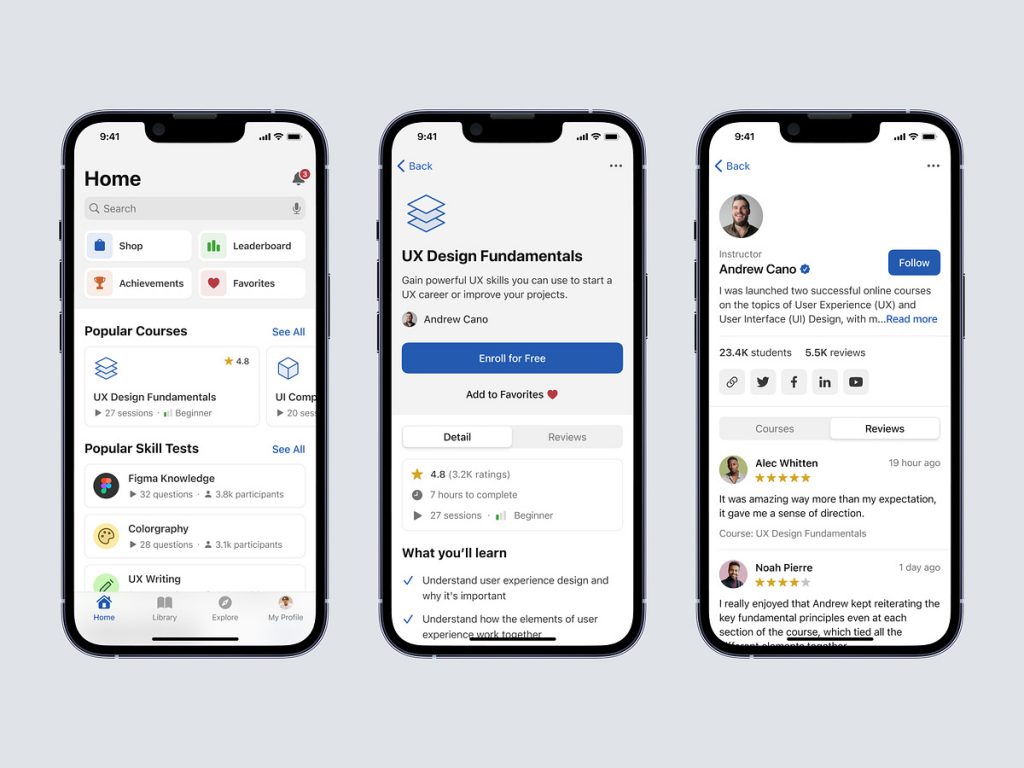
Blajar – UX/UI Online Learning Mobile App

Blajar - UX/UI Online Learning Mobile App

Blajar - UX/UI Online Learning Mobile App

Blajar – UX/UI Online Learning Mobile App

Blajar – Elevating Learning Experiences with UX/UI Online Learning Mobile App πŸ“±πŸŽ“

Blajar introduces a cutting-edge UX/UI Online Learning Mobile App, meticulously crafted to enhance the learning journey for users. This app prioritizes user experience and interface design to create an engaging, intuitive, and effective platform for online education. Let’s delve into the key features that make Blajar a standout in the realm of mobile learning.

🎨 Intuitive User Interface – Seamlessly Navigating Learning Modules

Blajar’s UX/UI design ensures an intuitive and user-friendly interface. Navigation through learning modules is made seamless, allowing users to effortlessly explore course content, assessments, and supplementary materials. The interface is designed to prioritize ease of use, fostering a positive and efficient learning experience.

🌈 Engaging Visual Design – Aesthetically Pleasing Learning Environment

Visual appeal plays a crucial role in the learning process. Blajar’s Online Learning App boasts an engaging visual design that creates an aesthetically pleasing learning environment. Vibrant color schemes, high-quality graphics, and thoughtfully chosen typography contribute to an immersive and enjoyable educational experience.

πŸ‘¨β€πŸ« Interactive Course Content – Enhancing User Engagement

Blajar goes beyond static learning materials. The app integrates interactive course content, including videos, quizzes, and interactive exercises. This interactive approach not only enhances user engagement but also caters to diverse learning preferences, ensuring that each user can absorb information in their preferred way.

πŸ“š Personalized Learning Paths – Tailoring Education to Individual Needs

Recognizing the uniqueness of each learner, Blajar incorporates personalized learning paths. The app adapts to users’ progress, offering recommendations and tailoring the learning journey based on individual strengths and areas for improvement. This personalized approach fosters a sense of ownership and autonomy in the learning process.

πŸ“Š Progress Tracking – Transparent Learning Metrics

Blajar’s UX/UI design includes a robust progress tracking feature. Users can transparently monitor their learning metrics, including course completion, quiz scores, and time spent on each module. This visibility into progress not only motivates learners but also provides valuable insights for educators and course administrators.

🀝 Collaborative Learning Features – Community Building

Learning is not just an individual endeavor; it’s a communal experience. Blajar promotes community building through collaborative learning features. Discussion forums, group projects, and peer-to-peer interactions are seamlessly integrated, creating a supportive online learning community that enhances the overall educational experience.

πŸ”„ Seamless Cross-Platform Experience – Learn Anytime, Anywhere

Flexibility is key to effective online learning. Blajar ensures a seamless cross-platform experience, allowing users to transition effortlessly between devices. Whether on a smartphone, tablet, or computer, learners can access course materials and continue their education anytime, anywhere.

πŸ“± Mobile-Optimized Design – Tailored Learning for Mobile Devices

Recognizing the prevalence of mobile learning, Blajar’s UX/UI design is optimized for mobile devices. The app ensures that learning materials are presented in a format that is conducive to smaller screens, without compromising the quality of the learning experience.

πŸ” Security Measures – Safeguarding Educational Data

Security is paramount in online learning. Blajar implements robust security measures to safeguard educational data, ensuring that user information and progress records are protected. Features like secure authentication and encrypted communication contribute to a safe and secure learning environment.

🌟 Conclusion – Blajar’s UX/UI Online Learning App: Shaping the Future of Education

In conclusion, Blajar’s UX/UI Online Learning Mobile App stands as a beacon in shaping the future of education. With an intuitive user interface, engaging visual design, interactive course content, personalized learning paths, progress tracking, collaborative learning features, seamless cross-platform experience, mobile-optimized design, and robust security measures, Blajar elevates the online learning experience to new heights. It’s not just an app; it’s a transformative platform that empowers learners and educators alike in their educational journey. πŸ“±πŸŽ“

β€” β€” β€” β€” β€” β€” β€” β€” β€” β€”

Want to collaborate? Email Us: work@keitoto.com

Keitoto | Behance | Instagram | UI8 | Dribbble | Pinterest

Kyezo – Personal Finance Dashboard Manager

Kyezo - Personal Finance Dashboard Manager

Kyezo – Personal Finance Dashboard Manager

Kyezo – Personal Finance Dashboard Manager πŸ’°πŸ“Š

Kyezo introduces a powerful Personal Finance Dashboard Manager, designed to empower individuals in managing their financial health with ease and efficiency. Let’s explore the key features that make Kyezo the go-to platform for comprehensive personal finance management.

πŸ’Έ Expense Tracking – Insightful Financial Awareness

Kyezo’s Personal Finance Dashboard provides robust expense tracking capabilities. Users can effortlessly record and categorize their expenses, gaining insightful awareness into their spending patterns. Visual representations and categorization make it easy to identify areas for potential savings and budget adjustments.

πŸ“ˆ Income Analysis – Holistic Financial Overview

Stay on top of your financial game with Kyezo’s Income Analysis feature. The dashboard provides a holistic overview of your income sources, allowing you to track and analyze your earnings. Understanding your income streams is crucial for making informed financial decisions and setting realistic financial goals.

πŸ“Š Budget Planning – Tailored Financial Goals

Crafting and managing budgets becomes a breeze with Kyezo. The Personal Finance Dashboard Manager allows users to set personalized budgets for different categories, ensuring that financial goals are tailored to individual lifestyles. Real-time updates and alerts keep users informed about their budget adherence.

πŸ”„ Transaction History – Transparent Financial Transactions

Kyezo promotes transparency in financial transactions. The dashboard compiles a detailed transaction history, providing a chronological record of income and expenses. Users can easily review their financial activities, identify trends, and make informed decisions based on a comprehensive transaction log.

πŸ“† Bill Reminders – Never Miss a Payment

Avoid late payments with Kyezo’s Bill Reminders feature. The Personal Finance Dashboard Manager sends timely alerts and reminders for upcoming bills, ensuring that users never miss a payment deadline. This proactive approach contributes to maintaining a positive credit history and financial stability.

πŸ“‰ Financial Analytics – Data-Driven Decision Making

Harness the power of financial analytics with Kyezo. The dashboard provides visual representations of financial data, including charts and graphs that highlight trends and patterns. This data-driven approach empowers users to make informed decisions about their spending, saving, and investment strategies.

πŸ”„ Investment Tracking – Monitor Portfolio Performance

For users venturing into investments, Kyezo offers Investment Tracking. The dashboard allows users to monitor the performance of their investment portfolio in real-time. Track changes, assess returns, and stay informed about the overall health of your investments, all within the Kyezo platform.

πŸ”’ Security Measures – Protecting Financial Data

Security is a top priority in Kyezo’s Personal Finance Dashboard Manager. The platform implements robust measures to protect user financial data, ensuring that sensitive information is secure and private. Features like encryption and secure authentication contribute to a safe financial management environment.

🌐 Cross-Platform Accessibility – Financial Management Anywhere

Access your financial dashboard seamlessly across devices with Kyezo’s cross-platform accessibility. Whether you prefer to manage your finances on a computer, tablet, or smartphone, Kyezo ensures that your financial data is synchronized and accessible anywhere, anytime.

✨ Conclusion – Kyezo’s Personal Finance Dashboard: Navigate Your Financial Journey with Confidence

In conclusion, Kyezo’s Personal Finance Dashboard Manager is a comprehensive tool designed to empower individuals on their financial journey. With expense tracking, income analysis, budget planning, transaction history, bill reminders, financial analytics, investment tracking, security measures, and cross-platform accessibility, Kyezo provides a holistic approach to personal finance management. Navigate your financial landscape with confidence using Kyezo’s intuitive and feature-rich dashboard. πŸ’°πŸ“Š

β€” β€” β€” β€” β€” β€” β€” β€” β€” β€”

Want to collaborate? Email Us: work@keitoto.com
Keitoto | Behance | Instagram | UI8 | Dribbble | Pinterest

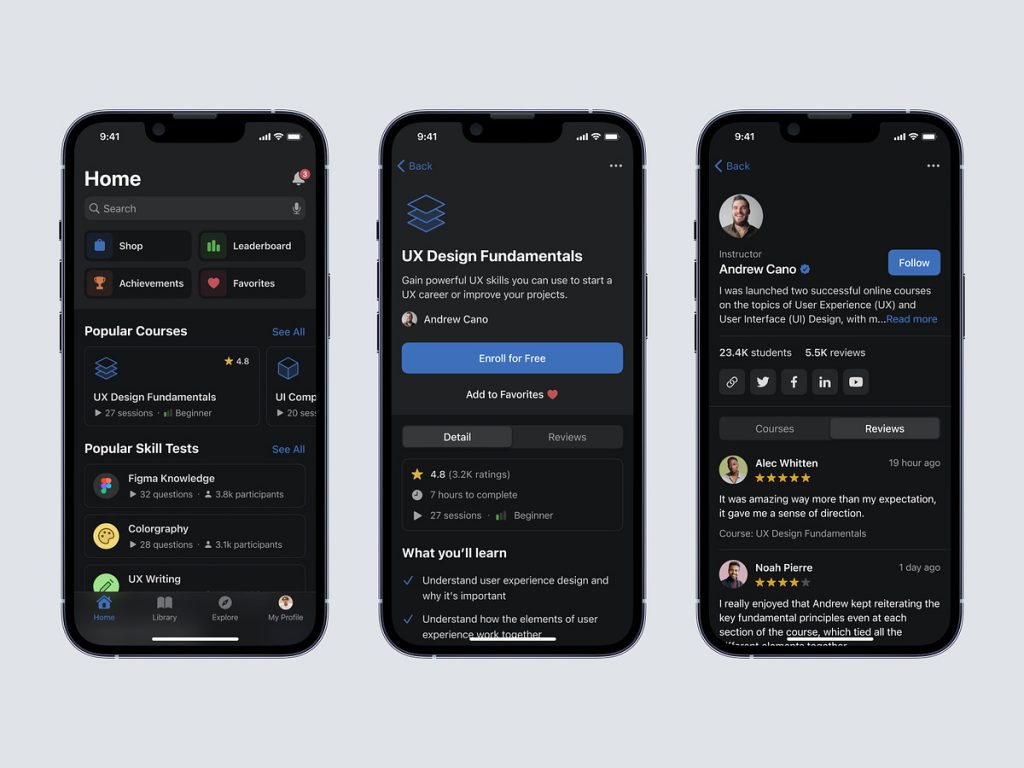
Yagitu – To-do list Dashboard

Yagitu - To-do list Dashboard

Yagitu – To-do list Dashboard

Yagitu – Streamlined To-Do List Dashboard for Productive Days πŸ“…βœ¨

Yagitu presents a To-Do List Dashboard designed to elevate your productivity and bring organization to your daily tasks. This intuitive dashboard provides a seamless experience, allowing you to manage your to-do list efficiently. Let’s explore the key features that make Yagitu’s To-Do List Dashboard a valuable companion for your daily endeavors.

πŸ“… Intuitive Task Management – Simplifying Your Day

Yagitu’s To-Do List Dashboard offers an intuitive task management system. Adding, editing, and organizing tasks is a breeze, ensuring that you can quickly capture your thoughts and responsibilities. The user-friendly interface allows you to stay focused on what needs to be done without unnecessary complexities.

πŸš€ Priority and Urgency Levels – Strategic Task Planning

Prioritize your tasks effortlessly with Yagitu. The To-Do List Dashboard incorporates priority and urgency levels, enabling you to categorize tasks based on their importance and deadlines. This strategic approach helps you focus on high-priority items and ensures that urgent tasks are promptly addressed.

πŸ”„ Task Status Updates – Track Progress with Ease

Stay informed about your task progress through Yagitu’s status update feature. Whether a task is pending, in progress, or completed, you can easily track its status. This visual representation enhances transparency and provides a quick overview of your accomplishments and ongoing commitments.

πŸ“† Calendar Integration – Seamless Schedule Management

Yagitu seamlessly integrates with your calendar, allowing you to synchronize your to-do list with your schedule. This feature ensures that your tasks align with your appointments and commitments, creating a cohesive and well-managed agenda. Calendar integration contributes to effective time management.

πŸ“ˆ Progress Analytics – Insights into Your Productivity

Track your productivity trends with Yagitu’s Progress Analytics. The To-Do List Dashboard provides insights into your completion rates, task distribution, and overall productivity. These analytics empower you to identify patterns, optimize your workflow, and make informed decisions about your task management strategy.

πŸ”” Reminders and Notifications – Never Miss a Deadline

Yagitu understands the importance of timely reminders. The To-Do List Dashboard incorporates a robust reminder and notification system. Set alerts for upcoming deadlines, task due dates, or specific times, ensuring that you never miss an important commitment and stay on top of your responsibilities.

πŸ”— Project and Category Organization – Structured Task Groups

Organize your tasks seamlessly by categorizing them into projects or specific categories. Yagitu’s To-Do List Dashboard allows you to create structured task groups, making it easy to navigate and manage related responsibilities. This organizational feature enhances clarity and reduces the clutter in your task list.

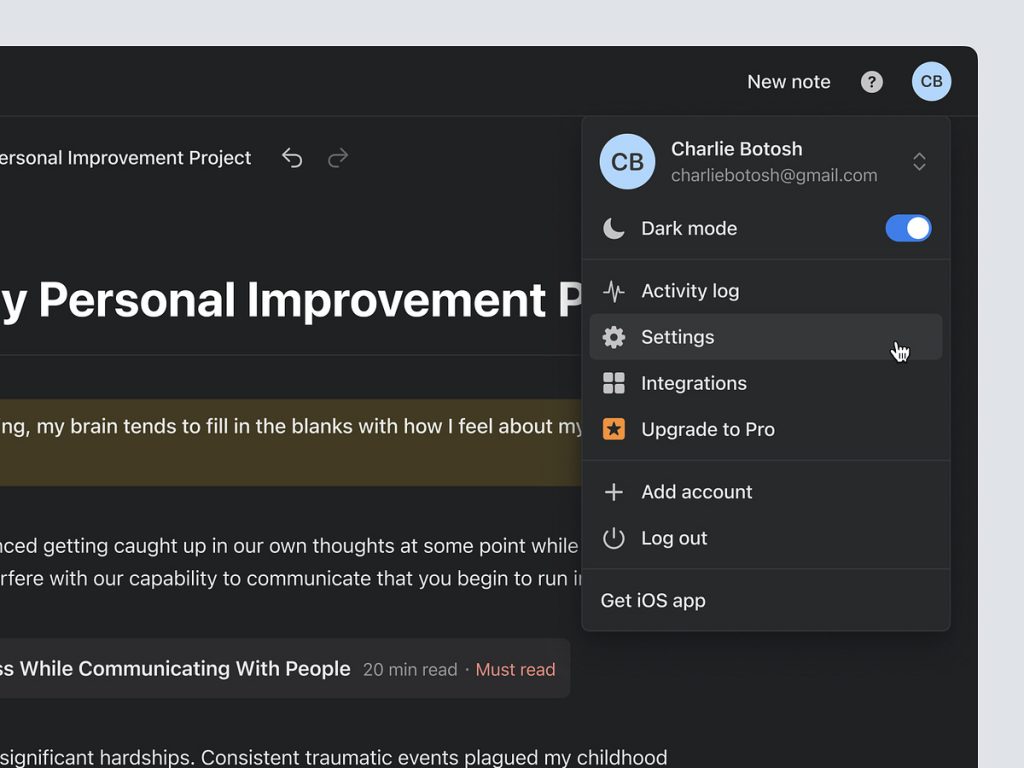
πŸŒ™ Dark Mode – Personalized Visual Experience

Tailor your visual experience with Yagitu’s Dark Mode. Whether you prefer a light or dark interface, the To-Do List Dashboard adapts to your visual preferences. Dark Mode reduces eye strain during late-night work sessions and provides a sleek and modern aesthetic.

🌐 Cross-Platform Accessibility – Productivity Anywhere

Access your to-do list seamlessly across devices with Yagitu’s cross-platform accessibility. Whether you’re using a computer, tablet, or smartphone, your tasks and updates are synchronized, ensuring a consistent and uninterrupted productivity experience.

✨ Conclusion – Yagitu’s To-Do List Dashboard: Your Productivity Ally

In conclusion, Yagitu’s To-Do List Dashboard is more than just a task manager; it’s your productivity ally. With intuitive task management, priority and urgency levels, task status updates, calendar integration, progress analytics, reminders and notifications, project and category organization, Dark Mode, and cross-platform accessibility, Yagitu empowers you to conquer your daily challenges with ease. Embrace a more organized and productive life with Yagitu’s To-Do List Dashboard. πŸ“…βœ¨

β€” β€” β€” β€” β€” β€” β€” β€” β€” β€”

Want to collaborate? Email Us: work@keitoto.com
Keitoto | Behance | Instagram | UI8 | Dribbble | Pinterest

3D – Finance Icon

3D - Finance Icon

3D – Finance Icon

3D – Dynamic Finance Icon Animation πŸ’ΈπŸ”„

Step into the world of finance with a captivating 3D icon animation that brings financial concepts to life. The 3D Finance Icon Animation is designed to convey the dynamic and ever-changing nature of the financial landscape. Let’s explore the key elements of this animation that make it a visually engaging representation of finance.

πŸ’Έ Currency Symbols in Motion – Symbolizing Transactions

The animation features iconic currency symbols, dynamically moving and interacting with each other. The fluid motion of currency symbols such as dollar signs, euro symbols, yen signs, and more, symbolizes the constant flow of transactions and financial activities on a global scale.

πŸ”„ Rotational Dynamics – Embracing Change and Flux

To convey the dynamic nature of finance, the 3D icon animation incorporates rotational dynamics. Currency symbols rotate and orbit, representing the continuous movement and evolution of financial markets. This dynamic rotation reflects the ever-changing values and fluctuations inherent in the financial world.

πŸ“ˆ Graphical Elements – Illustrating Market Trends

Graphical elements, such as upward and downward arrows and fluctuating lines, are seamlessly integrated into the animation. These elements symbolize market trends and financial indicators, adding a layer of depth to the representation of financial dynamics. The animation visually communicates the ebb and flow of financial markets.

πŸ”„ Looping Animation – Endless Financial Motion

The 3D Finance Icon Animation is crafted as a looping sequence, emphasizing the perpetual motion of finance. The looping nature of the animation signifies the continuous cycle of economic activities, investments, and financial transactions. It creates a mesmerizing effect, inviting viewers to contemplate the infinite possibilities within the financial realm.

πŸ’‘ Illumination and Shadows – Enhancing Realism

To enhance realism and depth, the animation incorporates dynamic lighting effects. Illumination and shadows cast by the 3D elements add a touch of realism, creating a visual experience that is not only engaging but also aesthetically pleasing. The interplay of light and shadow contributes to the overall immersive quality of the animation.

🌐 Global Connectivity – Symbolizing Worldwide Finance

Incorporating a globe or interconnected network of financial nodes, the animation symbolizes the global connectivity of financial markets. The 3D elements move seamlessly across the globe, emphasizing the interconnectedness of economies and the impact of international factors on financial dynamics.

πŸ’Ό Business and Finance Symbols – Holistic Representation

Beyond currency symbols, the animation may include additional icons such as briefcases, graphs, and financial instruments. These symbols provide a holistic representation of the finance industry, encompassing various aspects of business, investments, and economic activities.

🌟 Conclusion – 3D Finance Icon Animation: A Visual Symphony of Finance

In conclusion, the 3D Finance Icon Animation is a visual symphony that encapsulates the essence of finance. With currency symbols in motion, rotational dynamics, graphical elements illustrating market trends, a looping animation representing endless financial motion, realistic illumination and shadows, global connectivity symbolism, and a holistic representation of business and finance symbols, this animation is a captivating portrayal of the dynamic world of finance. It invites viewers to immerse themselves in the visual narrative of financial intricacies, making finance not just a concept but a vibrant and dynamic experience. πŸ’ΈπŸ”„

β€” β€” β€” β€” β€” β€” β€” β€” β€” β€”

Want to collaborate? Email Us: work@keitoto.com

Keitoto | Behance | Instagram | UI8 | Dribbble | Pinterest

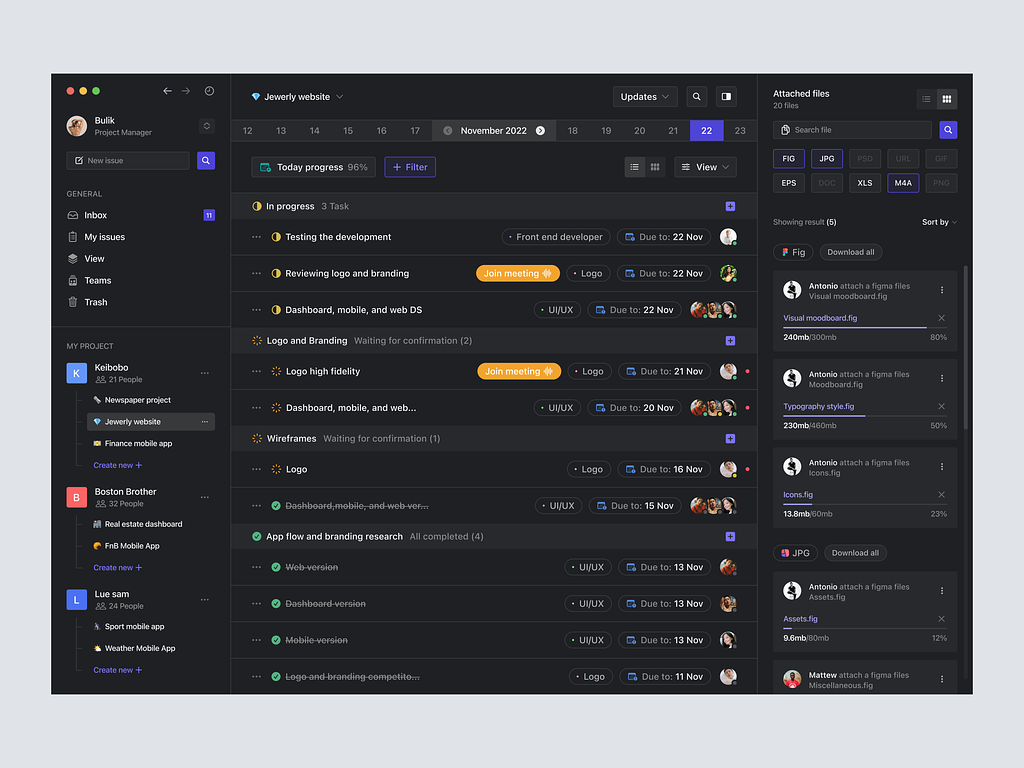
Nyurvei – Survey schedule and send components

Nyurvei - Survey schedule and send components

Nyurvei – Survey schedule and send components

Nyurvei – Streamlining Survey Scheduling and Sending Components πŸ“ŠπŸš€

Embark on a journey of efficient survey management with Nyurvei’s Survey Schedule and Send components. These features are carefully designed to simplify the process of scheduling surveys and sending them to the target audience. Let’s delve into the key elements that make Nyurvei’s Survey Schedule and Send components pivotal for effective data collection.

πŸ—“οΈ Survey Scheduling – Time Management Excellence

Nyurvei’s Survey Schedule component empowers users to strategically plan when surveys are deployed. The intuitive scheduling interface allows users to set specific dates and times for survey distribution. Whether it’s a one-time survey or a recurring series, the Survey Schedule ensures that surveys reach participants at the right moment.

πŸ“§ Email and Notification Integration – Seamless Outreach

The Send component seamlessly integrates with email and notifications. Users can choose to send surveys via email, leveraging Nyurvei’s built-in email system. Additionally, participants can receive notifications within the Nyurvei platform, ensuring that they are promptly informed about new surveys. This dual approach maximizes outreach and participant engagement.

🎯 Targeted Audience Selection – Precision in Survey Deployment

Nyurvei’s Survey Schedule and Send components offer a targeted approach to audience selection. Users can specify the demographic or criteria for survey recipients, ensuring that surveys reach the intended audience. This precision enhances the relevance of collected data and ensures that insights are aligned with specific goals.

πŸ“± Mobile-Friendly Interface – Access Anytime, Anywhere

Recognizing the diversity of participant devices, Nyurvei ensures a mobile-friendly interface for survey recipients. The Survey Schedule and Send components are optimized for various screen sizes, allowing participants to access and respond to surveys conveniently on their smartphones or tablets. This accessibility enhances response rates and overall survey engagement.

πŸ“Š Real-Time Monitoring – Insights at Your Fingertips

Nyurvei’s survey management goes beyond scheduling and sending. The platform provides real-time monitoring capabilities, allowing users to track survey responses and engagement metrics as they unfold. This feature provides valuable insights into participant behavior, enabling quick adjustments to survey strategies if needed.

πŸ”’ Security Measures – Protecting Participant Data

Security is a top priority in Nyurvei’s Survey Schedule and Send components. The platform implements robust measures to protect participant data during survey deployment. From secure transmission channels to data encryption, Nyurvei ensures that participant information is safeguarded throughout the survey process.

πŸ”„ Automated Reminders – Encouraging Participation

To enhance participant engagement, Nyurvei incorporates automated reminders within the Survey Schedule component. Users can set reminder intervals, prompting participants who haven’t completed the survey to do so. This thoughtful feature increases response rates and ensures a comprehensive dataset.

πŸ’‘ Conclusion – Nyurvei’s Survey Management: From Schedule to Insights

In conclusion, Nyurvei’s Survey Schedule and Send components represent a comprehensive solution for survey management. With precise survey scheduling, seamless email and notification integration, targeted audience selection, a mobile-friendly interface, real-time monitoring, robust security measures, and automated reminders, Nyurvei ensures a smooth journey from survey deployment to insightful data collection. It’s not just about surveys; it’s about orchestrating a seamless and efficient process that maximizes participant engagement and delivers valuable insights. πŸ“ŠπŸš€

β€” β€” β€” β€” β€” β€” β€” β€” β€” β€”

Want to collaborate? Email Us: work@keitoto.com
Keitoto | Behance | Instagram | UI8 | Dribbble | Pinterest

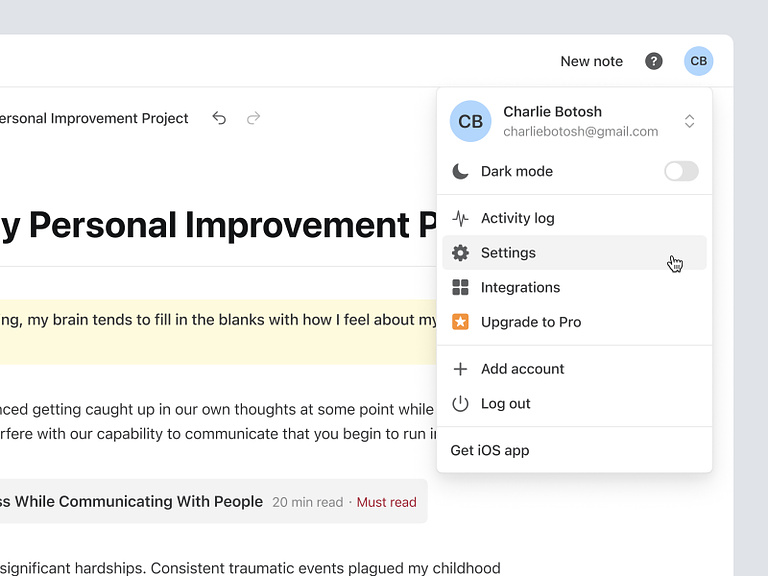
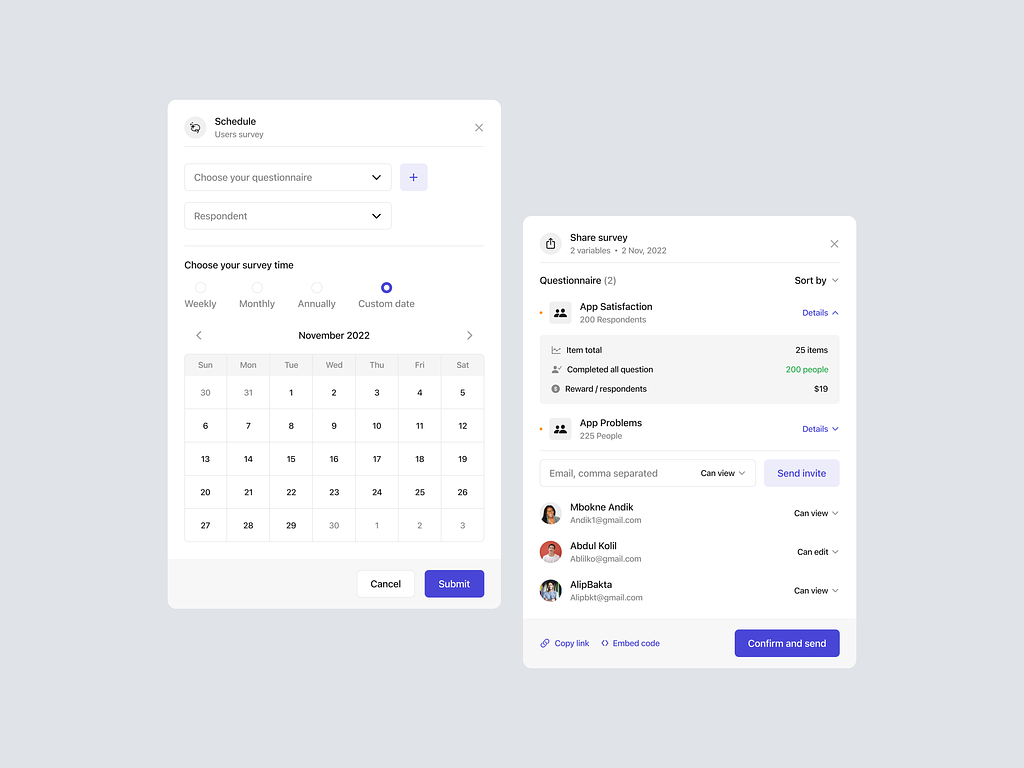
Nulis – User Menu Detail

Nulis - User Menu Detail

Nulis - User Menu Detail

Nulis – User Menu Detail

Nulis – Crafting a User-Centric Menu Detail for Seamless Interaction ✍️πŸ–₯️

Embark on a journey of user-centric design with Nulis’ User Menu Detail. This feature is meticulously crafted to provide a seamless and intuitive experience, empowering users with easy access to essential functions. Let’s explore the key elements that make Nulis’ User Menu Detail a cornerstone of user interaction and convenience.

✍️ Personalized User Profile – A Digital Identity

At the heart of Nulis’ User Menu Detail is the user profile. Users can personalize their digital identity by uploading a profile picture and adding essential information. This not only enhances the overall user experience but also creates a sense of ownership and familiarity within the Nulis platform.

πŸ”’ Account Security – Prioritizing User Safety

Security is paramount in Nulis’ User Menu Detail. Users can easily manage their account security settings, including password changes and two-factor authentication setup. The emphasis on account security ensures that users have control over their digital presence and can engage with confidence.

🌐 Language and Region Settings – Tailoring the Experience

Nulis understands the diversity of its user base. The Language and Region Settings in the User Menu Detail allow users to tailor their experience based on language preferences and regional settings. This inclusivity ensures that Nulis caters to a global audience, fostering a user-friendly environment.

πŸ“Š Usage Analytics – Insightful User Data

For users keen on tracking their writing habits and engagement, Nulis’ User Menu Detail includes usage analytics. This feature provides insightful data on writing patterns, word counts, and engagement metrics. Users can gain a deeper understanding of their contributions and progress within the Nulis community.

πŸ“§ Notification Center – Staying Connected

Stay informed and connected with Nulis’ Notification Center. The User Menu Detail consolidates all notifications in one accessible location. Users can easily manage and review notifications related to comments, likes, and interactions, ensuring they stay updated on their content’s reception within the platform.

πŸ–₯️ Theme Customization – Personalizing the Writing Environment

Writing is a personal journey, and Nulis’ User Menu Detail acknowledges this by offering theme customization options. Users can tailor the writing environment to suit their preferences, choosing from a variety of themes that complement their style and enhance the overall aesthetic appeal of the platform.

πŸ“š Saved Drafts and Favorites – Organizing Creativity

The User Menu Detail simplifies content organization with features like Saved Drafts and Favorites. Users can conveniently access their works in progress or revisit favorite pieces with just a few clicks. This organizational tool enhances the efficiency of content management within the Nulis platform.

πŸ”„ Sync Across Devices – Seamless Cross-Platform Experience

Nulis ensures a seamless cross-platform experience with the Sync Across Devices feature. Users can effortlessly transition from desktop to mobile or vice versa, knowing that their writing progress and preferences are synchronized. This continuity facilitates uninterrupted creativity on the go.

πŸ’‘ Conclusion – User Menu Detail: Where Convenience Meets Creativity

In conclusion, User Menu Detail stands as a testament to the platform’s commitment to user-centric design. With personalized user profiles, robust account security, language and region settings, insightful usage analytics, a comprehensive notification center, theme customization options, easy access to drafts and favorites, and seamless cross-platform synchronization, Nulis ensures that every user interaction is marked by convenience and creativity. It’s not just a menu; it’s a gateway to a personalized and enriched writing experience on Nulis. ✍️πŸ–₯️

β€” β€” β€” β€” β€” β€” β€” β€” β€” β€”

Want to collaborate? Email Us: work@keitoto.com

Keitoto | Behance | Instagram | UI8 | Dribbble | Pinterest

3D – Finance Icon

3D - Finance Icon

3D – Finance Icon

3D – Dynamic Finance Icon Animation πŸ’ΈπŸ”„

Step into the world of finance with a captivating 3D icon animation that brings financial concepts to life. The 3D Finance Icon Animation is designed to convey the dynamic and ever-changing nature of the financial landscape. Let’s explore the key elements of this animation that make it a visually engaging representation of finance.

πŸ’Έ Currency Symbols in Motion – Symbolizing Transactions

The animation features iconic currency symbols, dynamically moving and interacting with each other. The fluid motion of currency symbols such as dollar signs, euro symbols, yen signs, and more, symbolizes the constant flow of transactions and financial activities on a global scale.

πŸ”„ Rotational Dynamics – Embracing Change and Flux

To convey the dynamic nature of finance, the 3D icon animation incorporates rotational dynamics. Currency symbols rotate and orbit, representing the continuous movement and evolution of financial markets. This dynamic rotation reflects the ever-changing values and fluctuations inherent in the financial world.

πŸ“ˆ Graphical Elements – Illustrating Market Trends

Graphical elements, such as upward and downward arrows and fluctuating lines, are seamlessly integrated into the animation. These elements symbolize market trends and financial indicators, adding a layer of depth to the representation of financial dynamics. The animation visually communicates the ebb and flow of financial markets.

πŸ”„ Looping Animation – Endless Financial Motion

The 3D Finance Icon Animation is crafted as a looping sequence, emphasizing the perpetual motion of finance. The looping nature of the animation signifies the continuous cycle of economic activities, investments, and financial transactions. It creates a mesmerizing effect, inviting viewers to contemplate the infinite possibilities within the financial realm.

πŸ’‘ Illumination and Shadows – Enhancing Realism

To enhance realism and depth, the animation incorporates dynamic lighting effects. Illumination and shadows cast by the 3D elements add a touch of realism, creating a visual experience that is not only engaging but also aesthetically pleasing. The interplay of light and shadow contributes to the overall immersive quality of the animation.

🌐 Global Connectivity – Symbolizing Worldwide Finance

Incorporating a globe or interconnected network of financial nodes, the animation symbolizes the global connectivity of financial markets. The 3D elements move seamlessly across the globe, emphasizing the interconnectedness of economies and the impact of international factors on financial dynamics.

πŸ’Ό Business and Finance Symbols – Holistic Representation

Beyond currency symbols, the animation may include additional icons such as briefcases, graphs, and financial instruments. These symbols provide a holistic representation of the finance industry, encompassing various aspects of business, investments, and economic activities.

🌟 Conclusion – 3D Finance Icon Animation: A Visual Symphony of Finance

In conclusion, the 3D Finance Icon Animation is a visual symphony that encapsulates the essence of finance. With currency symbols in motion, rotational dynamics, graphical elements illustrating market trends, a looping animation representing endless financial motion, realistic illumination and shadows, global connectivity symbolism, and a holistic representation of business and finance symbols, this animation is a captivating portrayal of the dynamic world of finance. It invites viewers to immerse themselves in the visual narrative of financial intricacies, making finance not just a concept but a vibrant and dynamic experience. πŸ’ΈπŸ”„

β€” β€” β€” β€” β€” β€” β€” β€” β€” β€”

Want to collaborate? Email Us: work@keitoto.com
Keitoto | Behance | Instagram | UI8 | Dribbble | Pinterest